楼主 #1 2017-11-22 09:10:12 分享评论
- 沉鱼
- 管理员

- 注册时间: 2017-09-06
- 已发帖子: 161
- 积分: 161

荔枝派Zero V3s开发板入坑记录 (TF/SD卡启动)(主线Linux,主线u-boot)
荔枝派zero核心板pdf:
/files/20171005/11/lichee_zero(核心板).pdf
荔枝派zero底板pdf:
/files/20171005/11/lichee_base(底板).pdf
二代一体开发板: 荔枝派一体开发板原理图(核心板与底板整合到一块).pdf
全志V3s手册V1.0: Allwinner_V3s_Datasheet_V1.0.pdf
全志S3手册V0.2: Allwinner_S3_Datasheet_V0_2.pdf (索智S3手册)
-------------------------------------------------------------------------------------------
回顾: 【视频分享】制作荔枝派Zero开发板(全志V3s) TF/SD卡启动盘
准备工作
1) 安装Ubuntu14.04LTS(长支持版本),如果用虚拟机请安装vmware14(别的虚拟机都不推荐,泪的教训), 然后安装 vmware tools(不是必须,但是方便文件共享)
2) 安装arm linux 硬件浮点数工具链, 因为V3s支持VFPv4 浮点单元: sudo apt-get install gcc-arm-linux-gnueabihf
3) 安装git源码管理软件: sudo apt-get install git
4) 其他支撑软件
u-boot
首先获取u-boot源码: git clone https://github.com/Lichee-Pi/u-boot.git -b v3s-current
如果你需要支持spi flash: git clone https://github.com/Lichee-Pi/u-boot.git -b v3s-spi-experimental
修改 include/configs/sun8i.h, 使u-boot可以直接从tf卡启动:
#define CONFIG_BOOTCOMMAND "setenv bootm_boot_mode sec; " \
"load mmc 0:1 0x41000000 zImage; " \
"load mmc 0:1 0x41800000 sun8i-v3s-licheepi-zero-dock.dtb; " \
"bootz 0x41000000 - 0x41800000;"#define CONFIG_BOOTARGS "console=ttyS0,115200 panic=5 rootwait root=/dev/mmcblk0p2 earlyprintk rw vt.global_cursor_default=0"
cd u-boot
ARCH=arm CROSS_COMPILE=arm-linux-gnueabihf- make LicheePi_Zero_800x480LCD_defconfig (群主网店5寸屏)ARCH=arm CROSS_COMPILE=arm-linux-gnueabihf- make LicheePi_Zero_480x272LCD_defconfig (通用4.3寸屏)
ARCH=arm CROSS_COMPILE=arm-linux-gnueabihf- make LicheePi_Zero_defconfig (默认)
ARCH=arm make menuconfig
执行编译:
ARCH=arm CROSS_COMPILE=arm-linux-gnueabihf- make多核编译,避免cpu其他内核打酱油, J后的参数是参与编译的cpu个数:
ARCH=arm CROSS_COMPILE=arm-linux-gnueabihf- make -j3
设备树, Linux
获取Linux源码(zero-4.13.y分支对网卡支持比较好): git clone https://github.com/Lichee-Pi/linux.git -b zero-4.13.y
生成荔枝派Zero 默认配置文件: CROSS_COMPILE=arm-linux-gnueabihf- ARCH=arm make licheepi_zero_defconfig
设备树文件(默认不需要修改): arch/arm/boot/dts/sun8i-v3s-licheepi-zero.dts
编译内核: make ARCH=arm CROSS_COMPILE=arm-linux-gnueabihf- -j4
编译设备树: make ARCH=arm CROSS_COMPILE=arm-linux-gnueabihf- dtbs根文件系统
1). 下载最新的buildroot稳定版本
官方网站: https://buildroot.org/download.html
长支持版本:buildroot-2017.02.7.tar.gz
最新稳定版:buildroot-2017.08.1.tar.gz
2). 配置buildroot 参数, make menuconfig; make


如果不会配置, 就下载下面这个文件,然后把 buildroot-v3s-20171122.zip解压后 拷贝到 buidroot目录成 .config 文件。
3). 执行编译, 生成文件跟文件系统。
4). 如需构建Qt应用程序, 视频地址: buildroot成功后如何编译Qt应用程序
烧录TF卡启动盘: 【视频分享】制作荔枝派Zero开发板(全志V3s) TF/SD卡启动盘
1) 删除TF卡所有分区
2) 将uboot写入到sd卡8k偏移处(必须8K偏移, brom龟腚的)。
sudo dd if=u-boot-sunxi-with-spl.bin of=/dev/sdX bs=1024 seek=8
3) 建立第一个分区,大小32M(可以随意填写), 格式FAT16, 把zImage, sun8i-v3s-licheepi-zero-dock.dtb拷贝到 这个分区
4) 建立第二个分区,用尽剩余空间,格式ext4, 把buildroot产生的rootfs.tar解压到该分区根目录
tar xvf output/images/rootfs.tar -C /挂载的tf卡第二个分区目录
这是我编译好的uboot, linux&dtb, rootfs: V3s_TFCard.7z
荔枝派Zero开发板网卡验证通过, 登陆账号root,无密码。
sha1sum文件校验码: 43c635802438e26c8fe96ada66255b664d52cddd
离线
#2 2017-11-22 15:03:45 分享评论
- 1066950103
- 会员
- 注册时间: 2017-11-17
- 已发帖子: 61
- 积分: 46
Re: 荔枝派Zero V3s开发板入坑记录 (TF/SD卡启动)(主线Linux,主线u-boot)
1.用win下面的镜像烧录工具烧录了一个基本的能跑的镜像文件进去lichee_zero-mindb_alpha.dd 这样做的目的 我懒得去为TF分区。
2.lichee_zero-mindb_alpha.dd默认的内核应该是4.10版本,我替换了自己编译的4.13版本的。/linux/arch/arm/boot目录下的zImage
3.把TF接入ubuntu然后把TF卡第二个分区 挂在 , 删除里面的所有文件 用tar xvf output/images/rootfs.tar -C 把编译的rootfs解压进去 执行sync
然后umount 。
4.上面的rootfs 是跟楼主一样的操作 配置也是用的楼主的 ,我在编译的时候发现出错缺QT5之类的东西 然后make menuconfig直接去掉了QT5的选项编译通过了。(在软件包里面添加过自己要的东西)
经过上面操作linux启动卡在了
{
[ 1.192356] hub 1-0:1.0: 1 port detected
[ 1.200380] using random self ethernet address
[ 1.208226] using random host ethernet address
[ 1.216843] usb0: HOST MAC ea:c8:a5:20:9a:df
[ 1.224451] usb0: MAC a2:ec:c7:6c:e1:00
[ 1.231535] g_cdc gadget: CDC Composite Gadget, version: King Kamehameha Day 2008
[ 1.242270] g_cdc gadget: g_cdc ready
[ 1.249411] sun6i-rtc 1c20400.rtc: setting system clock to 1970-01-01 01:09:08 UTC (4148)
[ 1.261211] vcc3v0: disabling
[ 1.267486] vcc5v0: disabling
[ 1.273645] ALSA device list:
[ 1.279839] No soundcards found.
[ 1.288015] Waiting for root device /dev/mmcblk0p2...
[ 1.332320] mmc0: host does not support reading read-only switch, assuming write-enable
[ 1.345631] mmc0: new high speed SD card at address b368
[ 1.354996] mmcblk0: mmc0:b368 00000 954 MiB
[ 1.364840] mmcblk0: p1 p2
[ 1.387187] EXT4-fs (mmcblk0p2): couldn't mount as ext3 due to feature incompatibilities
[ 1.400317] EXT4-fs (mmcblk0p2): couldn't mount as ext2 due to feature incompatibilities
[ 1.441536] random: fast init done
[ 1.465441] EXT4-fs (mmcblk0p2): recovery complete
[ 1.475471] EXT4-fs (mmcblk0p2): mounted filesystem with ordered data mode. Opts: (null)
[ 1.486876] VFS: Mounted root (ext4 filesystem) on device 179:2.
[ 1.497877] devtmpfs: mounted
[ 1.505378] Freeing unused kernel memory: 1024K
[ 1.663420] EXT4-fs (mmcblk0p2): re-mounted. Opts: data=ordered
[ 177.125243] random: crng init done
}
请楼主指点一下我那里操作不对为什么卡住了。
离线
楼主 #3 2017-11-22 15:10:01 分享评论
- 沉鱼
- 管理员
- 注册时间: 2017-09-06
- 已发帖子: 161
- 积分: 161
Re: 荔枝派Zero V3s开发板入坑记录 (TF/SD卡启动)(主线Linux,主线u-boot)
U-Boot 2017.01-rc2-00071-gf03c1f5-dirty (Nov 18 2017 - 22:15:31 +0800) Allwinner Technology

CPU:   Allwinner V3s (SUN8I 1681)
Model: Lichee Pi Zero
DRAM:  64 MiB
MMC:   SUNXI SD/MMC: 0
SF: Detected w25q256 with page size 256 Bytes, erase size 4 KiB, total 32 MiB
SF: Warning - Only lower 16MiB accessible, Full access #define CONFIG_SPI_FLASH_BAR
*** Warning - bad CRC, using default environment

Setting up a 800x480 lcd console (overscan 0x0)
dotclock: 33000kHz = 33000kHz: (1 * 3MHz * 66) / 6
In:    serial@01c28000
Out:   serial@01c28000
Err:   serial@01c28000
Net:   No ethernet found.
starting USB...
No controllers found
Hit any key to stop autoboot:  0
reading zImage
3898688 bytes read in 621 ms (6 MiB/s)
reading sun8i-v3s-licheepi-zero-dock.dtb
11931 bytes read in 28 ms (416 KiB/s)
## Flattened Device Tree blob at 41800000
   Booting using the fdt blob at 0x41800000
   Loading Device Tree to 42dfa000, end 42dffe9a ... OK

Starting kernel ...

[    0.000000] Booting Linux on physical CPU 0x0
[    0.000000] Linux version 4.13.0-licheepi-zero+ (hexing@ubuntu) (gcc version 4.8.4 (Ubuntu/Linaro 4.8.4-2ubuntu1~14.04.1)) #35 SMP Sat Nov 18 22:21:37 CST 2017
[    0.000000] CPU: ARMv7 Processor [410fc075] revision 5 (ARMv7), cr=10c5387d
[    0.000000] CPU: div instructions available: patching division code
[    0.000000] CPU: PIPT / VIPT nonaliasing data cache, VIPT aliasing instruction cache
[    0.000000] OF: fdt: Machine model: Lichee Pi Zero with Dock
[    0.000000] Memory policy: Data cache writealloc
[    0.000000] percpu: Embedded 16 pages/cpu @c3de6000 s33920 r8192 d23424 u65536
[    0.000000] Built 1 zonelists in Zone order, mobility grouping on.  Total pages: 15883
[    0.000000] Kernel command line: console=ttyS0,115200 panic=5 rootwait mtdparts=spi32766.0:1M(uboot)ro,64k(dtb)ro,6M(kernel)ro,-(rootfs) root=/dev/mmcblk0p2 earlyprintk rw
[    0.000000] PID hash table entries: 256 (order: -2, 1024 bytes)
[    0.000000] Dentry cache hash table entries: 8192 (order: 3, 32768 bytes)
[    0.000000] Inode-cache hash table entries: 4096 (order: 2, 16384 bytes)
[    0.000000] Memory: 53580K/64036K available (6144K kernel code, 217K rwdata, 1432K rodata, 1024K init, 262K bss, 10456K reserved, 0K cma-reserved, 0K highmem)
[    0.000000] Virtual kernel memory layout:
[    0.000000]     vector  : 0xffff0000 - 0xffff1000   (   4 kB)
[    0.000000]     fixmap  : 0xffc00000 - 0xfff00000   (3072 kB)
[    0.000000]     vmalloc : 0xc4000000 - 0xff800000   ( 952 MB)
[    0.000000]     lowmem  : 0xc0000000 - 0xc3e89000   (  62 MB)
[    0.000000]     pkmap   : 0xbfe00000 - 0xc0000000   (   2 MB)
[    0.000000]     modules : 0xbf000000 - 0xbfe00000   (  14 MB)
[    0.000000]       .text : 0xc0008000 - 0xc0700000   (7136 kB)
[    0.000000]       .init : 0xc0900000 - 0xc0a00000   (1024 kB)
[    0.000000]       .data : 0xc0a00000 - 0xc0a367c0   ( 218 kB)
[    0.000000]        .bss : 0xc0a3d874 - 0xc0a7f1bc   ( 263 kB)
[    0.000000] SLUB: HWalign=64, Order=0-3, MinObjects=0, CPUs=1, Nodes=1
[    0.000000] Hierarchical RCU implementation.
[    0.000000]  RCU event tracing is enabled.
[    0.000000]  RCU restricting CPUs from NR_CPUS=8 to nr_cpu_ids=1.
[    0.000000] RCU: Adjusting geometry for rcu_fanout_leaf=16, nr_cpu_ids=1
[    0.000000] NR_IRQS: 16, nr_irqs: 16, preallocated irqs: 16
[    0.000000] arch_timer: cp15 timer(s) running at 24.00MHz (virt).
[    0.000000] clocksource: arch_sys_counter: mask: 0xffffffffffffff max_cycles: 0x588fe9dc0, max_idle_ns: 440795202592 ns
[    0.000007] sched_clock: 56 bits at 24MHz, resolution 41ns, wraps every 4398046511097ns
[    0.000018] Switching to timer-based delay loop, resolution 41ns
[    0.000187] clocksource: timer: mask: 0xffffffff max_cycles: 0xffffffff, max_idle_ns: 79635851949 ns
[    0.000417] Console: colour dummy device 80x30
[    0.000454] Calibrating delay loop (skipped), value calculated using timer frequency.. 48.00 BogoMIPS (lpj=240000)
[    0.000470] pid_max: default: 32768 minimum: 301
[    0.000588] Mount-cache hash table entries: 1024 (order: 0, 4096 bytes)
[    0.000601] Mountpoint-cache hash table entries: 1024 (order: 0, 4096 bytes)
[    0.001204] CPU: Testing write buffer coherency: ok
[    0.001578] /cpus/cpu@0 missing clock-frequency property
[    0.001604] CPU0: thread -1, cpu 0, socket 0, mpidr 80000000
[    0.002044] Setting up static identity map for 0x40100000 - 0x40100060
[    0.002219] Hierarchical SRCU implementation.
[    0.002703] smp: Bringing up secondary CPUs ...
[    0.002720] smp: Brought up 1 node, 1 CPU
[    0.002730] SMP: Total of 1 processors activated (48.00 BogoMIPS).
[    0.002737] CPU: All CPU(s) started in SVC mode.
[    0.003505] devtmpfs: initialized
[    0.006733] VFP support v0.3: implementor 41 architecture 2 part 30 variant 7 rev 5
[    0.007030] clocksource: jiffies: mask: 0xffffffff max_cycles: 0xffffffff, max_idle_ns: 19112604462750000 ns
[    0.007058] futex hash table entries: 256 (order: 2, 16384 bytes)
[    0.007230] pinctrl core: initialized pinctrl subsystem
[    0.008093] random: get_random_u32 called from bucket_table_alloc+0xf0/0x250 with crng_init=0
[    0.008234] NET: Registered protocol family 16
[    0.008703] DMA: preallocated 256 KiB pool for atomic coherent allocations
[    0.009842] hw-breakpoint: found 5 (+1 reserved) breakpoint and 4 watchpoint registers.
[    0.009861] hw-breakpoint: maximum watchpoint size is 8 bytes.
[    0.023902] SCSI subsystem initialized
[    0.024221] usbcore: registered new interface driver usbfs
[    0.024290] usbcore: registered new interface driver hub
[    0.024388] usbcore: registered new device driver usb
[    0.024653] pps_core: LinuxPPS API ver. 1 registered
[    0.024667] pps_core: Software ver. 5.3.6 - Copyright 2005-2007 Rodolfo Giometti <giometti@linux.it>
[    0.024691] PTP clock support registered
[    0.024931] Advanced Linux Sound Architecture Driver Initialized.
[    0.026779] clocksource: Switched to clocksource arch_sys_counter
[    0.037466] NET: Registered protocol family 2
[    0.038055] TCP established hash table entries: 1024 (order: 0, 4096 bytes)
[    0.038091] TCP bind hash table entries: 1024 (order: 1, 8192 bytes)
[    0.038114] TCP: Hash tables configured (established 1024 bind 1024)
[    0.038250] UDP hash table entries: 256 (order: 1, 8192 bytes)
[    0.038299] UDP-Lite hash table entries: 256 (order: 1, 8192 bytes)
[    0.038527] NET: Registered protocol family 1
[    0.039133] RPC: Registered named UNIX socket transport module.
[    0.039156] RPC: Registered udp transport module.
[    0.039162] RPC: Registered tcp transport module.
[    0.039167] RPC: Registered tcp NFSv4.1 backchannel transport module.
[    0.041054] workingset: timestamp_bits=30 max_order=14 bucket_order=0
[    0.050094] NFS: Registering the id_resolver key type
[    0.050156] Key type id_resolver registered
[    0.050164] Key type id_legacy registered
[    0.051175] random: fast init done
[    0.053944] Block layer SCSI generic (bsg) driver version 0.4 loaded (major 249)
[    0.053969] io scheduler noop registered
[    0.053977] io scheduler deadline registered
[    0.054238] io scheduler cfq registered (default)
[    0.054250] io scheduler mq-deadline registered
[    0.054257] io scheduler kyber registered
[    0.058737] sun8i-v3s-pinctrl 1c20800.pinctrl: initialized sunXi PIO driver
[    0.126666] Serial: 8250/16550 driver, 8 ports, IRQ sharing disabled
[    0.130091] console [ttyS0] disabled
[    0.150367] 1c28000.serial: ttyS0 at MMIO 0x1c28000 (irq = 36, base_baud = 1500000) is a U6_16550A
[    0.733086] console [ttyS0] enabled
[    0.758199] 1c28400.serial: ttyS1 at MMIO 0x1c28400 (irq = 37, base_baud = 1500000) is a U6_16550A
[    0.788741] 1c28800.serial: ttyS2 at MMIO 0x1c28800 (irq = 38, base_baud = 1500000) is a U6_16550A
[    0.802399] m25p80 spi32766.0: w25q256 (32768 Kbytes)
[    0.807603] 4 cmdlinepart partitions found on MTD device spi32766.0
[    0.813863] Creating 4 MTD partitions on "spi32766.0":
[    0.819040] 0x000000000000-0x000000100000 : "uboot"
[    0.824545] 0x000000100000-0x000000110000 : "dtb"
[    0.829815] 0x000000110000-0x000000710000 : "kernel"
[    0.835152] 0x000000710000-0x000002000000 : "rootfs"
[    0.840987] libphy: Fixed MDIO Bus: probed
[    0.845629] dwmac-sun8i 1c30000.ethernet: PTP uses main clock
[    0.851525] dwmac-sun8i 1c30000.ethernet: No regulator found
[    0.857266] dwmac-sun8i 1c30000.ethernet: Will use internal PHY
[    0.863418] dwmac-sun8i 1c30000.ethernet: Chain mode enabled
[    0.869119] dwmac-sun8i 1c30000.ethernet: No HW DMA feature register supported
[    0.876334] dwmac-sun8i 1c30000.ethernet: Normal descriptors
[    0.882000] dwmac-sun8i 1c30000.ethernet: RX Checksum Offload Engine supported
[    0.889225] dwmac-sun8i 1c30000.ethernet: COE Type 2
[    0.894184] dwmac-sun8i 1c30000.ethernet: TX Checksum insertion supported
[    0.901160] libphy: stmmac: probed
[    0.906501] ehci_hcd: USB 2.0 'Enhanced' Host Controller (EHCI) Driver
[    0.913168] ehci-platform: EHCI generic platform driver
[    0.918715] ehci-platform 1c1a000.usb: EHCI Host Controller
[    0.924329] ehci-platform 1c1a000.usb: new USB bus registered, assigned bus number 1
[    0.932305] ehci-platform 1c1a000.usb: irq 26, io mem 0x01c1a000
[    0.966800] ehci-platform 1c1a000.usb: USB 2.0 started, EHCI 1.00
[    0.974049] hub 1-0:1.0: USB hub found
[    0.977995] hub 1-0:1.0: 1 port detected
[    0.982545] ohci_hcd: USB 1.1 'Open' Host Controller (OHCI) Driver
[    0.988852] ohci-platform: OHCI generic platform driver
[    0.994425] ohci-platform 1c1a400.usb: Generic Platform OHCI controller
[    1.001157] ohci-platform 1c1a400.usb: new USB bus registered, assigned bus number 2
[    1.009114] ohci-platform 1c1a400.usb: irq 27, io mem 0x01c1a400
[    1.081939] hub 2-0:1.0: USB hub found
[    1.085759] hub 2-0:1.0: 1 port detected
[    1.093423] udc-core: couldn't find an available UDC - added [g_cdc] to list of pending drivers
[    1.103057] input: 1c22800.lradc as /devices/platform/soc/1c22800.lradc/input/input0
[    1.111989] sun6i-rtc 1c20400.rtc: rtc core: registered rtc-sun6i as rtc0
[    1.118894] sun6i-rtc 1c20400.rtc: RTC enabled
[    1.123445] i2c /dev entries driver
[    1.128364] input: ns2009_ts as /devices/platform/soc/1c2ac00.i2c/i2c-0/0-0048/input/input1
[    1.137888] sunxi-wdt 1c20ca0.watchdog: Watchdog enabled (timeout=16 sec, nowayout=0)
[    1.206827] sunxi-mmc 1c0f000.mmc: base:0xc41fe000 irq:23
[    1.253909] mmc0: host does not support reading read-only switch, assuming write-enable
[    1.263906] mmc0: new high speed SD card at address b368
[    1.269784] sunxi-mmc 1c10000.mmc: base:0xc4303000 irq:24
[    1.276198] usbcore: registered new interface driver usbhid
[    1.281865] usbhid: USB HID core driver
[    1.286452] mmcblk0: mmc0:b368 FFFFF 1.85 GiB
[    1.293142] sun4i-codec 1c22c00.codec: ASoC: /soc/codec-analog@01c23000 not registered
[    1.301196] sun4i-codec 1c22c00.codec: Failed to register our card
[    1.307701]  mmcblk0: p1 p2
[    1.315808] NET: Registered protocol family 17
[    1.320502] Key type dns_resolver registered
[    1.324909] Registering SWP/SWPB emulation handler
[    1.334192] simple-framebuffer 43e89000.framebuffer: framebuffer at 0x43e89000, 0x177000 bytes, mapped to 0xc4380000
[    1.344903] simple-framebuffer 43e89000.framebuffer: format=x8r8g8b8, mode=800x480x32, linelength=3200
[    1.361252] Console: switching to colour frame buffer device 100x30
[    1.373677] simple-framebuffer 43e89000.framebuffer: fb0: simplefb registered!
[    1.382270] usb_phy_generic usb_phy_generic.0.auto: usb_phy_generic.0.auto supply vcc not found, using dummy regulator
[    1.393669] musb-hdrc musb-hdrc.1.auto: MUSB HDRC host driver
[    1.399513] musb-hdrc musb-hdrc.1.auto: new USB bus registered, assigned bus number 3
[    1.408694] hub 3-0:1.0: USB hub found
[    1.412562] hub 3-0:1.0: 1 port detected
[    1.417910] using random self ethernet address
[    1.422406] using random host ethernet address
[    1.429079] usb0: HOST MAC ea:2e:b5:37:94:39
[    1.433399] usb0: MAC ea:73:b4:e9:b1:97
[    1.437391] g_cdc gadget: CDC Composite Gadget, version: King Kamehameha Day 2008
[    1.444869] g_cdc gadget: g_cdc ready
[    1.451183] sun4i-codec 1c22c00.codec: Codec <-> 1c22c00.codec mapping ok
[    1.459688] sun6i-rtc 1c20400.rtc: setting system clock to 1970-01-01 00:00:11 UTC (11)
[    1.468021] vcc5v0: disabling
[    1.470997] ALSA device list:
[    1.473961]   #0: V3s Audio Codec
[    1.479412] EXT4-fs (mmcblk0p2): couldn't mount as ext3 due to feature incompatibilities
[    1.488737] EXT4-fs (mmcblk0p2): couldn't mount as ext2 due to feature incompatibilities
[    1.744749] EXT4-fs (mmcblk0p2): recovery complete
[    1.752584] EXT4-fs (mmcblk0p2): mounted filesystem with ordered data mode. Opts: (null)
[    1.760827] VFS: Mounted root (ext4 filesystem) on device 179:2.
[    1.769205] devtmpfs: mounted
[    1.773355] Freeing unused kernel memory: 1024K
[    1.924658] EXT4-fs (mmcblk0p2): re-mounted. Opts: data=ordered
Starting logging: OK
Initializing random number generator... done.
Starting network: OK

Welcome to Buildroot
buildroot login:
我的TF启动是这样的,
你看下第二个分区有没有 /dev/null, /dev/consle的设备?
离线
楼主 #4 2017-11-22 15:12:02 分享评论
- 沉鱼
- 管理员
- 注册时间: 2017-09-06
- 已发帖子: 161
- 积分: 161
Re: 荔枝派Zero V3s开发板入坑记录 (TF/SD卡启动)(主线Linux,主线u-boot)
tar 解压缩到tf卡分区完成之后执行一次 sync再拔卡,
看下第二个分区下面的文件是否都完整, 目录结构是否正确,
看下 /sbin/init, /bin/busybox 这些文件是否都存在,
上面都试过不行的话就换张卡试一试。
离线
#5 2017-11-22 15:34:44 分享评论
- 1066950103
- 会员
- 注册时间: 2017-11-17
- 已发帖子: 61
- 积分: 46
Re: 荔枝派Zero V3s开发板入坑记录 (TF/SD卡启动)(主线Linux,主线u-boot)
坑哥说我这个正常 我认为我是那里没有做的好。我从0开始在来了一遍。发现之前其实可以了的只是,lcd的分辨率不对导致登陆那里没有显示出来。系统正常运行后uart0 串口不能交互了。但是lcd上出现了用户登陆提示 以及光标说明系统正常运行了。我现在需要让uart0 具有交互 ,以及想登陆系统 请问用户名和密码是好多呢? 在buildroo里面可以配置么?
离线
楼主 #6 2017-11-22 15:38:54 分享评论
- 沉鱼
- 管理员
- 注册时间: 2017-09-06
- 已发帖子: 161
- 积分: 161
Re: 荔枝派Zero V3s开发板入坑记录 (TF/SD卡启动)(主线Linux,主线u-boot)
buildroot的默认账号是root, 密码是空,
配置的话在buildroot menuconfig里面可能可以配置,
如果不行的话, 在V3s 的Linux终端执行 passwd,
重设root密码.
如果觉得登陆对话框碍事, 看看这个 我用buildroot产生的rootfs,每次启动都要登录,有什么办法可以去掉这个登录吗?
离线
楼主 #7 2017-11-22 15:40:18 分享评论
- 沉鱼
- 管理员
- 注册时间: 2017-09-06
- 已发帖子: 161
- 积分: 161
Re: 荔枝派Zero V3s开发板入坑记录 (TF/SD卡启动)(主线Linux,主线u-boot)
但是lcd上出现了用户登陆提示,这种情况你把 uboot,设备树, Linux都用我上面写的。
log跑屏幕上去这个是在哪里配置的,我现在还没找到,如果你找到麻烦跟帖一下。
离线
#8 2017-12-11 16:21:48 分享评论
- Wang
- 会员
- 注册时间: 2017-12-09
- 已发帖子: 13
- 积分: 3
Re: 荔枝派Zero V3s开发板入坑记录 (TF/SD卡启动)(主线Linux,主线u-boot)
[    1.435209] ALSA device list:
[    1.441772]   #0: V3s Audio Codec
[    1.450847] EXT4-fs (mmcblk0p2): couldn't mount as ext3 due to feature incompatibilities
[    1.464176] EXT4-fs (mmcblk0p2): couldn't mount as ext2 due to feature incompatibilities
[    1.501478] EXT4-fs (mmcblk0p2): recovery complete
[    1.511839] EXT4-fs (mmcblk0p2): mounted filesystem with ordered data mode. Opts: (null)
[    1.523603] VFS: Mounted root (ext4 filesystem) on device 179:2.
[    1.534523] devtmpfs: mounted
[    1.542406] Freeing unused kernel memory: 1024K
[    1.575758] request_module: kmod_concurrent_max (0) close to 0 (max_modprobes: 50), for module binfmt-464c, throttling...
[    6.646708] request_module: modprobe binfmt-464c cannot be processed, kmod busy with 50 threads for more than 5 seconds now
[    6.669615] Starting init: /sbin/init exists but couldn't execute it (error -8)
[    6.718357] request_module: kmod_concurrent_max (0) close to 0 (max_modprobes: 50), for module binfmt-464c, throttling...
[   11.766679] request_module: modprobe binfmt-464c cannot be processed, kmod busy with 50 threads for more than 5 seconds now
[   11.789876] Starting init: /bin/sh exists but couldn't execute it (error -8)
[   11.819580] Kernel panic - not syncing: No working init found.  Try passing init= option to kernel. See Linux Documentation/admin-guide/init.rst for guidance.
[   11.841746] CPU: 0 PID: 1 Comm: swapper/0 Not tainted 4.13.0-licheepi-zero+ #1
[   11.853155] Hardware name: Allwinner sun8i Family
[   11.862104] [<c010e5f8>] (unwind_backtrace) from [<c010b2a0>] (show_stack+0x10/0x14)
[   11.874216] [<c010b2a0>] (show_stack) from [<c06604a8>] (dump_stack+0x88/0x9c)
[   11.885796] [<c06604a8>] (dump_stack) from [<c011b5dc>] (panic+0xdc/0x248)
[   11.896984] [<c011b5dc>] (panic) from [<c0672074>] (kernel_init+0xf8/0x108)
[   11.908254] [<c0672074>] (kernel_init) from [<c0107618>] (ret_from_fork+0x14/0x3c)
[   11.920133] Rebooting in 5 seconds..
根文件系统配置用了楼主的,启动时打印这个错误Starting init: /sbin/init exists but couldn't execute it (error -8),换了张卡也一样,怎么解决,是不是还是配置问题
离线
#9 2017-12-11 16:47:13 分享评论
- 晕哥
- 管理员

- 所在地: wechat: whycan_cn
- 注册时间: 2017-09-06
- 已发帖子: 9,473
- 积分: 9207
在线
#10 2017-12-11 17:01:36 分享评论
- Wang
- 会员
- 注册时间: 2017-12-09
- 已发帖子: 13
- 积分: 3
Re: 荔枝派Zero V3s开发板入坑记录 (TF/SD卡启动)(主线Linux,主线u-boot)
离线
#11 2017-12-11 17:52:12 分享评论
- 晕哥
- 管理员
- 所在地: wechat: whycan_cn
- 注册时间: 2017-09-06
- 已发帖子: 9,473
- 积分: 9207
Re: 荔枝派Zero V3s开发板入坑记录 (TF/SD卡启动)(主线Linux,主线u-boot)
Wang wrote:
wget https://buildroot.org/downloads/buildroot-2017.08.tar.gz
这个是buildroot源码, 不是根文件系统哦。
根文件系统是编译后的这个文件: output/images/rootfs.tar
在线
#12 2017-12-11 19:18:34 分享评论
- Wang
- 会员
- 注册时间: 2017-12-09
- 已发帖子: 13
- 积分: 3
Re: 荔枝派Zero V3s开发板入坑记录 (TF/SD卡启动)(主线Linux,主线u-boot)
晕哥 wrote:
Wang wrote:
wget https://buildroot.org/downloads/buildroot-2017.08.tar.gz
这个是buildroot源码, 不是根文件系统哦。
根文件系统是编译后的这个文件: output/images/rootfs.tar
就是用这个源码编译的根文件系统,配置文件用的楼主的,启动后就一直提示错误然后重启
离线
#13 2017-12-11 19:52:31 分享评论
- 晕哥
- 管理员
- 所在地: wechat: whycan_cn
- 注册时间: 2017-09-06
- 已发帖子: 9,473
- 积分: 9207
Re: 荔枝派Zero V3s开发板入坑记录 (TF/SD卡启动)(主线Linux,主线u-boot)
Wang wrote:
晕哥 wrote:
Wang wrote:
wget https://buildroot.org/downloads/buildroot-2017.08.tar.gz
这个是buildroot源码, 不是根文件系统哦。
根文件系统是编译后的这个文件: output/images/rootfs.tar就是用这个源码编译的根文件系统,配置文件用的楼主的,启动后就一直提示错误然后重启
我传一个编译好的给你, 试一试 rootfs_tar.7z,
看能否跑起来,然后再排除问题。
有问题可以继续留言。
在线
#14 2017-12-11 20:43:10 分享评论
- basicdev
- 会员
- 注册时间: 2017-10-02
- 已发帖子: 159
- 积分: 159
Re: 荔枝派Zero V3s开发板入坑记录 (TF/SD卡启动)(主线Linux,主线u-boot)
我大概明白原因了, 应该解压缩 buildroot-v3s-20171122.zip 改名 成 .config
离线
#15 2017-12-12 11:58:03 分享评论
- Wang
- 会员
- 注册时间: 2017-12-09
- 已发帖子: 13
- 积分: 3
Re: 荔枝派Zero V3s开发板入坑记录 (TF/SD卡启动)(主线Linux,主线u-boot)
basicdev wrote:
我大概明白原因了, 应该解压缩 buildroot-v3s-20171122.zip 改名 成 .config
是的,都没理解这句话,谢谢各位
离线
#16 2017-12-14 09:19:55 分享评论
- Lvy
- 会员
- 注册时间: 2017-11-25
- 已发帖子: 107
- 积分: 91.5
Re: 荔枝派Zero V3s开发板入坑记录 (TF/SD卡启动)(主线Linux,主线u-boot)
请问你装的vmware14是Workstation Player版还是Workstation Pro版?
离线
#17 2017-12-14 11:27:18 分享评论
- 晕哥
- 管理员
- 所在地: wechat: whycan_cn
- 注册时间: 2017-09-06
- 已发帖子: 9,473
- 积分: 9207
Re: 荔枝派Zero V3s开发板入坑记录 (TF/SD卡启动)(主线Linux,主线u-boot)
Lvy wrote:
请问你装的vmware14是Workstation Player版还是Workstation Pro版?
我用的就是这个: VMware-workstation-full-14.0.0-6661328.exe
序列号网上很多,找找就能用。
有人说VirtualBox好用,但是我用过多台电脑均不稳定。
在线
#18 2017-12-23 11:09:42 分享评论
- daydayup
- 会员
- 注册时间: 2017-10-09
- 已发帖子: 343
- 积分: 343
Re: 荔枝派Zero V3s开发板入坑记录 (TF/SD卡启动)(主线Linux,主线u-boot)
这是我编译好的uboot, linux&dtb, rootfs: V3s_TFCard.7z
荔枝派Zero开发板网卡验证通过, 登陆账号root,无密码。
sha1sum文件校验码: 43c635802438e26c8fe96ada66255b664d52cddd
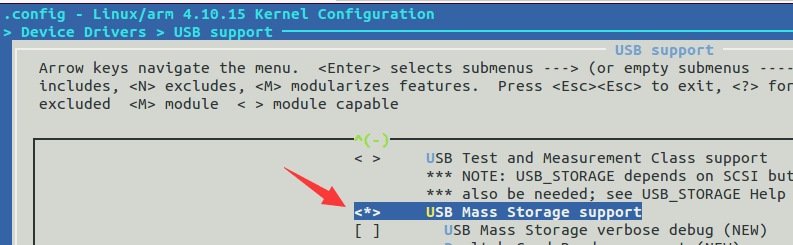
lz你好,请问我用这个固件能否用荔枝派zero 开发板挂载U盘呢?
离线


#20 2017-12-23 16:29:57 分享评论
- zhuacai
- 会员
- 注册时间: 2017-12-16
- 已发帖子: 234
- 积分: 233.5
Re: 荔枝派Zero V3s开发板入坑记录 (TF/SD卡启动)(主线Linux,主线u-boot)
晕哥,u盘不是接到otg口么,你那个是怎接的u盘呢
离线
#21 2017-12-23 16:34:00 分享评论
- zhuacai
- 会员
- 注册时间: 2017-12-16
- 已发帖子: 234
- 积分: 233.5
Re: 荔枝派Zero V3s开发板入坑记录 (TF/SD卡启动)(主线Linux,主线u-boot)
zhuacai wrote:
晕哥,u盘不是接到otg口么,你那个是怎接的u盘呢
看错了,你的也是接到otg口,我的内核是按你这个页面的教程做的,是不是没配置内核支持u盘或读卡器呢
离线
#22 2017-12-23 16:38:34 分享评论
- zhuacai
- 会员
- 注册时间: 2017-12-16
- 已发帖子: 234
- 积分: 233.5
Re: 荔枝派Zero V3s开发板入坑记录 (TF/SD卡启动)(主线Linux,主线u-boot)
晕哥,内核配置太难了,比如要配置网卡等等,我一点都不懂,有什么资料可以推存给我学习的吗
离线
#23 2017-12-23 16:46:02 分享评论
- 晕哥
- 管理员
- 所在地: wechat: whycan_cn
- 注册时间: 2017-09-06
- 已发帖子: 9,473
- 积分: 9207
在线
#24 2017-12-23 18:50:37 分享评论
- basicdev
- 会员
- 注册时间: 2017-10-02
- 已发帖子: 159
- 积分: 159
Re: 荔枝派Zero V3s开发板入坑记录 (TF/SD卡启动)(主线Linux,主线u-boot)

musb-hrc musb-hdrc.1.auto: VBUS_ERROR in bidle(98 VALID)
请问大神们, 我的U盘插入荔枝派Zero dock板子上, 一点反应都没有, 就是上面这个错误.
离线
#25 2017-12-23 18:55:55 分享评论
- 晕哥
- 管理员
- 所在地: wechat: whycan_cn
- 注册时间: 2017-09-06
- 已发帖子: 9,473
- 积分: 9207
Re: 荔枝派Zero V3s开发板入坑记录 (TF/SD卡启动)(主线Linux,主线u-boot)
basicdev wrote:
/files/members/317/QQ20171223184340.png
musb-hrc musb-hdrc.1.auto: VBUS_ERROR in bidle(98 VALID)
请问大神们, 我的U盘插入荔枝派Zero dock板子上, 一点反应都没有, 就是上面这个错误.
我碰到过这个问题:
github 上 4.10-y 分支亲自试过, 板子上的电源拨码开关有问题,导致VBUS无电造成!
解决方法就是把电源开关按下,确认VUSB有5V,然后再插入U盘。
保证药到病除!
4.13-y 还没有验证。
造成这个的原因我问过荔枝派zero的群主, 因为这些开关不耐热,过高温回流焊的时候按键损坏造成接触不良。

在线
#26 2018-01-07 21:52:50 分享评论
- bugfix
- 会员
- 注册时间: 2017-11-22
- 已发帖子: 125
- 积分: 125
Re: 荔枝派Zero V3s开发板入坑记录 (TF/SD卡启动)(主线Linux,主线u-boot)
请问大家,我用buildroot 不管我怎么减少 增加包 编译出来的 target 大小都不会改变, 应该怎么做?
离线
#27 2018-01-07 21:58:01 分享评论
- 晕哥
- 管理员
- 所在地: wechat: whycan_cn
- 注册时间: 2017-09-06
- 已发帖子: 9,473
- 积分: 9207
Re: 荔枝派Zero V3s开发板入坑记录 (TF/SD卡启动)(主线Linux,主线u-boot)
bugfix wrote:
请问大家,我用buildroot 不管我怎么减少 增加包 编译出来的 target 大小都不会改变, 应该怎么做?
这个问题, 你应该先删除生成的二进制文件, 再删除 .stamp_built (比如 output/build/busybox-1.27.2/.stamp_built), 到buildroot目录执行make.
如果再不行, 把 .stamp_ 开头的文件全删了, 再make一次,药到病除。
在线
#28 2018-01-07 22:08:05 分享评论
- linghaibin
- 会员
- 注册时间: 2018-01-07
- 已发帖子: 36
- 积分: 28
Re: 荔枝派Zero V3s开发板入坑记录 (TF/SD卡启动)(主线Linux,主线u-boot)
如果需要指定 rootfs.jffs2 的大小 可以在哪里设置
离线
#30 2018-01-07 22:23:29 分享评论
- linghaibin
- 会员
- 注册时间: 2018-01-07
- 已发帖子: 36
- 积分: 28
Re: 荔枝派Zero V3s开发板入坑记录 (TF/SD卡启动)(主线Linux,主线u-boot)
晕哥 wrote:
linghaibin wrote:
如果需要指定 rootfs.jffs2 的大小 可以在哪里设置
貌似不能指定文件大小,只能指定page size和erase size.
#mkfs.jffs2 -r rootfs -o fs.jffs2 -e 0x20000 --pad=0x500000 -s 0x800 –n -l
即可生成 rootfs.jffs2
Mkfs.jffs2各参数的意义如下:
-r:指定要做成image的目录名。
-o:指定输出image的文件名。
-e:每一块要擦除的block size,默认是64KB.要注意,不同的flash, 其block size会不一样,三星的K9F2G08U0A的block size为0x20000(从其datasheet里可以找到)。在没有加-e选项是,启动会出现以下错误:at91sam user.warn kernel: Empty flash at 0x00f0fffc ends at 0x00f10000。因此,若有类似的错误,加上-e选项,并配置nandflash的块大小,即可消除。
--pad(-p):用16进制来表示所要输出文件的大小,也就是fs.jffs2的大小,如果实际大小不足此设定的大小,则用0xFF补足。也可以不用此选项,生成的文件系统的大小跟本身大小一致,暂时还不知道有和妙用,但是加上后会少出现很多错误。
-n,-no-cleanmarkers:指明不添加清楚标记(nandflash有自己的校检块,存放相关的信息)。如果挂载后会出现类似:CLEANMARKER node found at 0x0042c000 has totlen 0xc != normal 0x0的警告,则加上-n就会消失。
-l,--little-endian:指定使用小端格式。
还有的选项,不需要了,可以自己看帮助!用如下命令mkfs.jffs2 –h。
看mkfs 应该是可以的
离线
#31 2018-01-07 22:29:06 分享评论
- 晕哥
- 管理员
- 所在地: wechat: whycan_cn
- 注册时间: 2017-09-06
- 已发帖子: 9,473
- 积分: 9207
在线
#32 2018-01-08 11:07:32 分享评论
- linghaibin
- 会员
- 注册时间: 2018-01-07
- 已发帖子: 36
- 积分: 28
Re: 荔枝派Zero V3s开发板入坑记录 (TF/SD卡启动)(主线Linux,主线u-boot)
晕哥 wrote:
我看过 mkfs.jffs2 并没有输出文件大小的参数,
他只能根据你指定rootfs目录,生成一个 rootfs.jffs2格式的文件,
至于大小是由 rootfs 目录里面的文件体积决定。个人推测。
通过直接删除 output 目录是可以按照内容变小的 但是没找到设置指定大小的方法
离线
#33 2018-01-08 13:46:53 分享评论
- 晕哥
- 管理员
- 所在地: wechat: whycan_cn
- 注册时间: 2017-09-06
- 已发帖子: 9,473
- 积分: 9207
Re: 荔枝派Zero V3s开发板入坑记录 (TF/SD卡启动)(主线Linux,主线u-boot)
linghaibin wrote:
晕哥 wrote:
我看过 mkfs.jffs2 并没有输出文件大小的参数,
他只能根据你指定rootfs目录,生成一个 rootfs.jffs2格式的文件,
至于大小是由 rootfs 目录里面的文件体积决定。个人推测。
通过直接删除 output 目录是可以按照内容变小的 但是没找到设置指定大小的方法
我认为没有这种接口,你的目录直接决定了输出文件大小,最多给你超出指定大小的的警告。
在线
#34 2018-01-13 11:01:50 分享评论
- Any
- 会员
- 注册时间: 2017-12-11
- 已发帖子: 20
- 积分: 20
Re: 荔枝派Zero V3s开发板入坑记录 (TF/SD卡启动)(主线Linux,主线u-boot)
楼主你好,想请教下buildroot使用的问题。
硬件环境是ilicheepi一代,系统是ubuntu17.10,想用buildroot创建根文件系统。有几个问题请教。
我打算用最新版本的交叉编译器,apt-get下载的版本是arm-linux-gnueabihf-gcc 7.2。
那么我在buildroot配置菜单里,toolchains这里有几个选项不知道该怎么选。
选择外部编译器;
选择编译器路径:/usr
选择编译器头?:arm-linux-genueabihf
然后我执行make,报一下错误:
as they were configured in a way that makes them non-relocatable,
and contain a lot of pre-built libraries that would conflict with
the ones Buildroot wants to build.
package/pkg-generic.mk:224: recipe for target '/opt/buildroot-2017.11/output/build/toolchain-external-custom/.stamp_configured' failed
make: *** [/opt/buildroot-2017.11/output/build/toolchain-external-custom/.stamp_configured] Error 1
any@Any-Desktop-PC:/opt/buildroot-2017.11$
离线
#35 2018-01-13 11:04:07 分享评论
- 晕哥
- 管理员
- 所在地: wechat: whycan_cn
- 注册时间: 2017-09-06
- 已发帖子: 9,473
- 积分: 9207
Re: 荔枝派Zero V3s开发板入坑记录 (TF/SD卡启动)(主线Linux,主线u-boot)
Any wrote:
楼主你好,想请教下buildroot使用的问题。
硬件环境是ilicheepi一代,系统是ubuntu17.10,想用buildroot创建根文件系统。有几个问题请教。
我打算用最新版本的交叉编译器,apt-get下载的版本是arm-linux-gnueabihf-gcc 7.2。
那么我在buildroot配置菜单里,toolchains这里有几个选项不知道该怎么选。
选择外部编译器;
选择编译器路径:/usr
选择编译器头?:arm-linux-genueabihf
然后我执行make,报一下错误:
as they were configured in a way that makes them non-relocatable,
and contain a lot of pre-built libraries that would conflict with
the ones Buildroot wants to build.
package/pkg-generic.mk:224: recipe for target '/opt/buildroot-2017.11/output/build/toolchain-external-custom/.stamp_configured' failed
make: *** [/opt/buildroot-2017.11/output/build/toolchain-external-custom/.stamp_configured] Error 1
any@Any-Desktop-PC:/opt/buildroot-2017.11$
参考链接: 如何配置buildroot用外部编译器?
在线
#36 2018-03-22 10:22:57 分享评论
- 丘哥
- 会员
- 注册时间: 2018-03-22
- 已发帖子: 1
- 积分: 1
Re: 荔枝派Zero V3s开发板入坑记录 (TF/SD卡启动)(主线Linux,主线u-boot)
我编译完Buildroot出现以下错误:
ERROR: attr-2.4.47.src.tar.gz has wrong sha256 hash:
ERROR: expected: 25772f653ac5b2e3ceeb89df50e4688891e21f723c460636548971652af0a859
ERROR: got : 13f04a44c4648a1da2aea09765ae87d9be5d7f31329bc7b0ef8565c5f3a46b18
ERROR: Incomplete download, or man-in-the-middle (MITM) attack
make: *** [/home/lianyy/lichee/buildroot-2017.08/output/build/host-attr-2.4.47/.stamp_downloaded] Error 1
请问是什么原因
离线
#38 2018-03-22 10:43:09 分享评论
- 晕哥
- 管理员
- 所在地: wechat: whycan_cn
- 注册时间: 2017-09-06
- 已发帖子: 9,473
- 积分: 9207
Re: 荔枝派Zero V3s开发板入坑记录 (TF/SD卡启动)(主线Linux,主线u-boot)
他这个防止篡改软件的,所以用了哈希校验。
你可以手动从这里下载 attr-2.4.47.src.tar.gz 到buildroot的dl目录。
hexing@ubuntu:/disk2$ wget https://ftp.osuosl.org/pub/lfs/lfs-packages/7.10/attr-2.4.47.src.tar.gz
--2018-03-22 10:42:17-- https://ftp.osuosl.org/pub/lfs/lfs-packages/7.10/attr-2.4.47.src.tar.gz
Resolving ftp.osuosl.org (ftp.osuosl.org)... 140.211.166.134, 64.50.236.52, 64.50.233.100, ...
Connecting to ftp.osuosl.org (ftp.osuosl.org)|140.211.166.134|:443... connected.
HTTP request sent, awaiting response... 200 OK
Length: 343692 (336K) [application/x-gzip]
Saving to: ‘attr-2.4.47.src.tar.gz’100%[=============================================================================================================>] 343,692 177KB/s in 1.9s
2018-03-22 10:42:22 (177 KB/s) - ‘attr-2.4.47.src.tar.gz’ saved [343692/343692]
hexing@ubuntu:/disk2$ sha256sum attr-2.4.47.src.tar.gz
25772f653ac5b2e3ceeb89df50e4688891e21f723c460636548971652af0a859 attr-2.4.47.src.tar.gz
帮你试过了, 这个链接的文件是没有问题的。
在线
#39 2018-03-29 11:58:27 分享评论
- heroydx
- 会员
- 注册时间: 2018-03-22
- 已发帖子: 5
- 积分: 5
Re: 荔枝派Zero V3s开发板入坑记录 (TF/SD卡启动)(主线Linux,主线u-boot)
请问楼主,这个是不是不能连以太网啊。。
离线
#41 2018-04-04 11:30:44 分享评论
- heroydx
- 会员
- 注册时间: 2018-03-22
- 已发帖子: 5
- 积分: 5
Re: 荔枝派Zero V3s开发板入坑记录 (TF/SD卡启动)(主线Linux,主线u-boot)
晕哥 wrote:
heroydx wrote:
请问楼主,这个是不是不能连以太网啊。。
以太网功能正常!设备树和驱动都已经开启以太网了。
现在已经连上了,之前是网线出了问题,麻烦晕哥了。。。
离线
#42 2018-04-18 12:38:25 分享评论
- 小猪佩奇
- 会员
- 注册时间: 2018-03-19
- 已发帖子: 59
- 积分: 59
Re: 荔枝派Zero V3s开发板入坑记录 (TF/SD卡启动)(主线Linux,主线u-boot)
@沉鱼 楼主,你编译好的linux&dtb,是直接下载下来的主线内核没有修改过的吗?
离线
楼主 #43 2018-04-18 13:34:39 分享评论
- 沉鱼
- 管理员
- 注册时间: 2017-09-06
- 已发帖子: 161
- 积分: 161
Re: 荔枝派Zero V3s开发板入坑记录 (TF/SD卡启动)(主线Linux,主线u-boot)
小猪佩奇 wrote:
@沉鱼 楼主,你编译好的linux&dtb,是直接下载下来的主线内核没有修改过的吗?
是的,就是4.13-y 原味的。
离线
#44 2018-05-11 10:18:53 分享评论
- northseawind
- 会员
- 注册时间: 2017-11-22
- 已发帖子: 4
- 积分: 4
Re: 荔枝派Zero V3s开发板入坑记录 (TF/SD卡启动)(主线Linux,主线u-boot)
点32个赞
离线
#45 2018-07-20 12:36:39 分享评论
- john78
- 会员
- 注册时间: 2018-07-19
- 已发帖子: 223
- 积分: 146
Re: 荔枝派Zero V3s开发板入坑记录 (TF/SD卡启动)(主线Linux,主线u-boot)
buildroot-v3s-20171122.zip ----复制后make
最后
table='/work/v3s/buildroot-2017.02.7/output/build/_device_table.txt'
/usr/bin/install -m 0644 support/misc/target-dir-warning.txt /work/v3s/buildroot-2017.02.7/output/target/THIS_ IS_NOT_YOUR_ROOT_FILESYSTEM
又是什么坑?
离线
#47 2018-07-20 13:06:36 分享评论
- john78
- 会员
- 注册时间: 2018-07-19
- 已发帖子: 223
- 积分: 146
Re: 荔枝派Zero V3s开发板入坑记录 (TF/SD卡启动)(主线Linux,主线u-boot)
谢谢!
还有 sun8i-v3s-licheepi-zero-dock.dtb 这个文件,从哪生成的?
离线
#48 2018-07-20 13:33:17 分享评论
- 晕哥
- 管理员
- 所在地: wechat: whycan_cn
- 注册时间: 2017-09-06
- 已发帖子: 9,473
- 积分: 9207
Re: 荔枝派Zero V3s开发板入坑记录 (TF/SD卡启动)(主线Linux,主线u-boot)
john78 wrote:
还有 sun8i-v3s-licheepi-zero-dock.dtb 这个文件,从哪生成的?
由这个命令:
make ARCH=arm CROSS_COMPILE=arm-linux-gnueabihf-
或者这个命令生成的:
make ARCH=arm CROSS_COMPILE=arm-linux-gnueabihf- dtbs
在这个位置:
arch/arm/boot/dts/sun8i-v3s-licheepi-zero-dock.dtb
在线
#49 2018-08-06 17:01:27 分享评论
- hydys
- 会员
- 注册时间: 2018-06-19
- 已发帖子: 30
- 积分: 25
Re: 荔枝派Zero V3s开发板入坑记录 (TF/SD卡启动)(主线Linux,主线u-boot)
全志V3s,sysconfig和dts是个什么关系,4.13-y 有使用sysconfig吗?
离线
#50 2018-08-06 17:29:10 分享评论
- 晕哥
- 管理员
- 所在地: wechat: whycan_cn
- 注册时间: 2017-09-06
- 已发帖子: 9,473
- 积分: 9207
在线
#51 2018-09-06 20:27:29 分享评论
- 无情一刀
- 会员
- 注册时间: 2018-09-04
- 已发帖子: 723
- 积分: 690
Re: 荔枝派Zero V3s开发板入坑记录 (TF/SD卡启动)(主线Linux,主线u-boot)
沉鱼 wrote:
U-Boot 2017.01-rc2-00071-gf03c1f5-dirty (Nov 18 2017 - 22:15:31 +0800) Allwinner Technology

CPU:   Allwinner V3s (SUN8I 1681)
Model: Lichee Pi Zero
DRAM:  64 MiB
MMC:   SUNXI SD/MMC: 0
SF: Detected w25q256 with page size 256 Bytes, erase size 4 KiB, total 32 MiB
SF: Warning - Only lower 16MiB accessible, Full access #define CONFIG_SPI_FLASH_BAR
*** Warning - bad CRC, using default environment

Setting up a 800x480 lcd console (overscan 0x0)
dotclock: 33000kHz = 33000kHz: (1 * 3MHz * 66) / 6
In:    serial@01c28000
Out:   serial@01c28000
Err:   serial@01c28000
Net:   No ethernet found.
starting USB...
No controllers found
Hit any key to stop autoboot:  0
reading zImage
3898688 bytes read in 621 ms (6 MiB/s)
reading sun8i-v3s-licheepi-zero-dock.dtb
11931 bytes read in 28 ms (416 KiB/s)
## Flattened Device Tree blob at 41800000
   Booting using the fdt blob at 0x41800000
   Loading Device Tree to 42dfa000, end 42dffe9a ... OK

Starting kernel ...

[    0.000000] Booting Linux on physical CPU 0x0
[    0.000000] Linux version 4.13.0-licheepi-zero+ (hexing@ubuntu) (gcc version 4.8.4 (Ubuntu/Linaro 4.8.4-2ubuntu1~14.04.1)) #35 SMP Sat Nov 18 22:21:37 CST 2017
[    0.000000] CPU: ARMv7 Processor [410fc075] revision 5 (ARMv7), cr=10c5387d
[    0.000000] CPU: div instructions available: patching division code
[    0.000000] CPU: PIPT / VIPT nonaliasing data cache, VIPT aliasing instruction cache
[    0.000000] OF: fdt: Machine model: Lichee Pi Zero with Dock
[    0.000000] Memory policy: Data cache writealloc
[    0.000000] percpu: Embedded 16 pages/cpu @c3de6000 s33920 r8192 d23424 u65536
[    0.000000] Built 1 zonelists in Zone order, mobility grouping on.  Total pages: 15883
[    0.000000] Kernel command line: console=ttyS0,115200 panic=5 rootwait mtdparts=spi32766.0:1M(uboot)ro,64k(dtb)ro,6M(kernel)ro,-(rootfs) root=/dev/mmcblk0p2 earlyprintk rw
[    0.000000] PID hash table entries: 256 (order: -2, 1024 bytes)
[    0.000000] Dentry cache hash table entries: 8192 (order: 3, 32768 bytes)
[    0.000000] Inode-cache hash table entries: 4096 (order: 2, 16384 bytes)
[    0.000000] Memory: 53580K/64036K available (6144K kernel code, 217K rwdata, 1432K rodata, 1024K init, 262K bss, 10456K reserved, 0K cma-reserved, 0K highmem)
[    0.000000] Virtual kernel memory layout:
[    0.000000]     vector  : 0xffff0000 - 0xffff1000   (   4 kB)
[    0.000000]     fixmap  : 0xffc00000 - 0xfff00000   (3072 kB)
[    0.000000]     vmalloc : 0xc4000000 - 0xff800000   ( 952 MB)
[    0.000000]     lowmem  : 0xc0000000 - 0xc3e89000   (  62 MB)
[    0.000000]     pkmap   : 0xbfe00000 - 0xc0000000   (   2 MB)
[    0.000000]     modules : 0xbf000000 - 0xbfe00000   (  14 MB)
[    0.000000]       .text : 0xc0008000 - 0xc0700000   (7136 kB)
[    0.000000]       .init : 0xc0900000 - 0xc0a00000   (1024 kB)
[    0.000000]       .data : 0xc0a00000 - 0xc0a367c0   ( 218 kB)
[    0.000000]        .bss : 0xc0a3d874 - 0xc0a7f1bc   ( 263 kB)
[    0.000000] SLUB: HWalign=64, Order=0-3, MinObjects=0, CPUs=1, Nodes=1
[    0.000000] Hierarchical RCU implementation.
[    0.000000]  RCU event tracing is enabled.
[    0.000000]  RCU restricting CPUs from NR_CPUS=8 to nr_cpu_ids=1.
[    0.000000] RCU: Adjusting geometry for rcu_fanout_leaf=16, nr_cpu_ids=1
[    0.000000] NR_IRQS: 16, nr_irqs: 16, preallocated irqs: 16
[    0.000000] arch_timer: cp15 timer(s) running at 24.00MHz (virt).
[    0.000000] clocksource: arch_sys_counter: mask: 0xffffffffffffff max_cycles: 0x588fe9dc0, max_idle_ns: 440795202592 ns
[    0.000007] sched_clock: 56 bits at 24MHz, resolution 41ns, wraps every 4398046511097ns
[    0.000018] Switching to timer-based delay loop, resolution 41ns
[    0.000187] clocksource: timer: mask: 0xffffffff max_cycles: 0xffffffff, max_idle_ns: 79635851949 ns
[    0.000417] Console: colour dummy device 80x30
[    0.000454] Calibrating delay loop (skipped), value calculated using timer frequency.. 48.00 BogoMIPS (lpj=240000)
[    0.000470] pid_max: default: 32768 minimum: 301
[    0.000588] Mount-cache hash table entries: 1024 (order: 0, 4096 bytes)
[    0.000601] Mountpoint-cache hash table entries: 1024 (order: 0, 4096 bytes)
[    0.001204] CPU: Testing write buffer coherency: ok
[    0.001578] /cpus/cpu@0 missing clock-frequency property
[    0.001604] CPU0: thread -1, cpu 0, socket 0, mpidr 80000000
[    0.002044] Setting up static identity map for 0x40100000 - 0x40100060
[    0.002219] Hierarchical SRCU implementation.
[    0.002703] smp: Bringing up secondary CPUs ...
[    0.002720] smp: Brought up 1 node, 1 CPU
[    0.002730] SMP: Total of 1 processors activated (48.00 BogoMIPS).
[    0.002737] CPU: All CPU(s) started in SVC mode.
[    0.003505] devtmpfs: initialized
[    0.006733] VFP support v0.3: implementor 41 architecture 2 part 30 variant 7 rev 5
[    0.007030] clocksource: jiffies: mask: 0xffffffff max_cycles: 0xffffffff, max_idle_ns: 19112604462750000 ns
[    0.007058] futex hash table entries: 256 (order: 2, 16384 bytes)
[    0.007230] pinctrl core: initialized pinctrl subsystem
[    0.008093] random: get_random_u32 called from bucket_table_alloc+0xf0/0x250 with crng_init=0
[    0.008234] NET: Registered protocol family 16
[    0.008703] DMA: preallocated 256 KiB pool for atomic coherent allocations
[    0.009842] hw-breakpoint: found 5 (+1 reserved) breakpoint and 4 watchpoint registers.
[    0.009861] hw-breakpoint: maximum watchpoint size is 8 bytes.
[    0.023902] SCSI subsystem initialized
[    0.024221] usbcore: registered new interface driver usbfs
[    0.024290] usbcore: registered new interface driver hub
[    0.024388] usbcore: registered new device driver usb
[    0.024653] pps_core: LinuxPPS API ver. 1 registered
[    0.024667] pps_core: Software ver. 5.3.6 - Copyright 2005-2007 Rodolfo Giometti <giometti@linux.it>
[    0.024691] PTP clock support registered
[    0.024931] Advanced Linux Sound Architecture Driver Initialized.
[    0.026779] clocksource: Switched to clocksource arch_sys_counter
[    0.037466] NET: Registered protocol family 2
[    0.038055] TCP established hash table entries: 1024 (order: 0, 4096 bytes)
[    0.038091] TCP bind hash table entries: 1024 (order: 1, 8192 bytes)
[    0.038114] TCP: Hash tables configured (established 1024 bind 1024)
[    0.038250] UDP hash table entries: 256 (order: 1, 8192 bytes)
[    0.038299] UDP-Lite hash table entries: 256 (order: 1, 8192 bytes)
[    0.038527] NET: Registered protocol family 1
[    0.039133] RPC: Registered named UNIX socket transport module.
[    0.039156] RPC: Registered udp transport module.
[    0.039162] RPC: Registered tcp transport module.
[    0.039167] RPC: Registered tcp NFSv4.1 backchannel transport module.
[    0.041054] workingset: timestamp_bits=30 max_order=14 bucket_order=0
[    0.050094] NFS: Registering the id_resolver key type
[    0.050156] Key type id_resolver registered
[    0.050164] Key type id_legacy registered
[    0.051175] random: fast init done
[    0.053944] Block layer SCSI generic (bsg) driver version 0.4 loaded (major 249)
[    0.053969] io scheduler noop registered
[    0.053977] io scheduler deadline registered
[    0.054238] io scheduler cfq registered (default)
[    0.054250] io scheduler mq-deadline registered
[    0.054257] io scheduler kyber registered
[    0.058737] sun8i-v3s-pinctrl 1c20800.pinctrl: initialized sunXi PIO driver
[    0.126666] Serial: 8250/16550 driver, 8 ports, IRQ sharing disabled
[    0.130091] console [ttyS0] disabled
[    0.150367] 1c28000.serial: ttyS0 at MMIO 0x1c28000 (irq = 36, base_baud = 1500000) is a U6_16550A
[    0.733086] console [ttyS0] enabled
[    0.758199] 1c28400.serial: ttyS1 at MMIO 0x1c28400 (irq = 37, base_baud = 1500000) is a U6_16550A
[    0.788741] 1c28800.serial: ttyS2 at MMIO 0x1c28800 (irq = 38, base_baud = 1500000) is a U6_16550A
[    0.802399] m25p80 spi32766.0: w25q256 (32768 Kbytes)
[    0.807603] 4 cmdlinepart partitions found on MTD device spi32766.0
[    0.813863] Creating 4 MTD partitions on "spi32766.0":
[    0.819040] 0x000000000000-0x000000100000 : "uboot"
[    0.824545] 0x000000100000-0x000000110000 : "dtb"
[    0.829815] 0x000000110000-0x000000710000 : "kernel"
[    0.835152] 0x000000710000-0x000002000000 : "rootfs"
[    0.840987] libphy: Fixed MDIO Bus: probed
[    0.845629] dwmac-sun8i 1c30000.ethernet: PTP uses main clock
[    0.851525] dwmac-sun8i 1c30000.ethernet: No regulator found
[    0.857266] dwmac-sun8i 1c30000.ethernet: Will use internal PHY
[    0.863418] dwmac-sun8i 1c30000.ethernet: Chain mode enabled
[    0.869119] dwmac-sun8i 1c30000.ethernet: No HW DMA feature register supported
[    0.876334] dwmac-sun8i 1c30000.ethernet: Normal descriptors
[    0.882000] dwmac-sun8i 1c30000.ethernet: RX Checksum Offload Engine supported
[    0.889225] dwmac-sun8i 1c30000.ethernet: COE Type 2
[    0.894184] dwmac-sun8i 1c30000.ethernet: TX Checksum insertion supported
[    0.901160] libphy: stmmac: probed
[    0.906501] ehci_hcd: USB 2.0 'Enhanced' Host Controller (EHCI) Driver
[    0.913168] ehci-platform: EHCI generic platform driver
[    0.918715] ehci-platform 1c1a000.usb: EHCI Host Controller
[    0.924329] ehci-platform 1c1a000.usb: new USB bus registered, assigned bus number 1
[    0.932305] ehci-platform 1c1a000.usb: irq 26, io mem 0x01c1a000
[    0.966800] ehci-platform 1c1a000.usb: USB 2.0 started, EHCI 1.00
[    0.974049] hub 1-0:1.0: USB hub found
[    0.977995] hub 1-0:1.0: 1 port detected
[    0.982545] ohci_hcd: USB 1.1 'Open' Host Controller (OHCI) Driver
[    0.988852] ohci-platform: OHCI generic platform driver
[    0.994425] ohci-platform 1c1a400.usb: Generic Platform OHCI controller
[    1.001157] ohci-platform 1c1a400.usb: new USB bus registered, assigned bus number 2
[    1.009114] ohci-platform 1c1a400.usb: irq 27, io mem 0x01c1a400
[    1.081939] hub 2-0:1.0: USB hub found
[    1.085759] hub 2-0:1.0: 1 port detected
[    1.093423] udc-core: couldn't find an available UDC - added [g_cdc] to list of pending drivers
[    1.103057] input: 1c22800.lradc as /devices/platform/soc/1c22800.lradc/input/input0
[    1.111989] sun6i-rtc 1c20400.rtc: rtc core: registered rtc-sun6i as rtc0
[    1.118894] sun6i-rtc 1c20400.rtc: RTC enabled
[    1.123445] i2c /dev entries driver
[    1.128364] input: ns2009_ts as /devices/platform/soc/1c2ac00.i2c/i2c-0/0-0048/input/input1
[    1.137888] sunxi-wdt 1c20ca0.watchdog: Watchdog enabled (timeout=16 sec, nowayout=0)
[    1.206827] sunxi-mmc 1c0f000.mmc: base:0xc41fe000 irq:23
[    1.253909] mmc0: host does not support reading read-only switch, assuming write-enable
[    1.263906] mmc0: new high speed SD card at address b368
[    1.269784] sunxi-mmc 1c10000.mmc: base:0xc4303000 irq:24
[    1.276198] usbcore: registered new interface driver usbhid
[    1.281865] usbhid: USB HID core driver
[    1.286452] mmcblk0: mmc0:b368 FFFFF 1.85 GiB
[    1.293142] sun4i-codec 1c22c00.codec: ASoC: /soc/codec-analog@01c23000 not registered
[    1.301196] sun4i-codec 1c22c00.codec: Failed to register our card
[    1.307701]  mmcblk0: p1 p2
[    1.315808] NET: Registered protocol family 17
[    1.320502] Key type dns_resolver registered
[    1.324909] Registering SWP/SWPB emulation handler
[    1.334192] simple-framebuffer 43e89000.framebuffer: framebuffer at 0x43e89000, 0x177000 bytes, mapped to 0xc4380000
[    1.344903] simple-framebuffer 43e89000.framebuffer: format=x8r8g8b8, mode=800x480x32, linelength=3200
[    1.361252] Console: switching to colour frame buffer device 100x30
[    1.373677] simple-framebuffer 43e89000.framebuffer: fb0: simplefb registered!
[    1.382270] usb_phy_generic usb_phy_generic.0.auto: usb_phy_generic.0.auto supply vcc not found, using dummy regulator
[    1.393669] musb-hdrc musb-hdrc.1.auto: MUSB HDRC host driver
[    1.399513] musb-hdrc musb-hdrc.1.auto: new USB bus registered, assigned bus number 3
[    1.408694] hub 3-0:1.0: USB hub found
[    1.412562] hub 3-0:1.0: 1 port detected
[    1.417910] using random self ethernet address
[    1.422406] using random host ethernet address
[    1.429079] usb0: HOST MAC ea:2e:b5:37:94:39
[    1.433399] usb0: MAC ea:73:b4:e9:b1:97
[    1.437391] g_cdc gadget: CDC Composite Gadget, version: King Kamehameha Day 2008
[    1.444869] g_cdc gadget: g_cdc ready
[    1.451183] sun4i-codec 1c22c00.codec: Codec <-> 1c22c00.codec mapping ok
[    1.459688] sun6i-rtc 1c20400.rtc: setting system clock to 1970-01-01 00:00:11 UTC (11)
[    1.468021] vcc5v0: disabling
[    1.470997] ALSA device list:
[    1.473961]   #0: V3s Audio Codec
[    1.479412] EXT4-fs (mmcblk0p2): couldn't mount as ext3 due to feature incompatibilities
[    1.488737] EXT4-fs (mmcblk0p2): couldn't mount as ext2 due to feature incompatibilities
[    1.744749] EXT4-fs (mmcblk0p2): recovery complete
[    1.752584] EXT4-fs (mmcblk0p2): mounted filesystem with ordered data mode. Opts: (null)
[    1.760827] VFS: Mounted root (ext4 filesystem) on device 179:2.
[    1.769205] devtmpfs: mounted
[    1.773355] Freeing unused kernel memory: 1024K
[    1.924658] EXT4-fs (mmcblk0p2): re-mounted. Opts: data=ordered
Starting logging: OK
Initializing random number generator... done.
Starting network: OK

Welcome to Buildroot
buildroot login:
我的TF启动是这样的,
你看下第二个分区有没有 /dev/null, /dev/consle的设备?
为什么我这里输入root 在串口上面不会显示出来 ,也没有任何反应 就是一直你上面的那个地方
离线
#52 2018-09-07 09:32:19 分享评论
- cassette
- 会员
- 注册时间: 2018-09-07
- 已发帖子: 5
- 积分: 0
Re: 荔枝派Zero V3s开发板入坑记录 (TF/SD卡启动)(主线Linux,主线u-boot)
正在往buildroot里装一些package,楼主能否发一份配置buildroot 的参数。
离线
#54 2018-09-19 13:52:28 分享评论
- cassette
- 会员
- 注册时间: 2018-09-07
- 已发帖子: 5
- 积分: 0
Re: 荔枝派Zero V3s开发板入坑记录 (TF/SD卡启动)(主线Linux,主线u-boot)
晕哥 wrote:
cassette wrote:
正在往buildroot里装一些package,楼主能否发一份配置buildroot 的参数。
看一楼的 4. 根文件系统
多谢,buildroot安装应用与调试一直正常,
今天改动了下BSP Kernel config,用的是build_tiger-cdr kernel 脚本,编出来的UImage,单独替换了第一分区中的文件,启动后Kernel panic,
将config恢复成lichee中默认的sunxiW8pismp-tiger-cdr,启动后也会panic
log是默认config的
[    1.210254] platform reg-20-cs-ldoio0: Driver reg-20-cs-ldoio0 requests probe deferral
[    1.219238] sunxi_wdt_init_module: sunxi WatchDog Timer Driver v1.0
[    1.226475] sunxi_wdt_probe: devm_ioremap return wdt_reg 0xf1c20ca0, res->start 0x01c20ca0, res->end 0x01c20cbf
[    1.237879] sunxi_wdt_probe: initialized (g_timeout=16s, g_nowayout=0)
[    1.245673] wdt_enable, write reg 0xf1c20cb8 val 0x00000000
[    1.251973] wdt_set_tmout, write 0x000000b0 to mode reg 0xf1c20cb8, actual timeout 16 sec
[    1.263958] no led_3, ignore it!
[    1.267665] no led_4, ignore it!
[    1.271463] no led_5, ignore it!
[    1.275135] no led_6, ignore it!
[    1.278856] no led_7, ignore it!
[    1.284687] usbcore: registered new interface driver usbhid
[    1.291020] usbhid: USB HID core driver
[    1.296074] ashmem: initialized
[    1.299875] logger: created 256K log 'log_main'
[    1.305411] logger: created 32K log 'log_events'
[    1.310791] logger: created 32K log 'log_radio'
[    1.316153] logger: created 32K log 'log_system'
[    1.322955] script_get_item return type err, consider it no ldo
[    1.333857] *******************Try sdio*******************
[    1.340417] asoc: sndcodec <-> sunxi-codec mapping ok
[    1.348410] TCP: cubic registered
[    1.352302] NET: Registered protocol family 17
[    1.357353] *******************Try sd *******************
[    1.363704] VFP support v0.3: implementor 41 architecture 2 part 30 variant 7 rev 5
[    1.372518] ThumbEE CPU extension supported.
[    1.377381] Registering SWP/SWPB emulation handler
[    1.387376] platform reg-20-cs-ldoio0: Driver reg-20-cs-ldoio0 requests probe deferral
[    1.396595] platform reg-20-cs-ldo4: Driver reg-20-cs-ldo4 requests probe deferral
[    1.405287] platform reg-20-cs-ldo3: Driver reg-20-cs-ldo3 requests probe deferral
[    1.413853] platform reg-20-cs-ldo2: Driver reg-20-cs-ldo2 requests probe deferral
[    1.422501] platform reg-20-cs-ldo1: Driver reg-20-cs-ldo1 requests probe deferral
[    1.431158] platform reg-20-cs-dcdc3: Driver reg-20-cs-dcdc3 requests probe deferral
[    1.439895] platform reg-20-cs-dcdc2: Driver reg-20-cs-dcdc2 requests probe deferral
[    1.448794] sunxi-rtc sunxi-rtc: setting system clock to 1970-01-01 00:16:37 UTC (997)
[    1.459945] mmc0: new high speed SDHC card at address 1234
[    1.566637] ------------[ cut here ]------------
[    1.570002] kernel BUG at drivers/mmc/host/sunxi-mci.c:2656!
[    1.570002] Internal error: Oops - BUG: 0 [#1] ARM
[    1.570002] Modules linked in:
[    1.570002] CPU: 0    Not tainted  (3.4.39 #3)
[    1.570002] PC is at sunxi_mci_rescan_card+0x28/0x4c
[    1.570002] LR is at sif_platform_rescan_card+0x24/0x2c
[    1.570002] pc : [<c0271dd0>]    lr : [<c01cf18c>]    psr: 60000013
[    1.570002] sp : c1821f08  ip : c1821f18  fp : c1821f14
[    1.570002] r10: c04dde50  r9 : c04aef6c  r8 : c04dde50
[    1.570002] r7 : c055c958  r6 : 00000004  r5 : c049ff3c  r4 : c055c954
[    1.570002] r3 : 00000000  r2 : 00000000  r1 : 00000001  r0 : 00000001
[    1.570002] Flags: nZCv  IRQs on  FIQs on  Mode SVC_32  ISA ARM  Segment kernel
[    1.570002] Control: 10c5387d  Table: 40004059  DAC: 00000015
[    1.570002]
[    1.570002] PC: 0xc0271d50:
[    1.570002] 1d50  e1a05001 e5967000 ebf704fc e594324c e0800007 e593203c e3120c02 0a000003
[    1.570002] 1d70  e5962000 e0602002 e3520000 bafffff8 e593003c e2100c02 089da8f0 e1a01005
[    1.570002] 1d90  e59f000c eb03bf61 e3e00000 e89da8f0 c04bd7a0 c0453a14 e1a0c00d e92dd800
[    1.570002] 1db0  e24cb004 e3500003 9a000000 e7f001f2 e59f3028 e7933100 e3530000 1a000000
[    1.570002] 1dd0  e7f001f2 e2911000 e5930004 13a01001 e583106c e3a01000 ebffb8a6 e89da800
[    1.570002] 1df0  c055f84c e1a0c00d e92dd818 e24cb004 e59030c8 e1a04000 e3130002 0a000003
[    1.570002] 1e10  e5903000 e59f0028 e5931004 eb03bf3f e3a03003 e3a00000 e584305c e594300c
[    1.570002] 1e30  e584008c e5932000 e3a02007 e5832000 e89da818 c0454368 e1a0c00d e92dd8f0
[    1.570002]
[    1.570002] LR: 0xc01cf10c:
[    1.570002] f10c  e3a03002 e1a00004 e5853234 eb026cdd e3100001 1a000002 e59f0034 e59f1028
[    1.570002] f12c  eb064a7b e1a00004 e3a01001 eb026cc3 e3500000 0a000002 e59f0018 e59f1008
[    1.570002] f14c  eb064a73 e3a00000 e89da830 c03815a1 c041e387 c04393ad c04393da e1a0c00d
[    1.570002] f16c  e92dd800 e24cb004 e59f3014 e1a01000 e5930004 e3700001 089da800 eb028b06
[    1.570002] f18c  e89da800 c04dde50 e1a0c00d e92dd818 e24cb004 e59f4018 e1a00004 eb064a5c
[    1.570002] f1ac  e59f0010 eb064a5a e1a00004 eb064a58 e89da818 c04393ff c0439438 e1a0c00d
[    1.570002] f1cc  e92dd830 e24cb004 e59f0048 e3a04065 eb064a4f e59f0040 eb064a4d e59f0034
[    1.570002] f1ec  eb064a4b e59f1034 e59f0034 eb064a48 e3a00000 e59f502c ebff7b38 ea000002
[    1.570002]
[    1.570002] SP: 0xc1821e88:
[    1.570002] 1e88  c04dde50 c04aef6c c04dde50 c1821ec4 c1821eb0 c1821eb0 c1821ec4 c0271dd4
[    1.570002] 1ea8  60000013 c000f894 c1821f14 c1821ec0 c000f5ec c000a020 00000001 00000001
[    1.570002] 1ec8  00000000 00000000 c055c954 c049ff3c 00000004 c055c958 c04dde50 c04aef6c
[    1.570002] 1ee8  c04dde50 c1821f14 c1821f18 c1821f08 c01cf18c c0271dd0 60000013 ffffffff
[    1.570002] 1f08  c1821f24 c1821f18 c01cf18c c0271db4 c1821f4c c1821f28 c01d0294 c01cf174
[    1.570002] 1f28  00000007 c049ff3c 00000000 c0521280 0000009f c048d258 c1821f64 c1821f50
[    1.570002] 1f48  c01ceaa0 c01d0238 00000000 00000007 c1821f7c c1821f68 c049ffa0 c01cea8c
[    1.570002] 1f68  56bfbaf7 000075be c1821fb4 c1821f80 c000a3fc c049ff48 00000000 c0413ebc
[    1.570002]
[    1.570002] IP: 0xc1821e98:
[    1.570002] 1e98  c1821eb0 c1821eb0 c1821ec4 c0271dd4 60000013 c000f894 c1821f14 c1821ec0
[    1.570002] 1eb8  c000f5ec c000a020 00000001 00000001 00000000 00000000 c055c954 c049ff3c
[    1.570002] 1ed8  00000004 c055c958 c04dde50 c04aef6c c04dde50 c1821f14 c1821f18 c1821f08
[    1.570002] 1ef8  c01cf18c c0271dd0 60000013 ffffffff c1821f24 c1821f18 c01cf18c c0271db4
[    1.570002] 1f18  c1821f4c c1821f28 c01d0294 c01cf174 00000007 c049ff3c 00000000 c0521280
[    1.570002] 1f38  0000009f c048d258 c1821f64 c1821f50 c01ceaa0 c01d0238 00000000 00000007
[    1.570002] 1f58  c1821f7c c1821f68 c049ffa0 c01cea8c 56bfbaf7 000075be c1821fb4 c1821f80
[    1.570002] 1f78  c000a3fc c049ff48 00000000 c0413ebc c1821fb4 00000007 00000007 c04aae88
[    1.570002]
[    1.570002] FP: 0xc1821e94:
[    1.570002] 1e94  c1821ec4 c1821eb0 c1821eb0 c1821ec4 c0271dd4 60000013 c000f894 c1821f14
[    1.570002] 1eb4  c1821ec0 c000f5ec c000a020 00000001 00000001 00000000 00000000 c055c954
[    1.570002] 1ed4  c049ff3c 00000004 c055c958 c04dde50 c04aef6c c04dde50 c1821f14 c1821f18
[    1.570002] 1ef4  c1821f08 c01cf18c c0271dd0 60000013 ffffffff c1821f24 c1821f18 c01cf18c
[    1.570002] 1f14  c0271db4 c1821f4c c1821f28 c01d0294 c01cf174 00000007 c049ff3c 00000000
[    1.570002] 1f34  c0521280 0000009f c048d258 c1821f64 c1821f50 c01ceaa0 c01d0238 00000000
[    1.570002] 1f54  00000007 c1821f7c c1821f68 c049ffa0 c01cea8c 56bfbaf7 000075be c1821fb4
[    1.570002] 1f74  c1821f80 c000a3fc c049ff48 00000000 c0413ebc c1821fb4 00000007 00000007
[    1.570002]
[    1.570002] R4: 0xc055c8d4:
[    1.570002] c8d4  00000000 00000000 01c68000 01c68fff c19c1840 00000200 c04bca34 c063b240
[    1.570002] c8f4  c19c1600 00000061 00000061 c19c1840 00000400 00000000 00000000 00000000
[    1.570002] c914  00000000 00000000 00000000 00000000 00000000 00000000 00000000 00000000
[    1.570002] c934  00000000 00000000 00000000 00000000 f1c30000 00000001 00000003 c143a418
[    1.570002] c954  00000000 c055c958 c055c958 00000000 00000000 00000000 00000000 00000000
[    1.570002] c974  00000000 00000000 00000000 00000000 00000000 00000000 c1a56e80 00000000
[    1.570002] c994  00000000 00000000 00000000 00000000 00000000 00000000 00000000 00000000
[    1.570002] c9b4  00000000 00000000 00000000 00000000 00000000 00000000 00000000 00000000
[    1.570002]
[    1.570002] R5: 0xc049febc:
[    1.570002] febc  e1a0c00d e92dd800 e24cb004 e59f0014 ebf3ff0f e3500000 189da800 e59f0008
[    1.570002] fedc  ebf3fdfc e89da800 c04ddc38 c04ddbe4 e1a0c00d e92dd800 e24cb004 e3500000
[    1.570002] fefc  0a00000b e5d03000 e3530000 0a000008 e59f3024 e2802010 e5933018 e4901004
[    1.570002] ff1c  e1500002 e4831004 1afffffb e1d020b0 e1c320b0 e3a00000 e89da800 c04ddbc8
[    1.570002] ff3c  e1a0c00d e92dd800 e24cb004 e24dd008 e59f3054 e5933000 e3130010 0a000006
[    1.570002] ff5c  e59f2048 e30735be e59f0044 e59f1044 e1cd20f0 e59f2040 ebfb06e9 ebf4bbd6
[    1.570002] ff7c  e2501000 1a000003 e59f0030 e3a03003 e59f2014 ebf4bb2f ebf4c6f1 ebf4c5ca
[    1.570002] ff9c  ebf4bab7 e24bd00c e89da800 c04dde50 56bfbaf7 c04391ec c0439215 c0439221
[    1.570002]
[    1.570002] R7: 0xc055c8d8:
[    1.570002] c8d8  00000000 01c68000 01c68fff c19c1840 00000200 c04bca34 c063b240 c19c1600
[    1.570002] c8f8  00000061 00000061 c19c1840 00000400 00000000 00000000 00000000 00000000
[    1.570002] c918  00000000 00000000 00000000 00000000 00000000 00000000 00000000 00000000
[    1.570002] c938  00000000 00000000 00000000 f1c30000 00000001 00000003 c143a418 00000000
[    1.570002] c958  c055c958 c055c958 00000000 00000000 00000000 00000000 00000000 00000000
[    1.570002] c978  00000000 00000000 00000000 00000000 00000000 c1a56e80 00000000 00000000
[    1.570002] c998  00000000 00000000 00000000 00000000 00000000 00000000 00000000 00000000
[    1.570002] c9b8  00000000 00000000 00000000 00000000 00000000 00000000 00000000 00000000
[    1.570002]
[    1.570002] R8: 0xc04dddd0:
[    1.570002] ddd0  c0438f89 00000400 00000000 00000000 00000000 00000000 00000000 00000000
[    1.570002] ddf0  c01ceafc c01ceba0 00000000 00000000 00000000 00000000 00000000 00000000
[    1.570002] de10  00000000 c01ceae0 00000000 00000000 00000000 00000000 00000000 00000000
[    1.570002] de30  00000000 00000000 00000000 00000000 00000000 00000000 00000000 00000000
[    1.570002] de50  000000d1 00000001 c04398c3 c0381668 c01cf064 c01cf054 00000000 00000000
[    1.570002] de70  00000000 00000000 00000000 00000000 00000000 00000000 00000000 00000000
[    1.570002] de90  00000000 00000000 00000000 00000000 c04398d4 c0381668 c01cfddc c01cfc2c
[    1.570002] deb0  00000000 00000000 00000000 00000000 00000000 00000000 00000000 00000000
[    1.570002]
[    1.570002] R9: 0xc04aeeec:
[    1.570002] eeec  c04a7260 c04a727c c04a741c c04a7470 c048ee68 c0490978 c04909dc c0493cfc
[    1.570002] ef0c  c002eadc c04940e8 c0495494 c04954fc c0495690 c04958c4 c049591c c0497088
[    1.570002] ef2c  c049c194 c049cb64 c049dfc4 c019de0c c049edd4 c01b596c c04a1240 c04a2198
[    1.570002] ef4c  c04a3148 c04a32d0 c04a38d4 c04a4f7c c04a61fc c049ee14 c049f068 c049ff3c
[    1.570002] ef6c  c04a4be8 c04a5020 c049d63c 37303730 30303130 32303030 30303144 31343030
[    1.570002] ef8c  30304445 30303030 30303030 30303030 30303030 30303030 42353230 35443141
[    1.570002] efac  30303230 30303030 30303030 30303030 30303330 30303030 30303130 30303030
[    1.570002] efcc  30303030 30303030 30303030 30303030 30303430 30303030 65643030 00000076
[    1.570002]
[    1.570002] R10: 0xc04dddd0:
[    1.570002] ddd0  c0438f89 00000400 00000000 00000000 00000000 00000000 00000000 00000000
[    1.570002] ddf0  c01ceafc c01ceba0 00000000 00000000 00000000 00000000 00000000 00000000
[    1.570002] de10  00000000 c01ceae0 00000000 00000000 00000000 00000000 00000000 00000000
[    1.570002] de30  00000000 00000000 00000000 00000000 00000000 00000000 00000000 00000000
[    1.570002] de50  000000d1 00000001 c04398c3 c0381668 c01cf064 c01cf054 00000000 00000000
[    1.570002] de70  00000000 00000000 00000000 00000000 00000000 00000000 00000000 00000000
[    1.570002] de90  00000000 00000000 00000000 00000000 c04398d4 c0381668 c01cfddc c01cfc2c
[    1.570002] deb0  00000000 00000000 00000000 00000000 00000000 00000000 00000000 00000000
[    1.570002] Process swapper (pid: 1, stack limit = 0xc18202f0)
[    1.570002] Stack: (0xc1821f08 to 0xc1822000)
[    1.570002] 1f00:                   c1821f24 c1821f18 c01cf18c c0271db4 c1821f4c c1821f28
[    1.570002] 1f20: c01d0294 c01cf174 00000007 c049ff3c 00000000 c0521280 0000009f c048d258
[    1.570002] 1f40: c1821f64 c1821f50 c01ceaa0 c01d0238 00000000 00000007 c1821f7c c1821f68
[    1.570002] 1f60: c049ffa0 c01cea8c 56bfbaf7 000075be c1821fb4 c1821f80 c000a3fc c049ff48
[    1.570002] 1f80: 00000000 c0413ebc c1821fb4 00000007 00000007 c04aae88 c04aae68 c0521280
[    1.570002] 1fa0: 0000009f c04aef6c c1821ff4 c1821fb8 c048d8c4 c000a370 00000007 00000007
[    1.570002] 1fc0: c048d258 c048d7d8 c0031d20 00000000 c048d7d8 c0031d20 00000013 00000000
[    1.570002] 1fe0: 00000000 00000000 00000000 c1821ff8 c0031d20 c048d7e4 aae8aae8 aae8aae8
[    1.570002] Backtrace:
[    1.570002] [<c0271da8>] (sunxi_mci_rescan_card+0x0/0x4c) from [<c01cf18c>] (sif_platform_rescan_card+0x24/0x2c)
[    1.570002] [<c01cf168>] (sif_platform_rescan_card+0x0/0x2c) from [<c01d0294>] (esp_sdio_init+0x68/0x210)
[    1.570002] [<c01d022c>] (esp_sdio_init+0x0/0x210) from [<c01ceaa0>] (esp_common_init+0x20/0x38)
[    1.570002] [<c01cea80>] (esp_common_init+0x0/0x38) from [<c049ffa0>] (esp_init+0x64/0x84)
[    1.570002]  r4:00000007 r3:00000000
[    1.570002] [<c049ff3c>] (esp_init+0x0/0x84) from [<c000a3fc>] (do_one_initcall+0x98/0x168)
[    1.570002] [<c000a364>] (do_one_initcall+0x0/0x168) from [<c048d8c4>] (kernel_init+0xec/0x1a8)
[    1.570002]  r9:c04aef6c r8:0000009f r7:c0521280 r6:c04aae68 r5:c04aae88
[    1.570002] r4:00000007
[    1.570002] [<c048d7d8>] (kernel_init+0x0/0x1a8) from [<c0031d20>] (do_exit+0x0/0x660)
[    1.570002] Code: e59f3028 e7933100 e3530000 1a000000 (e7f001f2)
[    2.776953] ---[ end trace cdb2e77eb4bbe170 ]---
[    2.782210] Kernel panic - not syncing: Attempted to kill init! exitcode=0x0000000b
[    2.782218]
[    2.792647] Rebooting in 5 seconds..
离线
#56 2018-09-19 17:09:26 分享评论
- cassette
- 会员
- 注册时间: 2018-09-07
- 已发帖子: 5
- 积分: 0
Re: 荔枝派Zero V3s开发板入坑记录 (TF/SD卡启动)(主线Linux,主线u-boot)
晕哥 wrote:
kernel BUG at drivers/mmc/host/sunxi-mci.c:2656!
TF/SD卡电路有问题?还是驱动没配好?
确实config搞错了,重新配置了一遍,编译正常
但是kernel启动后 挂载根文件出错了
[    1.221294] *******************Try sdio*******************
[    1.228825] TCP: cubic registered
[    1.232742] NET: Registered protocol family 17
[    1.237921] VFP support v0.3: implementor 41 architecture 2 part 30 variant 7 rev 5
[    1.246719] ThumbEE CPU extension supported.
[    1.251613] Registering SWP/SWPB emulation handler
[    1.258171] platform reg-20-cs-ldoio0: Driver reg-20-cs-ldoio0 requests probe deferral
[    1.267158] *******************Try sd *******************
[    1.273453] platform reg-20-cs-ldo4: Driver reg-20-cs-ldo4 requests probe deferral
[    1.282038] platform reg-20-cs-ldo3: Driver reg-20-cs-ldo3 requests probe deferral
[    1.292032] platform reg-20-cs-ldo2: Driver reg-20-cs-ldo2 requests probe deferral
[    1.302883] platform reg-20-cs-ldo1: Driver reg-20-cs-ldo1 requests probe deferral
[    1.311480] platform reg-20-cs-dcdc3: Driver reg-20-cs-dcdc3 requests probe deferral
[    1.320347] platform reg-20-cs-dcdc2: Driver reg-20-cs-dcdc2 requests probe deferral
[    1.329219] sunxi-rtc sunxi-rtc: setting system clock to 1970-01-01 00:00:17 UTC (17)
[    1.339431] ALSA device list:
[    1.342909]   #0: audiocodec
[    1.346642] Waiting for root device /dev/mmcblk0p2...
[    1.355516] mmc0: new high speed SDHC card at address 1234
[    1.362258] mmcblk0: mmc0:1234 SA16G 14.6 GiB
[    1.369305]  mmcblk0: p1 p2
[    1.373376] mmcblk mmc0:1234: Card claimed for testing.
[    1.379301] mmc0:1234: SA16G 14.6 GiB
[    1.383712] platform reg-20-cs-dcdc2: Driver reg-20-cs-dcdc2 requests probe deferral
[    1.392560] *******************sd init ok*******************
[    1.399101] platform reg-20-cs-dcdc3: Driver reg-20-cs-dcdc3 requests probe deferral
[    1.407865] platform reg-20-cs-ldo1: Driver reg-20-cs-ldo1 requests probe deferral
[    1.416497] platform reg-20-cs-ldo2: Driver reg-20-cs-ldo2 requests probe deferral
[    1.425133] platform reg-20-cs-ldo3: Driver reg-20-cs-ldo3 requests probe deferral
[    1.433671] platform reg-20-cs-ldo4: Driver reg-20-cs-ldo4 requests probe deferral
[    1.442303] platform reg-20-cs-ldoio0: Driver reg-20-cs-ldoio0 requests probe deferral
[    1.467269] Kernel panic - not syncing: VFS: Unable to mount root fs on unknown-block(179,2)
[    1.476807] Backtrace:
离线
#58 2018-09-19 17:32:01 分享评论
- cassette
- 会员
- 注册时间: 2018-09-07
- 已发帖子: 5
- 积分: 0
Re: 荔枝派Zero V3s开发板入坑记录 (TF/SD卡启动)(主线Linux,主线u-boot)
晕哥 wrote:
/dev/mmcblk0p2 不是一个合法的分区, 文件系统不对?没有挂载起来.
要按照要求在PC下格式化一下, mkfs.extX ??
将卡分区删除,重新格式化,考入一个最小的rootfs
报如下错误
[    1.426855] *******************sd init ok*******************
[    1.433318] platform reg-20-cs-dcdc3: Driver reg-20-cs-dcdc3 requests probe deferral
[    1.442161] platform reg-20-cs-ldo1: Driver reg-20-cs-ldo1 requests probe deferral
[    1.450801] platform reg-20-cs-ldo2: Driver reg-20-cs-ldo2 requests probe deferral
[    1.459327] platform reg-20-cs-ldo3: Driver reg-20-cs-ldo3 requests probe deferral
[    1.467958] platform reg-20-cs-ldo4: Driver reg-20-cs-ldo4 requests probe deferral
[    1.476579] platform reg-20-cs-ldoio0: Driver reg-20-cs-ldoio0 requests probe deferral
[    1.491722] EXT4-fs (mmcblk0p2): couldn't mount as ext3 due to feature incompatibilities
[    1.502381] EXT4-fs (mmcblk0p2): couldn't mount as ext2 due to feature incompatibilities
[    1.537268] EXT4-fs (mmcblk0p2): mounted filesystem with ordered data mode. Opts: (null)
[    1.546579] VFS: Mounted root (ext4 filesystem) on device 179:2.
[    1.556482] devtmpfs: mounted
[    1.560130] Freeing init memory: 140K
[    1.589523] Kernel panic - not syncing: No init found.  Try passing init= option to kernel. See Linux Documentation/init.txt for guidance.
[    1.603595] Backtrace:
[    1.606540] [<c0013410>] (dump_backtrace+0x0/0x110) from [<c0354534>] (dump_stack+0x18/0x1c)
[    1.616101]  r6:c049c090 r5:c049c0b0 r4:c04e5fc0 r3:00000001
[    1.622892] [<c035451c>] (dump_stack+0x0/0x1c) from [<c0354918>] (panic+0x78/0x1cc)
[    1.631584] [<c03548a0>] (panic+0x0/0x1cc) from [<c03544f8>] (init_post+0xa8/0xcc)
[    1.640179]  r3:c181db40 r2:00000010 r1:00001a33 r0:c0403bbe
[    1.646949]  r7:c04e5fc0
[    1.649964] [<c0354450>] (init_post+0x0/0xcc) from [<c047e950>] (kernel_init+0x170/0x1a8)
[    1.659228]  r4:00000007 r3:c1401798
[    1.663502] [<c047e7e0>] (kernel_init+0x0/0x1a8) from [<c0031df4>] (do_exit+0x0/0x66c)
[    1.672491] Rebooting in 5 seconds..
[    6.676867] Restarting Linux version 3.4.39 (qh@ubuntu) (gcc version 4.6.3 20120201 (prerelease) (crosstool-NG linaro-1.13.1-2012.02-20120222 - Linaro GCC 2012.02) ) #4 Thu Jan 11 13:00:40 CST 2018
[    6.676883]
离线
#60 2018-09-20 01:12:10 分享评论
- cassette
- 会员
- 注册时间: 2018-09-07
- 已发帖子: 5
- 积分: 0
Re: 荔枝派Zero V3s开发板入坑记录 (TF/SD卡启动)(主线Linux,主线u-boot)
晕哥 wrote:
Try passing init= option to kernel
bootargs 里面 init 参数指定第一个进程
是否指的是Uboot传参,
不太了解这个,可否详细指引一下,
环境是主线uboot+BSP kernel
谢谢
最近编辑记录 cassette (2018-09-20 01:13:36)
离线
#62 2018-09-25 13:49:41 分享评论
- fypp
- 会员
- 注册时间: 2018-09-25
- 已发帖子: 5
- 积分: 5
Re: 荔枝派Zero V3s开发板入坑记录 (TF/SD卡启动)(主线Linux,主线u-boot)
1066950103 wrote:
坑哥说我这个正常 我认为我是那里没有做的好。我从0开始在来了一遍。发现之前其实可以了的只是,lcd的分辨率不对导致登陆那里没有显示出来。系统正常运行后uart0 串口不能交互了。但是lcd上出现了用户登陆提示 以及光标说明系统正常运行了。我现在需要让uart0 具有交互 ,以及想登陆系统 请问用户名和密码是好多呢? 在buildroo里面可以配置么?
我这里用4.13的内核,也遇到启动到这里卡住的问题。楼主最后是怎么解决的?
离线
#63 2018-09-25 13:59:37 分享评论
- 晕哥
- 管理员
- 所在地: wechat: whycan_cn
- 注册时间: 2017-09-06
- 已发帖子: 9,473
- 积分: 9207
Re: 荔枝派Zero V3s开发板入坑记录 (TF/SD卡启动)(主线Linux,主线u-boot)
fypp wrote:
1066950103 wrote:
坑哥说我这个正常 我认为我是那里没有做的好。我从0开始在来了一遍。发现之前其实可以了的只是,lcd的分辨率不对导致登陆那里没有显示出来。系统正常运行后uart0 串口不能交互了。但是lcd上出现了用户登陆提示 以及光标说明系统正常运行了。我现在需要让uart0 具有交互 ,以及想登陆系统 请问用户名和密码是好多呢? 在buildroo里面可以配置么?
我这里用4.13的内核,也遇到启动到这里卡住的问题。楼主最后是怎么解决的?
什么提示信息?
在线
#64 2018-09-25 14:49:12 分享评论
- fypp
- 会员
- 注册时间: 2018-09-25
- 已发帖子: 5
- 积分: 5
Re: 荔枝派Zero V3s开发板入坑记录 (TF/SD卡启动)(主线Linux,主线u-boot)
晕哥 wrote:
fypp wrote:
1066950103 wrote:
坑哥说我这个正常 我认为我是那里没有做的好。我从0开始在来了一遍。发现之前其实可以了的只是,lcd的分辨率不对导致登陆那里没有显示出来。系统正常运行后uart0 串口不能交互了。但是lcd上出现了用户登陆提示 以及光标说明系统正常运行了。我现在需要让uart0 具有交互 ,以及想登陆系统 请问用户名和密码是好多呢? 在buildroo里面可以配置么?
我这里用4.13的内核,也遇到启动到这里卡住的问题。楼主最后是怎么解决的?
什么提示信息?
[    1.002502] input: 1c22800.lradc as /devices/platform/soc/1c22800.lradc/input                          /input0
[    1.011495] sun6i-rtc 1c20400.rtc: rtc core: registered rtc-sun6i as rtc0
[    1.018426] sun6i-rtc 1c20400.rtc: RTC enabled
[    1.022979] i2c /dev entries driver
[    1.027967] input: ns2009_ts as /devices/platform/soc/1c2ac00.i2c/i2c-0/0-004                          8/input/input1
[    1.037505] sunxi-wdt 1c20ca0.watchdog: Watchdog enabled (timeout=16 sec, now                          ayout=0)
[    1.106434] sunxi-mmc 1c0f000.mmc: base:0xc4981000 irq:23
[    1.153643] mmc0: host does not support reading read-only switch, assuming wr                          ite-enable
[    1.163923] mmc0: new high speed SDHC card at address aaaa
[    1.169997] sunxi-mmc 1c10000.mmc: base:0xc4985000 irq:24
[    1.176598] usbcore: registered new interface driver usbhid
[    1.182197] usbhid: USB HID core driver
[    1.186803] mmcblk0: mmc0:aaaa SU16G 14.8 GiB
[    1.193275] sun4i-codec 1c22c00.codec: ASoC: /soc/codec-analog@01c23000 not r                          egistered
[    1.201367] sun4i-codec 1c22c00.codec: Failed to register our card
[    1.208930]  mmcblk0: p1 p2
[    1.215895] NET: Registered protocol family 17
[    1.220584] Key type dns_resolver registered
[    1.225001] Registering SWP/SWPB emulation handler
[    1.235307] usb_phy_generic usb_phy_generic.0.auto: usb_phy_generic.0.auto su                          pply vcc not found, using dummy regulator
[    1.246817] musb-hdrc musb-hdrc.1.auto: MUSB HDRC host driver
[    1.252607] musb-hdrc musb-hdrc.1.auto: new USB bus registered, assigned bus                           number 3
[    1.261754] hub 3-0:1.0: USB hub found
[    1.265643] hub 3-0:1.0: 1 port detected
[    1.270970] using random self ethernet address
[    1.275485] using random host ethernet address
[    1.281121] usb0: HOST MAC 8e:cf:26:d6:b1:83
[    1.285461] usb0: MAC 02:a6:8d:82:9b:23
[    1.289429] g_cdc gadget: CDC Composite Gadget, version: King Kamehameha Day                           2008
[    1.296952] g_cdc gadget: g_cdc ready
[    1.303090] sun4i-codec 1c22c00.codec: Codec <-> 1c22c00.codec mapping ok
[    1.312606] sun6i-rtc 1c20400.rtc: setting system clock to 1970-01-01 00:00:0                          5 UTC (5)
[    1.320838] vcc5v0: disabling
[    1.323830] ALSA device list:
[    1.326862]   #0: V3s Audio Codec
[    1.331737] EXT4-fs (mmcblk0p2): couldn't mount as ext3 due to feature incomp                          atibilities
[    1.341187] EXT4-fs (mmcblk0p2): couldn't mount as ext2 due to feature incomp                          atibilities
[    1.548366] EXT4-fs (mmcblk0p2): mounted filesystem with ordered data mode. O                          pts: (null)
[    1.556634] VFS: Mounted root (ext4 filesystem) on device 179:2.
[    1.564782] devtmpfs: mounted
[    1.569033] Freeing unused kernel memory: 1024K
[    1.698646] EXT4-fs (mmcblk0p2): re-mounted. Opts: data=ordered
[    1.784013] Adding 131068k swap on /swap.  Priority:-1 extents:1 across:13106                          8k SS
[   10.886447] random: crng init done
启动卡在这里,没有出现登录界面。
离线
#66 2018-09-25 15:16:56 分享评论
- fypp
- 会员
- 注册时间: 2018-09-25
- 已发帖子: 5
- 积分: 5
Re: 荔枝派Zero V3s开发板入坑记录 (TF/SD卡启动)(主线Linux,主线u-boot)
晕哥 wrote:
你的根文件系统有问题,请重新格式化第二个分区并把根文件系统拷进去, 或者换一张TF卡试一试.
重新制作试过了,还是卡在这里。我用网盘共享的文件启动发现是正常的,不知道我自己制作的时候哪里出了问题。我看了下/dev/ 下没有console和log,这个有影响吗? 在哪个阶段会生成这个两个文件。
离线
#67 2018-09-25 15:23:18 分享评论
- 晕哥
- 管理员
- 所在地: wechat: whycan_cn
- 注册时间: 2017-09-06
- 已发帖子: 9,473
- 积分: 9207
Re: 荔枝派Zero V3s开发板入坑记录 (TF/SD卡启动)(主线Linux,主线u-boot)
fypp wrote:
晕哥 wrote:
你的根文件系统有问题,请重新格式化第二个分区并把根文件系统拷进去, 或者换一张TF卡试一试.
重新制作试过了,还是卡在这里。我用网盘共享的文件启动发现是正常的,不知道我自己制作的时候哪里出了问题。我看了下/dev/ 下没有console和log,这个有影响吗? 在哪个阶段会生成这个两个文件。
有影响,一定要有 /dev/console 文件.
创建 console 设备文件的方法:
mkdir dev -p
cd dev/
sudo mknod console c 5 1
在线
#68 2018-09-25 15:57:15 分享评论
- fypp
- 会员
- 注册时间: 2018-09-25
- 已发帖子: 5
- 积分: 5
Re: 荔枝派Zero V3s开发板入坑记录 (TF/SD卡启动)(主线Linux,主线u-boot)
晕哥 wrote:
fypp wrote:
晕哥 wrote:
你的根文件系统有问题,请重新格式化第二个分区并把根文件系统拷进去, 或者换一张TF卡试一试.
重新制作试过了,还是卡在这里。我用网盘共享的文件启动发现是正常的,不知道我自己制作的时候哪里出了问题。我看了下/dev/ 下没有console和log,这个有影响吗? 在哪个阶段会生成这个两个文件。
有影响,一定要有 /dev/console 文件.
创建 console 设备文件的方法:
mkdir dev -p
cd dev/
sudo mknod console c 5 1
U-Boot SPL 2017.01-rc2-00057-g32ab180 (Sep 24 2018 - 03:47:58)
DRAM: 64 MiB
Trying to boot from MMC1
U-Boot 2017.01-rc2-00057-g32ab180 (Sep 24 2018 - 03:47:58 -0700) Allwinner Techn ology
CPU: Allwinner V3s (SUN8I 1681)
Model: Lichee Pi Zero
DRAM: 64 MiB
MMC: SUNXI SD/MMC: 0
*** Warning - bad CRC, using default environment
In: serial@01c28000
Out: serial@01c28000
Err: serial@01c28000
U-Boot 2017.01-rc2-00057-g32ab180 (Sep 24 2018 - 03:47:58 -0700) Allwinner Techn ology
CPU: Allwinner V3s (SUN8I 1681)
Model: Lichee Pi Zero
DRAM: 64 MiB
MMC: SUNXI SD/MMC: 0
*** Warning - bad CRC, using default environment
In: serial@01c28000
Out: serial@01c28000
Err: serial@01c28000
Net: No ethernet found.
starting USB...
No controllers found
Hit any key to stop autoboot: 0
switch to partitions #0, OK
mmc0 is current device
Scanning mmc 0:1...
Found U-Boot script /boot.scr
reading /boot.scr
292 bytes read in 20 ms (13.7 KiB/s)
## Executing script at 41900000
reading zImage
3949696 bytes read in 201 ms (18.7 MiB/s)
reading sun8i-v3s-licheepi-zero-dock.dtb
11856 bytes read in 26 ms (445.3 KiB/s)
## Flattened Device Tree blob at 41800000
Booting using the fdt blob at 0x41800000
Loading Device Tree to 42dfa000, end 42dffe4f ... OK
Starting kernel ...
[ 0.000000] Booting Linux on physical CPU 0x0
[ 0.000000] Linux version 4.13.16-licheepi-zero+ (codixu@ubuntu) (gcc version 7.3.1 20180425 [linaro-7.3-2018.05 revision d29120a424ecfbc167ef90065c0eeb7f919 77701] (Linaro GCC 7.3-2018.05)) #1 SMP Mon Sep 24 08:04:54 PDT 2018
[ 0.000000] CPU: ARMv7 Processor [410fc075] revision 5 (ARMv7), cr=10c5387d
[ 0.000000] CPU: div instructions available: patching division code
[ 0.000000] CPU: PIPT / VIPT nonaliasing data cache, VIPT aliasing instructio n cache
[ 0.000000] OF: fdt: Machine model: Lichee Pi Zero with Dock
[ 0.000000] Memory policy: Data cache writealloc
[ 0.000000] percpu: Embedded 16 pages/cpu @c3f5f000 s33868 r8192 d23476 u6553 6
[ 0.000000] Built 1 zonelists in Zone order, mobility grouping on. Total pag es: 16256
[ 0.000000] Kernel command line: console=ttyS0,115200 panic=5 console=tty0 ro otwait root=/dev/mmcblk0p2 earlyprintk rw
[ 0.000000] PID hash table entries: 256 (order: -2, 1024 bytes)
[ 0.000000] Dentry cache hash table entries: 8192 (order: 3, 32768 bytes)
[ 0.000000] Inode-cache hash table entries: 4096 (order: 2, 16384 bytes)
[ 0.000000] Memory: 55096K/65536K available (6144K kernel code, 217K rwdata, 1436K rodata, 1024K init, 261K bss, 10440K reserved, 0K cma-reserved, 0K highmem )
[ 0.000000] Virtual kernel memory layout:
[ 0.000000] vector : 0xffff0000 - 0xffff1000 ( 4 kB)
[ 0.000000] fixmap : 0xffc00000 - 0xfff00000 (3072 kB)
[ 0.000000] vmalloc : 0xc4800000 - 0xff800000 ( 944 MB)
[ 0.000000] lowmem : 0xc0000000 - 0xc4000000 ( 64 MB)
[ 0.000000] pkmap : 0xbfe00000 - 0xc0000000 ( 2 MB)
[ 0.000000] modules : 0xbf000000 - 0xbfe00000 ( 14 MB)
[ 0.000000] .text : 0xc0008000 - 0xc0700000 (7136 kB)
[ 0.000000] .init : 0xc0900000 - 0xc0a00000 (1024 kB)
[ 0.000000] .data : 0xc0a00000 - 0xc0a366c0 ( 218 kB)
[ 0.000000] .bss : 0xc0a3d7f0 - 0xc0a7efec ( 262 kB)
[ 0.000000] SLUB: HWalign=64, Order=0-3, MinObjects=0, CPUs=1, Nodes=1
[ 0.000000] Hierarchical RCU implementation.
[ 0.000000] RCU event tracing is enabled.
[ 0.000000] RCU restricting CPUs from NR_CPUS=8 to nr_cpu_ids=1.
[ 0.000000] RCU: Adjusting geometry for rcu_fanout_leaf=16, nr_cpu_ids=1
[ 0.000000] NR_IRQS: 16, nr_irqs: 16, preallocated irqs: 16
[ 0.000000] arch_timer: cp15 timer(s) running at 24.00MHz (virt).
[ 0.000000] clocksource: arch_sys_counter: mask: 0xffffffffffffff max_cycles: 0x588fe9dc0, max_idle_ns: 440795202592 ns
[ 0.000007] sched_clock: 56 bits at 24MHz, resolution 41ns, wraps every 43980 46511097ns
[ 0.000018] Switching to timer-based delay loop, resolution 41ns
[ 0.000178] clocksource: timer: mask: 0xffffffff max_cycles: 0xffffffff, max_ idle_ns: 79635851949 ns
[ 0.000413] Console: colour dummy device 80x30
[ 0.000851] console [tty0] enabled
[ 0.000892] Calibrating delay loop (skipped), value calculated using timer fr equency.. 48.00 BogoMIPS (lpj=240000)
[ 0.000931] pid_max: default: 32768 minimum: 301
[ 0.001069] Mount-cache hash table entries: 1024 (order: 0, 4096 bytes)
[ 0.001100] Mountpoint-cache hash table entries: 1024 (order: 0, 4096 bytes)
[ 0.001720] CPU: Testing write buffer coherency: ok
[ 0.002112] /cpus/cpu@0 missing clock-frequency property
[ 0.002153] CPU0: thread -1, cpu 0, socket 0, mpidr 80000000
[ 0.002618] Setting up static identity map for 0x40100000 - 0x40100060
[ 0.002820] Hierarchical SRCU implementation.
[ 0.003351] smp: Bringing up secondary CPUs ...
[ 0.003383] smp: Brought up 1 node, 1 CPU
[ 0.003403] SMP: Total of 1 processors activated (48.00 BogoMIPS).
[ 0.003422] CPU: All CPU(s) started in SVC mode.
[ 0.004213] devtmpfs: initialized
[ 0.007273] VFP support v0.3: implementor 41 architecture 2 part 30 variant 7 rev 5
[ 0.007601] clocksource: jiffies: mask: 0xffffffff max_cycles: 0xffffffff, ma x_idle_ns: 19112604462750000 ns
[ 0.007653] futex hash table entries: 256 (order: 2, 16384 bytes)
[ 0.007830] pinctrl core: initialized pinctrl subsystem
[ 0.008689] random: get_random_u32 called from bucket_table_alloc+0xfc/0x224 with crng_init=0
[ 0.008858] NET: Registered protocol family 16
[ 0.009314] DMA: preallocated 256 KiB pool for atomic coherent allocations
[ 0.010537] hw-breakpoint: found 5 (+1 reserved) breakpoint and 4 watchpoint registers.
[ 0.010587] hw-breakpoint: maximum watchpoint size is 8 bytes.
[ 0.023462] SCSI subsystem initialized
[ 0.023801] usbcore: registered new interface driver usbfs
[ 0.023890] usbcore: registered new interface driver hub
[ 0.023996] usbcore: registered new device driver usb
[ 0.024277] pps_core: LinuxPPS API ver. 1 registered
[ 0.024305] pps_core: Software ver. 5.3.6 - Copyright 2005-2007 Rodolfo Giome tti <giometti@linux.it>
[ 0.024354] PTP clock support registered
[ 0.024578] Advanced Linux Sound Architecture Driver Initialized.
[ 0.026399] clocksource: Switched to clocksource arch_sys_counter
[ 0.036684] NET: Registered protocol family 2
[ 0.037289] TCP established hash table entries: 1024 (order: 0, 4096 bytes)
[ 0.037348] TCP bind hash table entries: 1024 (order: 1, 8192 bytes)
[ 0.037384] TCP: Hash tables configured (established 1024 bind 1024)
[ 0.037531] UDP hash table entries: 256 (order: 1, 8192 bytes)
[ 0.037593] UDP-Lite hash table entries: 256 (order: 1, 8192 bytes)
[ 0.037823] NET: Registered protocol family 1
[ 0.038430] RPC: Registered named UNIX socket transport module.
[ 0.038473] RPC: Registered udp transport module.
[ 0.038490] RPC: Registered tcp transport module.
[ 0.038507] RPC: Registered tcp NFSv4.1 backchannel transport module.
[ 0.040554] workingset: timestamp_bits=30 max_order=14 bucket_order=0
[ 0.049540] NFS: Registering the id_resolver key type
[ 0.049622] Key type id_resolver registered
[ 0.049640] Key type id_legacy registered
[ 0.050658] random: fast init done
[ 0.053463] Block layer SCSI generic (bsg) driver version 0.4 loaded (major 2 49)
[ 0.053517] io scheduler noop registered
[ 0.053535] io scheduler deadline registered
[ 0.053808] io scheduler cfq registered (default)
[ 0.053836] io scheduler mq-deadline registered
[ 0.053854] io scheduler kyber registered
[ 0.058258] sun8i-v3s-pinctrl 1c20800.pinctrl: initialized sunXi PIO driver
[ 0.126731] Serial: 8250/16550 driver, 8 ports, IRQ sharing disabled
[ 0.130057] console [ttyS0] disabled
[ 0.150356] 1c28000.serial: ttyS0 at MMIO 0x1c28000 (irq = 36, base_baud = 15 00000) is a U6_16550A
[ 0.737619] console [ttyS0] enabled
[ 0.744357] libphy: Fixed MDIO Bus: probed
[ 0.749058] dwmac-sun8i 1c30000.ethernet: PTP uses main clock
[ 0.754873] dwmac-sun8i 1c30000.ethernet: No regulator found
[ 0.760664] dwmac-sun8i 1c30000.ethernet: Will use internal PHY
[ 0.766885] dwmac-sun8i 1c30000.ethernet: Chain mode enabled
[ 0.772566] dwmac-sun8i 1c30000.ethernet: No HW DMA feature register supporte d
[ 0.779838] dwmac-sun8i 1c30000.ethernet: Normal descriptors
[ 0.785504] dwmac-sun8i 1c30000.ethernet: RX Checksum Offload Engine supporte d
[ 0.792754] dwmac-sun8i 1c30000.ethernet: COE Type 2
[ 0.797737] dwmac-sun8i 1c30000.ethernet: TX Checksum insertion supported
[ 0.804707] libphy: stmmac: probed
[ 0.809962] ehci_hcd: USB 2.0 'Enhanced' Host Controller (EHCI) Driver
[ 0.816634] ehci-platform: EHCI generic platform driver
[ 0.822152] ehci-platform 1c1a000.usb: EHCI Host Controller
[ 0.827858] ehci-platform 1c1a000.usb: new USB bus registered, assigned bus n umber 1
[ 0.835804] ehci-platform 1c1a000.usb: irq 26, io mem 0x01c1a000
[ 0.866421] ehci-platform 1c1a000.usb: USB 2.0 started, EHCI 1.00
[ 0.873594] hub 1-0:1.0: USB hub found
[ 0.877583] hub 1-0:1.0: 1 port detected
[ 0.882092] ohci_hcd: USB 1.1 'Open' Host Controller (OHCI) Driver
[ 0.888412] ohci-platform: OHCI generic platform driver
[ 0.893962] ohci-platform 1c1a400.usb: Generic Platform OHCI controller
[ 0.900706] ohci-platform 1c1a400.usb: new USB bus registered, assigned bus n umber 2
[ 0.908693] ohci-platform 1c1a400.usb: irq 27, io mem 0x01c1a400
[ 0.981497] hub 2-0:1.0: USB hub found
[ 0.985340] hub 2-0:1.0: 1 port detected
[ 0.992907] udc-core: couldn't find an available UDC - added [g_cdc] to list of pending drivers
[ 1.002529] input: 1c22800.lradc as /devices/platform/soc/1c22800.lradc/input /input0
[ 1.011509] sun6i-rtc 1c20400.rtc: rtc core: registered rtc-sun6i as rtc0
[ 1.018446] sun6i-rtc 1c20400.rtc: RTC enabled
[ 1.022994] i2c /dev entries driver
[ 1.027996] input: ns2009_ts as /devices/platform/soc/1c2ac00.i2c/i2c-0/0-004 8/input/input1
[ 1.037520] sunxi-wdt 1c20ca0.watchdog: Watchdog enabled (timeout=16 sec, now ayout=0)
[ 1.106448] sunxi-mmc 1c0f000.mmc: base:0xc4981000 irq:23
[ 1.153631] mmc0: host does not support reading read-only switch, assuming wr ite-enable
[ 1.163914] mmc0: new high speed SDHC card at address aaaa
[ 1.169992] sunxi-mmc 1c10000.mmc: base:0xc4985000 irq:24
[ 1.176587] usbcore: registered new interface driver usbhid
[ 1.182187] usbhid: USB HID core driver
[ 1.186794] mmcblk0: mmc0:aaaa SU16G 14.8 GiB
[ 1.193258] sun4i-codec 1c22c00.codec: ASoC: /soc/codec-analog@01c23000 not r egistered
[ 1.201349] sun4i-codec 1c22c00.codec: Failed to register our card
[ 1.208916] mmcblk0: p1 p2
[ 1.215873] NET: Registered protocol family 17
[ 1.220568] Key type dns_resolver registered
[ 1.224987] Registering SWP/SWPB emulation handler
[ 1.235277] usb_phy_generic usb_phy_generic.0.auto: usb_phy_generic.0.auto su pply vcc not found, using dummy regulator
[ 1.246796] musb-hdrc musb-hdrc.1.auto: MUSB HDRC host driver
[ 1.252584] musb-hdrc musb-hdrc.1.auto: new USB bus registered, assigned bus number 3
[ 1.261741] hub 3-0:1.0: USB hub found
[ 1.265634] hub 3-0:1.0: 1 port detected
[ 1.270956] using random self ethernet address
[ 1.275471] using random host ethernet address
[ 1.281101] usb0: HOST MAC be:50:aa:2c:22:94
[ 1.285439] usb0: MAC a2:1e:00:16:82:90
[ 1.289405] g_cdc gadget: CDC Composite Gadget, version: King Kamehameha Day 2008
[ 1.296933] g_cdc gadget: g_cdc ready
[ 1.303068] sun4i-codec 1c22c00.codec: Codec <-> 1c22c00.codec mapping ok
[ 1.312557] sun6i-rtc 1c20400.rtc: setting system clock to 1970-01-01 00:00:0 5 UTC (5)
[ 1.320792] vcc5v0: disabling
[ 1.323786] ALSA device list:
[ 1.326817] #0: V3s Audio Codec
[ 1.331910] EXT4-fs (mmcblk0p2): couldn't mount as ext3 due to feature incomp atibilities
[ 1.341365] EXT4-fs (mmcblk0p2): couldn't mount as ext2 due to feature incomp atibilities
[ 1.398757] EXT4-fs (mmcblk0p2): recovery complete
[ 1.405563] EXT4-fs (mmcblk0p2): mounted filesystem with ordered data mode. O pts: (null)
[ 1.413814] VFS: Mounted root (ext4 filesystem) on device 179:2.
[ 1.421855] devtmpfs: mounted
[ 1.426036] Freeing unused kernel memory: 1024K
[ 1.539973] EXT4-fs (mmcblk0p2): re-mounted. Opts: data=ordered
[ 1.624663] Adding 131068k swap on /swap. Priority:-1 extents:1 across:13106 8k SS创建了console, 启动到这里还是卡住了。另外我用网盘的镜像时,板上的哪个绿灯没有亮;自己制作的就亮在那里了...
晕哥,还有其他可能吗?
离线
#70 2018-09-26 17:55:22 分享评论
- fypp
- 会员
- 注册时间: 2018-09-25
- 已发帖子: 5
- 积分: 5
Re: 荔枝派Zero V3s开发板入坑记录 (TF/SD卡启动)(主线Linux,主线u-boot)
晕哥 wrote:
看了你的启动log, 没有显示bootargs ?是不是没有按照一楼的要求改?
我是通过写入boot.src来写入的。仔细对比了下,百度网盘中的zero_imager.zip的boot.cmd有问题,多了个console=tty0,去掉就好了。多谢晕哥指导。
setenv bootargs console=ttyS0,115200 panic=5 console=tty0 rootwait root=/dev/mmcblk0p2 earlyprintk rw
load mmc 0:1 0x41000000 zImage
load mmc 0:1 0x41800000 sun8i-v3s-licheepi-zero-ctc.dtb
bootz 0x41000000 - 0x41800000
离线
#72 2018-09-28 17:18:02 分享评论
- 未来
- 会员
- 注册时间: 2018-09-28
- 已发帖子: 14
- 积分: 14
Re: 荔枝派Zero V3s开发板入坑记录 (TF/SD卡启动)(主线Linux,主线u-boot)
大家好请教下大家以下两步的关系, 已经有“make LicheePi_Zero_defconfig” 了,“make menuconfig” 的作用是什么呢? 第二步可以省略吗?
Step1:ARCH=arm CROSS_COMPILE=arm-linux-gnueabihf- make LicheePi_Zero_defconfig (默认)
Step2:ARCH=arm make menuconfig
离线
#73 2018-09-28 17:39:01 分享评论
- 晕哥
- 管理员
- 所在地: wechat: whycan_cn
- 注册时间: 2017-09-06
- 已发帖子: 9,473
- 积分: 9207
Re: 荔枝派Zero V3s开发板入坑记录 (TF/SD卡启动)(主线Linux,主线u-boot)
make LicheePi_Zero_defconfig:
拷贝这个文件到 https://github.com/u-boot/u-boot/blob/master/configs/LicheePi_Zero_defconfig u-boot 根目录
make menuconfig:
配置参数与驱动,可以省略.
在线
#74 2018-09-28 20:25:59 分享评论
- 未来
- 会员
- 注册时间: 2018-09-28
- 已发帖子: 14
- 积分: 14
Re: 荔枝派Zero V3s开发板入坑记录 (TF/SD卡启动)(主线Linux,主线u-boot)
make menuconfig:
配置参数与驱动,可以省略.
--->感谢晕哥指导 ^^
离线
#75 2018-10-11 11:45:10 分享评论
- penlei
- 会员
- 注册时间: 2018-10-11
- 已发帖子: 9
- 积分: 9
Re: 荔枝派Zero V3s开发板入坑记录 (TF/SD卡启动)(主线Linux,主线u-boot)
为什么我编译完内核了,没有生成USB设备,代码跑不起来找不到摄像头,怎么配置,晕哥指导一下,感谢
最近编辑记录 penlei (2018-10-11 11:45:57)
离线
#77 2018-10-11 12:28:26 分享评论
- penlei
- 会员
- 注册时间: 2018-10-11
- 已发帖子: 9
- 积分: 9
Re: 荔枝派Zero V3s开发板入坑记录 (TF/SD卡启动)(主线Linux,主线u-boot)
是的接uvc,找不到摄像头设备,不知道是不是没配置好
离线
#79 2018-10-11 13:52:47 分享评论
- penlei
- 会员
- 注册时间: 2018-10-11
- 已发帖子: 9
- 积分: 9
Re: 荔枝派Zero V3s开发板入坑记录 (TF/SD卡启动)(主线Linux,主线u-boot)
哦哦,那就有点奇怪了,会不会我的menuconfig那块配置的没配好,代码一直报错打开v4l错误,第一次尝试编译内核不怎么懂,内核源代码下的是linux-zero-4.13,我按照编译步骤进行的,现在不知道问题出在哪里了
离线
#80 2018-10-11 14:56:15 分享评论
- 晕哥
- 管理员
- 所在地: wechat: whycan_cn
- 注册时间: 2017-09-06
- 已发帖子: 9,473
- 积分: 9207
Re: 荔枝派Zero V3s开发板入坑记录 (TF/SD卡启动)(主线Linux,主线u-boot)


试了一下, 很正常:
[ 160.637781] usb 1-1: new high-speed USB device number 2 using ehci-platform
[ 160.882556] uvcvideo: Found UVC 1.00 device HD Webcam C615 (046d:082c)ls /dev/video0 -l
crw-rw---- 1 root root 81, 0 Jan 8 23:29 /dev/video0
在线


#82 2018-10-11 15:38:34 分享评论
- 晕哥
- 管理员
- 所在地: wechat: whycan_cn
- 注册时间: 2017-09-06
- 已发帖子: 9,473
- 积分: 9207
Re: 荔枝派Zero V3s开发板入坑记录 (TF/SD卡启动)(主线Linux,主线u-boot)
操作方法:
buildroot 里面启用mjpg-streamer:
BR2_PACKAGE_MJPG_STREAMER=y
然后执行 make, 会自动生成可执行文件
打包可执行文件
cd /disk4/buildroot-2017.08.1/output/target
tar cvf m.tar ./usr/bin/mjpg_streamer ./usr/lib/input_testpicture.so ./usr/lib/input_uvc.so ./usr/lib/output_http.so ./usr/lib/libv4l2.so ./usr/lib/libv4lconvert.so. ./usr/lib/libjpeg.so* ./usr/www/
把 m.tar 拷贝到目标板,并执行:
tar xvf m.tar -C /
目标板执行:
LD_LIBRARY_PATH=/usr/lib /usr/bin/mjpg_streamer -i "/usr/lib/input_uvc.so -d /dev/video0" -o "/usr/lib/output_http.so -w /usr/www/"
在线
#83 2018-10-11 18:07:41 分享评论
- penlei
- 会员
- 注册时间: 2018-10-11
- 已发帖子: 9
- 积分: 9
Re: 荔枝派Zero V3s开发板入坑记录 (TF/SD卡启动)(主线Linux,主线u-boot)
非常感谢,我刚刚按照你给的操作步骤配置完menuconfig的uvc那块但是我编译make ARCH=arm CROSS_COMPILE=arm-linux-gnueabihf- -j4时会出现如图选择参数配置的问题,我一直点回车默认执行编译,整个编译完了,烧录完镜像系统跑不起了,我用串口调试工具看系统打印信息一直卡在Starting kernel...起不来,
离线
#84 2018-10-11 18:25:58 分享评论
- 晕哥
- 管理员
- 所在地: wechat: whycan_cn
- 注册时间: 2017-09-06
- 已发帖子: 9,473
- 积分: 9207
Re: 荔枝派Zero V3s开发板入坑记录 (TF/SD卡启动)(主线Linux,主线u-boot)
penlei wrote:
非常感谢,我刚刚按照你给的操作步骤配置完menuconfig的uvc那块但是我编译make ARCH=arm CROSS_COMPILE=arm-linux-gnueabihf- -j4时会出现如图选择参数配置的问题,我一直点回车默认执行编译,整个编译完了,烧录完镜像系统跑不起了,我用串口调试工具看系统打印信息一直卡在Starting kernel...起不来,
在线
#85 2018-10-11 23:15:45 分享评论
- penlei
- 会员
- 注册时间: 2018-10-11
- 已发帖子: 9
- 积分: 9
Re: 荔枝派Zero V3s开发板入坑记录 (TF/SD卡启动)(主线Linux,主线u-boot)
太感谢你了,刚刚才弄好
离线
#87 2018-10-12 09:33:30 分享评论
- penlei
- 会员
- 注册时间: 2018-10-11
- 已发帖子: 9
- 积分: 9
Re: 荔枝派Zero V3s开发板入坑记录 (TF/SD卡启动)(主线Linux,主线u-boot)
是自己把自己给坑了,犯了很低端的问题,第一次自己编译内核有太多的不懂呢,我在配置uvc时我用的make menuconfig,然后系统架构就默认变成了x86的了,烧录到板子系统就起不来,后来我就把之前能跑起来的内核(之前内核我都是默认licheepi配置的参数没有进行过修改)的.config文本和后面配置完uvc后的.config文本进行比较发现后面配置过的uvc参数的内核架构变成x86了的,而不是arm架构的,所以才跑不起来,这时才发现问题点在哪,后面用make ARCH=arm menuconfig配置uvc参数然后编译就行了,也生成vide0设备,昨天找问题的时多亏了同事帮助下才弄好,也非常感谢晕哥的回帖和帮助,感觉自己很菜鸟还有很多东西要学,多努力。
离线
#88 2018-10-12 09:38:48 分享评论
- 晕哥
- 管理员
- 所在地: wechat: whycan_cn
- 注册时间: 2017-09-06
- 已发帖子: 9,473
- 积分: 9207
Re: 荔枝派Zero V3s开发板入坑记录 (TF/SD卡启动)(主线Linux,主线u-boot)
penlei wrote:
是自己把自己给坑了,犯了很低端的问题,第一次自己编译内核有太多的不懂呢,我在配置uvc时我用的make menuconfig,然后系统架构就默认变成了x86的了,烧录到板子系统就起不来,后来我就把之前能跑起来的内核(之前内核我都是默认licheepi配置的参数没有进行过修改)的.config文本和后面配置完uvc后的.config文本进行比较发现后面配置过的uvc参数的内核架构变成x86了的,而不是arm架构的,所以才跑不起来,这时才发现问题点在哪,后面用make ARCH=arm menuconfig配置uvc参数然后编译就行了,也生成vide0设备,昨天找问题的时多亏了同事帮助下才弄好,也非常感谢晕哥的回帖和帮助,感觉自己很菜鸟还有很多东西要学,多努力。
哈,继续努力,一起加油!
在线
#89 2018-10-13 09:50:56 分享评论
- penlei
- 会员
- 注册时间: 2018-10-11
- 已发帖子: 9
- 积分: 9
Re: 荔枝派Zero V3s开发板入坑记录 (TF/SD卡启动)(主线Linux,主线u-boot)
晕哥,请教一个问题,我今天跑了一下代码,发现串口用不了,但是系统dev目录下有生成ttys1设备(我代码里open打开的是ttys1设备)代码初始化串口的时候波特率是115200,数据位是8,windos串口工具客户端显示已连接,但是就是不能接收和发送,这是什么情况,是不是我的内核配置还有问题。
离线
#90 2018-10-13 10:31:26 分享评论
- 晕哥
- 管理员
- 所在地: wechat: whycan_cn
- 注册时间: 2017-09-06
- 已发帖子: 9,473
- 积分: 9207
Re: 荔枝派Zero V3s开发板入坑记录 (TF/SD卡启动)(主线Linux,主线u-boot)
penlei wrote:
晕哥,请教一个问题,我今天跑了一下代码,发现串口用不了,但是系统dev目录下有生成ttys1设备(我代码里open打开的是ttys1设备)代码初始化串口的时候波特率是115200,数据位是8,windos串口工具客户端显示已连接,但是就是不能接收和发送,这是什么情况,是不是我的内核配置还有问题。
u-boot 用哪组串口,有没有数据输出?
在线
#91 2018-10-13 11:53:39 分享评论
- penlei
- 会员
- 注册时间: 2018-10-11
- 已发帖子: 9
- 积分: 9
Re: 荔枝派Zero V3s开发板入坑记录 (TF/SD卡启动)(主线Linux,主线u-boot)
u-boot的调试串口用的UART0,系统起来就有打印信息输出,终端调试串口配的是UART2,但是接发没反应,如果我代码跑起来并且串口连上的话会有一串打印信息出来(我代码初始化串口的时候,如果open串口成功会有输出一段字符串到串口调试工作的)但是现在什么都没有反应,会不会是串口驱动GPIO没配好,还请晕哥指导下,
离线
#93 2018-11-06 23:08:12 分享评论
- mwin
- 会员
- 注册时间: 2018-10-25
- 已发帖子: 30
- 积分: 10
Re: 荔枝派Zero V3s开发板入坑记录 (TF/SD卡启动)(主线Linux,主线u-boot)
晕哥你好。小白向你请教一下
用你的镜像文件写进去后,没有提示错。在登录根文件系统提示这个 Welcome to Buildroot
[ 189.446225] random: crng init done 具体不知道是什么原因.
离线
#94 2018-11-07 00:52:03 分享评论
- mwin
- 会员
- 注册时间: 2018-10-25
- 已发帖子: 30
- 积分: 10
Re: 荔枝派Zero V3s开发板入坑记录 (TF/SD卡启动)(主线Linux,主线u-boot)
自己来填一下这个坑,:解决方法是,把主板的电源也从电脑接出。原来是用手机的充电头接控制板,一直不可以,并助没有出错。搞了几天 会不会是电源共地的问题?
离线
#95 2018-11-07 16:24:37 分享评论
- 290qcxlf
- 会员
- 注册时间: 2018-11-07
- 已发帖子: 19
- 积分: 19
Re: 荔枝派Zero V3s开发板入坑记录 (TF/SD卡启动)(主线Linux,主线u-boot)
新手没找到怎么发帖[笑哭]
离线
#97 2018-11-08 17:55:23 分享评论
- 290qcxlf
- 会员
- 注册时间: 2018-11-07
- 已发帖子: 19
- 积分: 19
Re: 荔枝派Zero V3s开发板入坑记录 (TF/SD卡启动)(主线Linux,主线u-boot)
进入到 Device Drivers ‣ SPI Flash Support,选择Enable Driver Model for SPI flash:
-星号- Enable Driver Model for SPI flash │ │
│ │ [ ] Support sandbox SPI flash device │ │
│ │ [星号] Legacy SPI Flash Interface support │ │
│ │ [ ] SPI flash Bank/Extended address register support │ │
│ │ [ ] Atmel SPI flash support │ │
│ │ [ ] EON SPI flash support │ │
│ │ [ ] GigaDevice SPI flash support │ │
│ │ [ ] Macronix SPI flash support │ │
│ │ [ ] Spansion SPI flash support │ │
│ │ [ ] STMicro SPI flash support │ │
│ │ [ ] SST SPI flash support │ │
│ │ [星号] Winbond SPI flash support │ │
│ │ [星号] Use small 4096 B erase sectors │ │
│ │ [ ] AT45xxx DataFlash support │ │
│ │ [ ] SPI Flash MTD support
Save 以后直接退出是么????
然后遇到这个问题:
cmd/bootm.c: In function ‘do_imls_nor’:
cmd/bootm.c:327:7: error: ‘CONFIG_SYS_MAX_FLASH_BANKS’ undeclared (first use in this function)
i < CONFIG_SYS_MAX_FLASH_BANKS; ++i, ++info) {
^
cmd/bootm.c:327:7: note: each undeclared identifier is reported only once for each function it appears in
scripts/Makefile.build:280: recipe for target 'cmd/bootm.o' failed
离线
#99 2018-11-09 12:05:33 分享评论
- checkout
- 会员

- 注册时间: 2018-11-09
- 已发帖子: 173
- 积分: 168
Re: 荔枝派Zero V3s开发板入坑记录 (TF/SD卡启动)(主线Linux,主线u-boot)
为什么不配置builroot一键生成uboot,kernel和rootfs?
离线
#100 2018-11-09 21:44:36 分享评论
- dobyppg
- 会员
- 注册时间: 2018-11-09
- 已发帖子: 3
- 积分: 3
Re: 荔枝派Zero V3s开发板入坑记录 (TF/SD卡启动)(主线Linux,主线u-boot)
刚刚入坑,我按照步骤烧录的楼主提供的V3s_TFCard,但是总是自己重启,打印信息如下:
U-Boot SPL 2017.01-rc2-00075-gec3f3ba-dirty (Dec 15 2017 - 14:00:51)
DRAM: 64 MiB
Trying to boot from MMC1

U-Boot 2017.01-rc2-00075-gec3f3ba-dirty (Dec 15 2017 - 14:00:51 +0800) Allwinner Technology

CPU:   Allwinner V3s (SUN8I 1681)
Model: Lichee Pi Zero
DRAM:  64 MiB
MMC:   SUNXI SD/MMC: 0
SF: unrecognized JEDEC id bytes: 00, 00, 00
*** Warning - spi_flash_probe() failed, using default environment

Setting up a 800x480 lcd console (overscan 0x0)
dotclock: 33000kHz = 33000kHz: (1 * 3MHz * 66) / 6
In:    serial@01c28000
Out:   serial@01c28000
Err:   serial@01c28000

U-Boot 2017.01-rc2-00075-gec3f3ba-dirty (Dec 15 2017 - 14:00:51 +0800) Allwinner Technology

CPU:   Allwinner V3s (SUN8I 1681)
Model: Lichee Pi Zero
DRAM:  64 MiB
MMC:   SUNXI SD/MMC: 0
SF: unrecognized JEDEC id bytes: 00, 00, 00
*** Warning - spi_flash_probe() failed, using default environment

Setting up a 800x480 lcd console (overscan 0x0)
dotclock: 33000kHz = 33000kHz: (1 * 3MHz * 66) / 6
In:    serial@01c28000
Out:   serial@01c28000
Err:   serial@01c28000
Net:   phy interface0
eth0: ethernet@1c30000
starting USB...
No controllers found
Hit any key to stop autoboot:  0
reading zImage
4016104 bytes read in 637 ms (6 MiB/s)
reading sun8i-v3s-licheepi-zero-dock.dtb
11803 bytes read in 29 ms (397.5 KiB/s)
## Flattened Device Tree blob at 41800000
   Booting using the fdt blob at 0x41800000
   Loading Device Tree to 42dfa000, end 42dffe1a ... OK

Starting kernel ...

[    0.000000] Booting Linux on physical CPU 0x0
[    0.000000] Linux version 4.13.0-licheepi-zero+ (hexing@ubuntu) (gcc version 4.8.4 (Ubuntu/Linaro 4.8.4-2ubuntu1~14.04.1)) #46 SMP Fri Dec 15 14:36:43 CST 2017
[    0.000000] CPU: ARMv7 Processor [410fc075] revision 5 (ARMv7), cr=10c5387d
[    0.000000] CPU: div instructions available: patching division code
[    0.000000] CPU: PIPT / VIPT nonaliasing data cache, VIPT aliasing instruction cache
[    0.000000] OF: fdt: Machine model: Lichee Pi Zero with Dock
[    0.000000] Memory policy: Data cache writealloc
[    0.000000] percpu: Embedded 16 pages/cpu @c3de6000 s33920 r8192 d23424 u65536
[    0.000000] Built 1 zonelists in Zone order, mobility grouping on.  Total pages: 15883
[    0.000000] Kernel command line: console=ttyS0,115200 panic=5 mtdparts=spi32766.0:1M(uboot),64k(dtb),4M(kernel),-(rootfs) rootwait root=/dev/mmcblk0p2 earlyprintk rw  vt.global_cursor_default=0
[    0.000000] PID hash table entries: 256 (order: -2, 1024 bytes)
[    0.000000] Dentry cache hash table entries: 8192 (order: 3, 32768 bytes)
[    0.000000] Inode-cache hash table entries: 4096 (order: 2, 16384 bytes)
[    0.000000] Memory: 53572K/64036K available (6144K kernel code, 222K rwdata, 1480K rodata, 1024K init, 266K bss, 10464K reserved, 0K cma-reserved, 0K highmem)
[    0.000000] Virtual kernel memory layout:
[    0.000000]     vector  : 0xffff0000 - 0xffff1000   (   4 kB)
[    0.000000]     fixmap  : 0xffc00000 - 0xfff00000   (3072 kB)
[    0.000000]     vmalloc : 0xc4000000 - 0xff800000   ( 952 MB)
[    0.000000]     lowmem  : 0xc0000000 - 0xc3e89000   (  62 MB)
[    0.000000]     pkmap   : 0xbfe00000 - 0xc0000000   (   2 MB)
[    0.000000]     modules : 0xbf000000 - 0xbfe00000   (  14 MB)
[    0.000000]       .text : 0xc0008000 - 0xc0700000   (7136 kB)
[    0.000000]       .init : 0xc0900000 - 0xc0a00000   (1024 kB)
[    0.000000]       .data : 0xc0a00000 - 0xc0a37b00   ( 223 kB)
[    0.000000]        .bss : 0xc0a3ebec - 0xc0a8153c   ( 267 kB)
[    0.000000] SLUB: HWalign=64, Order=0-3, MinObjects=0, CPUs=1, Nodes=1
[    0.000000] Hierarchical RCU implementation.
[    0.000000] RCU event tracing is enabled.
[    0.000000] RCU restricting CPUs from NR_CPUS=8 to nr_cpu_ids=1.
[    0.000000] RCU: Adjusting geometry for rcu_fanout_leaf=16, nr_cpu_ids=1
[    0.000000] NR_IRQS: 16, nr_irqs: 16, preallocated irqs: 16
[    0.000000] arch_timer: cp15 timer(s) running at 24.00MHz (virt).
[    0.000000] clocksource: arch_sys_counter: mask: 0xffffffffffffff max_cycles: 0x588fe9dc0, max_idle_ns: 440795202592 ns
[    0.000007] sched_clock: 56 bits at 24MHz, resolution 41ns, wraps every 4398046511097ns
[    0.000017] Switching to timer-based delay loop, resolution 41ns
[    0.000189] clocksource: timer: mask: 0xffffffff max_cycles: 0xffffffff, max_idle_ns: 79635851949 ns
[    0.000417] Console: colour dummy device 80x30
[    0.000456] Calibrating delay loop (skipped), value calculated using timer frequency.. 48.00 BogoMIPS (lpj=240000)
[    0.000473] pid_max: default: 32768 minimum: 301
[    0.000603] Mount-cache hash table entries: 1024 (order: 0, 4096 bytes)
[    0.000619] Mountpoint-cache hash table entries: 1024 (order: 0, 4096 bytes)
[    0.001227] CPU: Testing write buffer coherency: ok
[    0.001611] /cpus/cpu@0 missing clock-frequency property
[    0.001635] CPU0: thread -1, cpu 0, socket 0, mpidr 80000000
[    0.002069] Setting up static identity map for 0x40100000 - 0x40100060
[    0.002249] Hierarchical SRCU implementation.
[    0.002739] smp: Bringing up secondary CPUs ...
[    0.002756] smp: Brought up 1 node, 1 CPU
[    0.002766] SMP: Total of 1 processors activated (48.00 BogoMIPS).
[    0.002773] CPU: All CPU(s) started in SVC mode.
[    0.003540] devtmpfs: initialized
[    0.006665] VFP support v0.3: implementor 41 architecture 2 part 30 variant 7 rev 5
[    0.006960] clocksource: jiffies: mask: 0xffffffff max_cycles: 0xffffffff, max_idle_ns: 19112604462750000 ns
[    0.006988] futex hash table entries: 256 (order: 2, 16384 bytes)
[    0.007154] pinctrl core: initialized pinctrl subsystem
[    0.008023] random: get_random_u32 called from bucket_table_alloc+0xf0/0x250 with crng_init=0
[    0.008164] NET: Registered protocol family 16
[    0.008652] DMA: preallocated 256 KiB pool for atomic coherent allocations
[    0.009781] hw-breakpoint: found 5 (+1 reserved) breakpoint and 4 watchpoint registers.
[    0.009798] hw-breakpoint: maximum watchpoint size is 8 bytes.
[    0.023293] SCSI subsystem initialized
[    0.023603] usbcore: registered new interface driver usbfs
[    0.023670] usbcore: registered new interface driver hub
[    0.023770] usbcore: registered new device driver usb
[    0.024022] pps_core: LinuxPPS API ver. 1 registered
[    0.024034] pps_core: Software ver. 5.3.6 - Copyright 2005-2007 Rodolfo Giometti <giometti@linux.it>
[    0.024056] PTP clock support registered
[    0.024282] Advanced Linux Sound Architecture Driver Initialized.
[    0.026142] clocksource: Switched to clocksource arch_sys_counter
[    0.036919] NET: Registered protocol family 2
[    0.037516] TCP established hash table entries: 1024 (order: 0, 4096 bytes)
[    0.037554] TCP bind hash table entries: 1024 (order: 1, 8192 bytes)
[    0.037576] TCP: Hash tables configured (established 1024 bind 1024)
[    0.037703] UDP hash table entries: 256 (order: 1, 8192 bytes)
[    0.037750] UDP-Lite hash table entries: 256 (order: 1, 8192 bytes)
[    0.037966] NET: Registered protocol family 1
[    0.038555] RPC: Registered named UNIX socket transport module.
[    0.038578] RPC: Registered udp transport module.
[    0.038583] RPC: Registered tcp transport module.
[    0.038588] RPC: Registered tcp NFSv4.1 backchannel transport module.
[    0.040562] workingset: timestamp_bits=30 max_order=14 bucket_order=0
[    0.049495] NFS: Registering the id_resolver key type
[    0.049551] Key type id_resolver registered
[    0.049558] Key type id_legacy registered
[    0.049605] jffs2: version 2.2. (NAND) 漏 2001-2006 Red Hat, Inc.
[    0.051066] random: fast init done
[    0.053877] Block layer SCSI generic (bsg) driver version 0.4 loaded (major 249)
[    0.053902] io scheduler noop registered
[    0.053911] io scheduler deadline registered
[    0.054164] io scheduler cfq registered (default)
[    0.054178] io scheduler mq-deadline registered
[    0.054185] io scheduler kyber registered
[    0.058527] sun8i-v3s-pinctrl 1c20800.pinctrl: initialized sunXi PIO driver
[    0.127613] Serial: 8250/16550 driver, 8 ports, IRQ sharing disabled
[    0.130886] console [ttyS0] disabled
[    0.151160] 1c28000.serial: ttyS0 at MMIO 0x1c28000 (irq = 36, base_baud = 1500000) is a U6_16550A
[    0.741853] console [ttyS0] enabled
[    0.750020] m25p80 spi32766.0: unrecognized JEDEC id bytes: 00, 00, 00
[    0.756669] m25p80: probe of spi32766.0 failed with error -2
[    0.762886] libphy: Fixed MDIO Bus: probed
[    0.767641] dwmac-sun8i 1c30000.ethernet: PTP uses main clock
[    0.773437] dwmac-sun8i 1c30000.ethernet: No regulator found
[    0.779223] dwmac-sun8i 1c30000.ethernet: Will use internal PHY
[    0.785213] dwmac-sun8i 1c30000.ethernet: Current syscon value is not the default 148000 (expect 38000)
[    0.794790] dwmac-sun8i 1c30000.ethernet: Chain mode enabled
[    0.800483] dwmac-sun8i 1c30000.ethernet: No HW DMA feature register supported
[    0.807716] dwmac-sun8i 1c30000.ethernet: Normal descriptors
[    0.813369] dwmac-sun8i 1c30000.ethernet: RX Checksum Offload Engine supported
[    0.820593] dwmac-sun8i 1c30000.ethernet: COE Type 2
[    0.825553] dwmac-sun8i 1c30000.ethernet: TX Checksum insertion supported
[    0.832521] libphy: stmmac: probed
[    0.837844] ehci_hcd: USB 2.0 'Enhanced' Host Controller (EHCI) Driver
[    0.844385] ehci-platform: EHCI generic platform driver
[    0.850019] ehci-platform 1c1a000.usb: EHCI Host Controller
[    0.855638] ehci-platform 1c1a000.usb: new USB bus registered, assigned bus number 1
[    0.863613] ehci-platform 1c1a000.usb: irq 26, io mem 0x01c1a000
[    0.896160] ehci-platform 1c1a000.usb: USB 2.0 started, EHCI 1.00
[    0.903402] hub 1-0:1.0: USB hub found
[    0.907354] hub 1-0:1.0: 1 port detected
[    0.911837] ohci_hcd: USB 1.1 'Open' Host Controller (OHCI) Driver
[    0.918131] ohci-platform: OHCI generic platform driver
[    0.923704] ohci-platform 1c1a400.usb: Generic Platform OHCI controller
[    0.930439] ohci-platform 1c1a400.usb: new USB bus registered, assigned bus number 2
[    0.938394] ohci-platform 1c1a400.usb: irq 27, io mem 0x01c1a400
[    1.011267] hub 2-0:1.0: USB hub found
[    1.015113] hub 2-0:1.0: 1 port detected
[    1.022753] udc-core: couldn't find an available UDC - added [g_cdc] to list of pending drivers
[    1.032352] input: 1c22800.lradc as /devices/platform/soc/1c22800.lradc/input/input0
[    1.041372] sun6i-rtc 1c20400.rtc: rtc core: registered rtc-sun6i as rtc0
[    1.048279] sun6i-rtc 1c20400.rtc: RTC enabled
[    1.052824] i2c /dev entries driver
[    1.057848] input: ns2009_ts as /devices/platform/soc/1c2ac00.i2c/i2c-0/0-0048/input/input1
[    1.067351] sunxi-wdt 1c20ca0.watchdog: Watchdog enabled (timeout=16 sec, nowayout=0)
[    1.136192] sunxi-mmc 1c0f000.mmc: base:0xc407b000 irq:23
[    1.183100] mmc0: host does not support reading read-only switch, assuming write-enable
[    1.192886] mmc0: Problem switching card into high-speed mode!
[    1.198843] sunxi-mmc 1c10000.mmc: base:0xc423b000 irq:24
[    1.205213] usbcore: registered new interface driver usbhid
[    1.210869] usbhid: USB HID core driver
[    1.215474] mmc0: new SDHC card at address 0001
[    1.220796] mmcblk0: mmc0:0001 SD16G 15.0 GiB
[    1.227568] sun4i-codec 1c22c00.codec: ASoC: /soc/codec-analog@01c23000 not registered
[    1.235497] sun4i-codec 1c22c00.codec: Failed to register our card
[    1.242082]  mmcblk0: p1 p2
[    1.250229] NET: Registered protocol family 17
[    1.254801] Key type dns_resolver registered
[    1.259354] Registering SWP/SWPB emulation handler
[    1.268798] simple-framebuffer 43e89000.framebuffer: framebuffer at 0x43e89000, 0x177000 bytes, mapped to 0xc4400000
[    1.279472] simple-framebuffer 43e89000.framebuffer: format=x8r8g8b8, mode=800x480x32, linelength=3200
[    1.295656] Console: switching to colour frame buffer device 100x30
[    1.308165] simple-framebuffer 43e89000.framebuffer: fb0: simplefb registered!
[    1.316879] usb_phy_generic usb_phy_generic.0.auto: usb_phy_generic.0.auto supply vcc not found, using dummy regulator
[    1.328305] musb-hdrc musb-hdrc.1.auto: MUSB HDRC host driver
[    1.334070] musb-hdrc musb-hdrc.1.auto: new USB bus registered, assigned bus number 3
[    1.343258] hub 3-0:1.0: USB hub found
[    1.347235] hub 3-0:1.0: 1 port detected
[    1.352445] using random self ethernet address
[    1.357024] using random host ethernet address
[    1.363533] usb0: HOST MAC 1e:56:5f:d1:5b:35
[    1.367980] usb0: MAC 7a:22:a8:1d:eb:71
[    1.371875] g_cdc gadget: CDC Composite Gadget, version: King Kamehameha Day 2008
[    1.379394] g_cdc gadget: g_cdc ready
[    1.385742] sun4i-codec 1c22c00.codec: Codec <-> 1c22c00.codec mapping ok
[    1.394243] sun6i-rtc 1c20400.rtc: setting system clock to 1970-01-01 00:08:36 UTC (516)
[    1.402666] vcc5v0: disabling
[    1.405642] ALSA device list:
[    1.408660]   #0: V3s Audio Codec
[    1.414061] EXT4-fs (mmcblk0p2): couldn't mount as ext3 due to feature incompatibilities
[    1.423537] EXT4-fs (mmcblk0p2): couldn't mount as ext2 due to feature incompatibilities
[    1.469694] EXT4-fs (mmcblk0p2): recovery complete
[    1.477571] EXT4-fs (mmcblk0p2): mounted filesystem with ordered data mode. Opts: (null)
[    1.485734] VFS: Mounted root (ext4 filesystem) on device 179:2.
[    1.494781] devtmpfs: mounted
[    1.499148] Freeing unused kernel memory: 1024K
[    1.530217] request_module: kmod_concurrent_max (0) close to 0 (max_modprobes: 50), for module binfmt-0000, throttling...
[    6.566158] request_module: modprobe binfmt-0000 cannot be processed, kmod busy with 50 threads for more than 5 seconds now
[    6.581503] Starting init: /sbin/init exists but couldn't execute it (error -8)
[    6.623106] request_module: kmod_concurrent_max (0) close to 0 (max_modprobes: 50), for module binfmt-0000, throttling...
[   11.686150] request_module: modprobe binfmt-0000 cannot be processed, kmod busy with 50 threads for more than 5 seconds now
[   11.701541] Starting init: /bin/sh exists but couldn't execute it (error -8)
[   11.719872] Kernel panic - not syncing: No working init found.  Try passing init= option to kernel. See Linux Documentation/admin-guide/init.rst for guidance.
[   11.734027] CPU: 0 PID: 1 Comm: swapper/0 Not tainted 4.13.0-licheepi-zero+ #46
[   11.741324] Hardware name: Allwinner sun8i Family
[   11.746067] [<c010e22c>] (unwind_backtrace) from [<c010af9c>] (show_stack+0x10/0x14)
[   11.753813] [<c010af9c>] (show_stack) from [<c0674fd0>] (dump_stack+0x90/0xa4)
[   11.761037] [<c0674fd0>] (dump_stack) from [<c011b05c>] (panic+0xf0/0x268)
[   11.767911] [<c011b05c>] (panic) from [<c06870d4>] (kernel_init+0x100/0x110)
[   11.774955] [<c06870d4>] (kernel_init) from [<c0107358>] (ret_from_fork+0x14/0x3c)
[   11.782527] Rebooting in 5 seconds..
离线
#101 2018-11-09 22:04:03 分享评论
#102 2018-11-10 14:50:06 分享评论
- dobyppg
- 会员
- 注册时间: 2018-11-09
- 已发帖子: 3
- 积分: 3
Re: 荔枝派Zero V3s开发板入坑记录 (TF/SD卡启动)(主线Linux,主线u-boot)
晕哥 wrote:
@dobyppg
你的根文件系统有问题,Starting init: /sbin/init exists but couldn't execute it (error -8)
我用sudo重新解压rootfs可以了,谢谢!
后边的VBUS_ERROR是怎么回事,我看有人说是一个拨码开关造成的,但是板子上好像没有拨码开关。
Starting network: OK

Welcome to Buildroot

buildroot login: [    7.286279] musb-hdrc musb-hdrc.1.auto: VBUS_ERROR in b_idle (98, VALID), retry #0, port1 00000100
[    9.366275] musb-hdrc musb-hdrc.1.auto: VBUS_ERROR in b_idle (98, VALID), retry #0, port1 00000100
[   13.206274] musb-hdrc musb-hdrc.1.auto: VBUS_ERROR in b_idle (98, VALID), retry #0, port1 00000100
[   15.286278] musb-hdrc musb-hdrc.1.auto: VBUS_ERROR in b_idle (98, VALID), retry #0, port1 00000100
[   17.366279] musb-hdrc musb-hdrc.1.auto: VBUS_ERROR in b_idle (98, VALID), retry #0, port1 00000100
[   19.446277] musb-hdrc musb-hdrc.1.auto: VBUS_ERROR in b_idle (98, VALID), retry #0, port1 00000100
[   23.286277] musb-hdrc musb-hdrc.1.auto: VBUS_ERROR in b_idle (98, VALID), retry #0, port1 00000100
离线
#103 2018-11-10 15:12:52 分享评论
- 晕哥
- 管理员
- 所在地: wechat: whycan_cn
- 注册时间: 2017-09-06
- 已发帖子: 9,473
- 积分: 9207
Re: 荔枝派Zero V3s开发板入坑记录 (TF/SD卡启动)(主线Linux,主线u-boot)
dobyppg wrote:
晕哥 wrote:
@dobyppg
你的根文件系统有问题,Starting init: /sbin/init exists but couldn't execute it (error -8)
我用sudo重新解压rootfs可以了,谢谢!
后边的VBUS_ERROR是怎么回事,我看有人说是一个拨码开关造成的,但是板子上好像没有拨码开关。Starting network: OK Welcome to Buildroot buildroot login: [ 7.286279] musb-hdrc musb-hdrc.1.auto: VBUS_ERROR in b_idle (98, VALID), retry #0, port1 00000100 [ 9.366275] musb-hdrc musb-hdrc.1.auto: VBUS_ERROR in b_idle (98, VALID), retry #0, port1 00000100 [ 13.206274] musb-hdrc musb-hdrc.1.auto: VBUS_ERROR in b_idle (98, VALID), retry #0, port1 00000100 [ 15.286278] musb-hdrc musb-hdrc.1.auto: VBUS_ERROR in b_idle (98, VALID), retry #0, port1 00000100 [ 17.366279] musb-hdrc musb-hdrc.1.auto: VBUS_ERROR in b_idle (98, VALID), retry #0, port1 00000100 [ 19.446277] musb-hdrc musb-hdrc.1.auto: VBUS_ERROR in b_idle (98, VALID), retry #0, port1 00000100 [ 23.286277] musb-hdrc musb-hdrc.1.auto: VBUS_ERROR in b_idle (98, VALID), retry #0, port1 00000100
看起来好像是 usb 的 vbus 电源 引脚引起?
在线
#104 2018-11-10 16:43:52 分享评论
- dobyppg
- 会员
- 注册时间: 2018-11-09
- 已发帖子: 3
- 积分: 3
Re: 荔枝派Zero V3s开发板入坑记录 (TF/SD卡启动)(主线Linux,主线u-boot)
晕哥 wrote:
dobyppg wrote:
晕哥 wrote:
@dobyppg
你的根文件系统有问题,Starting init: /sbin/init exists but couldn't execute it (error -8)
我用sudo重新解压rootfs可以了,谢谢!
后边的VBUS_ERROR是怎么回事,我看有人说是一个拨码开关造成的,但是板子上好像没有拨码开关。Starting network: OK Welcome to Buildroot buildroot login: [ 7.286279] musb-hdrc musb-hdrc.1.auto: VBUS_ERROR in b_idle (98, VALID), retry #0, port1 00000100 [ 9.366275] musb-hdrc musb-hdrc.1.auto: VBUS_ERROR in b_idle (98, VALID), retry #0, port1 00000100 [ 13.206274] musb-hdrc musb-hdrc.1.auto: VBUS_ERROR in b_idle (98, VALID), retry #0, port1 00000100 [ 15.286278] musb-hdrc musb-hdrc.1.auto: VBUS_ERROR in b_idle (98, VALID), retry #0, port1 00000100 [ 17.366279] musb-hdrc musb-hdrc.1.auto: VBUS_ERROR in b_idle (98, VALID), retry #0, port1 00000100 [ 19.446277] musb-hdrc musb-hdrc.1.auto: VBUS_ERROR in b_idle (98, VALID), retry #0, port1 00000100 [ 23.286277] musb-hdrc musb-hdrc.1.auto: VBUS_ERROR in b_idle (98, VALID), retry #0, port1 00000100看起来好像是 usb 的 vbus 电源 引脚引起?
不管他了能跑起来就可以了 哈哈 谢谢!
离线
#105 2018-11-13 16:36:31 分享评论
- 290qcxlf
- 会员
- 注册时间: 2018-11-07
- 已发帖子: 19
- 积分: 19
Re: 荔枝派Zero V3s开发板入坑记录 (TF/SD卡启动)(主线Linux,主线u-boot)
编译v3s的linux系统从16M的flash启动的步骤是怎样的???
离线
#106 2018-11-13 16:38:55 分享评论
- 晕哥
- 管理员
- 所在地: wechat: whycan_cn
- 注册时间: 2017-09-06
- 已发帖子: 9,473
- 积分: 9207
在线
#107 2018-11-13 16:40:40 分享评论
- 290qcxlf
- 会员
- 注册时间: 2018-11-07
- 已发帖子: 19
- 积分: 19
Re: 荔枝派Zero V3s开发板入坑记录 (TF/SD卡启动)(主线Linux,主线u-boot)
Docker开发环境可以比较好地开发使用使用摄像头吗????
离线
#108 2018-11-13 16:42:01 分享评论
- 290qcxlf
- 会员
- 注册时间: 2018-11-07
- 已发帖子: 19
- 积分: 19
Re: 荔枝派Zero V3s开发板入坑记录 (TF/SD卡启动)(主线Linux,主线u-boot)
晕哥 wrote:
290qcxlf wrote:
编译v3s从16M的flash启动的步骤是怎样的???
首先芯片内部BROM加载spl(boot0)到SRAM,
然后spl(boot0)初始化ddr并加载spi flash里面的u-boot到 ddr,
接着u-boot载入zImage,
zImage初始化各种硬件和根文件系统并启动到shell
OK,好的。
离线
#109 2018-11-13 16:46:13 分享评论
- 290qcxlf
- 会员
- 注册时间: 2018-11-07
- 已发帖子: 19
- 积分: 19
Re: 荔枝派Zero V3s开发板入坑记录 (TF/SD卡启动)(主线Linux,主线u-boot)
晕哥 wrote:
290qcxlf wrote:
编译v3s从16M的flash启动的步骤是怎样的???
首先芯片内部BROM加载spl(boot0)到SRAM,
然后spl(boot0)初始化ddr并加载spi flash里面的u-boot到 ddr,
接着u-boot载入zImage,
zImage初始化各种硬件和根文件系统并启动到shell
那先编译uboot,然后编译内核,最后编译根文件系统是么???我用ubuntu14.04真机编译有问题么???
最近编辑记录 290qcxlf (2018-11-13 16:49:29)
离线
#110 2018-11-13 16:47:30 分享评论
- 晕哥
- 管理员
- 所在地: wechat: whycan_cn
- 注册时间: 2017-09-06
- 已发帖子: 9,473
- 积分: 9207
Re: 荔枝派Zero V3s开发板入坑记录 (TF/SD卡启动)(主线Linux,主线u-boot)
290qcxlf wrote:
晕哥 wrote:
290qcxlf wrote:
编译v3s从16M的flash启动的步骤是怎样的???
首先芯片内部BROM加载spl(boot0)到SRAM,
然后spl(boot0)初始化ddr并加载spi flash里面的u-boot到 ddr,
接着u-boot载入zImage,
zImage初始化各种硬件和根文件系统并启动到shell那先编译uboot,然后编译内核,最后编译根文件系统是么???
对的,可以按照这个顺序。
建议先从 TF 卡玩起,套路都是一样的, 先熟悉玩法。
在线
#111 2018-11-13 16:48:39 分享评论
#112 2018-11-15 11:55:54 分享评论
- 290qcxlf
- 会员
- 注册时间: 2018-11-07
- 已发帖子: 19
- 积分: 19
Re: 荔枝派Zero V3s开发板入坑记录 (TF/SD卡启动)(主线Linux,主线u-boot)
问题1:编译16M的flash linux不能用qt写界面是么??
问题2: Debian GNU/Linux 8 LicheePi ttyS0
licheepi login: root
——》按下回车登录没有反应???
问题3:编译支持ov5647摄像头的linux系统的开发环境和主要步骤是怎样的???编sd卡启动和flash启动的步骤是一样的么???
离线
#113 2018-11-15 14:07:09 分享评论
- 290qcxlf
- 会员
- 注册时间: 2018-11-07
- 已发帖子: 19
- 积分: 19
Re: 荔枝派Zero V3s开发板入坑记录 (TF/SD卡启动)(主线Linux,主线u-boot)
晕哥 wrote:
290qcxlf wrote:
Docker开发环境可以比较好地开发使用使用摄像头吗????
新手不建议用dock.
USB摄像头?
如果是USB摄像头熟悉了前面的流程,都不是问题。
OV5647的摄像头应该咋编译16Mflash启动的Linux系统呢????
最近编辑记录 290qcxlf (2018-11-15 14:07:42)
离线
#114 2018-11-15 14:09:33 分享评论
- 晕哥
- 管理员
- 所在地: wechat: whycan_cn
- 注册时间: 2017-09-06
- 已发帖子: 9,473
- 积分: 9207
Re: 荔枝派Zero V3s开发板入坑记录 (TF/SD卡启动)(主线Linux,主线u-boot)
290qcxlf wrote:
问题1:编译16M的flash linux不能用qt写界面是么??
问题2: Debian GNU/Linux 8 LicheePi ttyS0
licheepi login: root
——》按下回车登录没有反应???
问题3:编译支持ov5647摄像头的linux系统的开发环境和主要步骤是怎样的???编sd卡启动和flash启动的步骤是一样的么???
16M 可以装下 Qt了
我记得账号是root, 密码是 licheepi
ov5647 要用全志官方的camdroid才行 https://whycan.cn/t_1780.html, 搞MIPI/DVP摄像头,视频编解码目前只能用官方的SDK.
在线
#115 2018-11-15 15:35:09 分享评论
- 290qcxlf
- 会员
- 注册时间: 2018-11-07
- 已发帖子: 19
- 积分: 19
Re: 荔枝派Zero V3s开发板入坑记录 (TF/SD卡启动)(主线Linux,主线u-boot)
晕哥 wrote:
290qcxlf wrote:
问题1:编译16M的flash linux不能用qt写界面是么??
问题2: Debian GNU/Linux 8 LicheePi ttyS0
licheepi login: root
——》按下回车登录没有反应???
问题3:编译支持ov5647摄像头的linux系统的开发环境和主要步骤是怎样的???编sd卡启动和flash启动的步骤是一样的么???
16M 可以装下 Qt了
我记得账号是root, 密码是 licheepi
ov5647 要用全志官方的camdroid才行 https://whycan.cn/t_1780.html, 搞MIPI/DVP摄像头,视频编解码目前只能用官方的SDK.
主线Uboot + Bsp 内核是可以支持什么摄像头比较好啊???16M flash的系统可以同时开发摄像头+qt+wifi么?
最近编辑记录 290qcxlf (2018-11-15 15:35:47)
离线
#116 2018-11-15 15:52:22 分享评论
- 晕哥
- 管理员
- 所在地: wechat: whycan_cn
- 注册时间: 2017-09-06
- 已发帖子: 9,473
- 积分: 9207
Re: 荔枝派Zero V3s开发板入坑记录 (TF/SD卡启动)(主线Linux,主线u-boot)
290qcxlf wrote:
晕哥 wrote:
290qcxlf wrote:
问题1:编译16M的flash linux不能用qt写界面是么??
问题2: Debian GNU/Linux 8 LicheePi ttyS0
licheepi login: root
——》按下回车登录没有反应???
问题3:编译支持ov5647摄像头的linux系统的开发环境和主要步骤是怎样的???编sd卡启动和flash启动的步骤是一样的么???
16M 可以装下 Qt了
我记得账号是root, 密码是 licheepi
ov5647 要用全志官方的camdroid才行 https://whycan.cn/t_1780.html, 搞MIPI/DVP摄像头,视频编解码目前只能用官方的SDK.
主线Uboot + Bsp 内核是可以支持什么摄像头比较好啊???16M flash的系统可以同时开发摄像头+qt+wifi么?
主线Uboot + Bsp 内核 支持所有bsp支持的摄像头 ov271X, ov5647, ar0330 等,
16M flash的系统可以同时开发摄像头+qt+wifi, 一般的应用足够了,
实在不行还有32M.
在线
#117 2018-11-15 18:00:41 分享评论
- 290qcxlf
- 会员
- 注册时间: 2018-11-07
- 已发帖子: 19
- 积分: 19
Re: 荔枝派Zero V3s开发板入坑记录 (TF/SD卡启动)(主线Linux,主线u-boot)
晕哥 wrote:
290qcxlf wrote:
晕哥 wrote:
16M 可以装下 Qt了
我记得账号是root, 密码是 licheepi
ov5647 要用全志官方的camdroid才行 https://whycan.cn/t_1780.html, 搞MIPI/DVP摄像头,视频编解码目前只能用官方的SDK.
主线Uboot + Bsp 内核是可以支持什么摄像头比较好啊???16M flash的系统可以同时开发摄像头+qt+wifi么?
主线Uboot + Bsp 内核 支持所有bsp支持的摄像头 ov271X, ov5647, ar0330 等,
16M flash的系统可以同时开发摄像头+qt+wifi, 一般的应用足够了,
实在不行还有32M.
OK,谢谢晕哥大神,那我用sd卡先熟悉编译系统,然后再编译16M的flash启动的linux开发ov5647摄像头+qt5+wifi(rtl8188cus或者esp的),采用主线Uboot + Bsp 内核的方式,就不用坑卓开发了
离线
#118 2018-11-19 14:06:46 分享评论
- vigour1000
- 会员
- 注册时间: 2018-11-19
- 已发帖子: 103
- 积分: 4
Re: 荔枝派Zero V3s开发板入坑记录 (TF/SD卡启动)(主线Linux,主线u-boot)
手上用老版本的底板加核心板的同样能这样用吗?
离线
#119 2018-11-19 14:37:55 分享评论
- lilo
- 会员
- 注册时间: 2017-10-15
- 已发帖子: 215
- 积分: 215
Re: 荔枝派Zero V3s开发板入坑记录 (TF/SD卡启动)(主线Linux,主线u-boot)
vigour1000 wrote:
手上用老版本的底板加核心板的同样能这样用吗?
新老版本原理图基本一致,只是把原来分离的底板和核心板做到一起了。
离线
#120 2018-11-20 18:32:02 分享评论
- 木子猫
- 会员
- 注册时间: 2018-03-27
- 已发帖子: 63
- 积分: 22.5
Re: 荔枝派Zero V3s开发板入坑记录 (TF/SD卡启动)(主线Linux,主线u-boot)
下载的最近的zero-4.13y 编译后lsusb命令只能找到v3s自己,外部插在usb口的都没反应 是怎么回事呢 参考4.10的dts相应的配置了的
离线
#121 2018-11-20 19:36:50 分享评论
- 晕哥
- 管理员
- 所在地: wechat: whycan_cn
- 注册时间: 2017-09-06
- 已发帖子: 9,473
- 积分: 9207
在线
#122 2019-01-09 10:26:07 分享评论
- 千石级灯
- 会员
- 注册时间: 2018-12-20
- 已发帖子: 47
- 积分: 47
Re: 荔枝派Zero V3s开发板入坑记录 (TF/SD卡启动)(主线Linux,主线u-boot)
@晕哥
晕哥,我这几天想重新编译配置内核时出现了错误,百度上也没有明确的解答,想请问下晕哥应该怎么解决这个问题呢?
以下是我在make ARCH=arm menuconfig后出现的错误:
root@ubuntu:~/v3s/linux4.13-y/linux# make ARCH=arm licheepi_zero_defconfig
HOSTCC scripts/kconfig/zconf.tab.o
In file included from scripts/kconfig/zconf.tab.c:2466:0:
scripts/kconfig/zconf.lex.c_shipped: In function ‘yy_get_next_buffer’:
scripts/kconfig/zconf.lex.c_shipped:971:16: error: ‘EINTR’ undeclared (first use in this function)
if( errno != EINTR) \
^
scripts/kconfig/zconf.lex.c_shipped:1615:3: note: in expansion of macro ‘YY_INPUT’
YY_INPUT( (&YY_CURRENT_BUFFER_LVALUE->yy_ch_buf[number_to_move]),
^~~~
scripts/kconfig/zconf.lex.c_shipped:971:16: note: each undeclared identifier is reported only once for each function it appears in
if( errno != EINTR) \
^
scripts/kconfig/zconf.lex.c_shipped:1615:3: note: in expansion of macro ‘YY_INPUT’
YY_INPUT( (&YY_CURRENT_BUFFER_LVALUE->yy_ch_buf[number_to_move]),
^~~~
In file included from scripts/kconfig/zconf.tab.c:2468:0:
scripts/kconfig/confdata.c: In function ‘conf_split_config’:
scripts/kconfig/confdata.c:921:17: error: ‘ENOENT’ undeclared (first use in this function); did you mean ‘E_NOT’?
if (errno != ENOENT) {
^~
E_NOT
scripts/kconfig/confdata.c: In function ‘conf_set_all_new_symbols’:
scripts/kconfig/confdata.c:1144:13: error: ‘ERANGE’ undeclared (first use in this function); did you mean ‘E_RANGE’?
errno = ERANGE;
^~
E_RANGE
scripts/Makefile.host:118: recipe for target 'scripts/kconfig/zconf.tab.o' failed
make[1]: *** [scripts/kconfig/zconf.tab.o] Error 1
Makefile:547: recipe for target 'licheepi_zero_defconfig' failed
make: *** [licheepi_zero_defconfig] Error 2
离线
#123 2019-01-09 10:52:56 分享评论
- 晕哥
- 管理员
- 所在地: wechat: whycan_cn
- 注册时间: 2017-09-06
- 已发帖子: 9,473
- 积分: 9207
Re: 荔枝派Zero V3s开发板入坑记录 (TF/SD卡启动)(主线Linux,主线u-boot)
感觉你的 x86 gcc 有问题, 用 apt-get 卸载,再装一下新的试一试。
https://stackoverflow.com/questions/43314326/why-is-eintr-undeclared
在线
#124 2019-01-09 11:08:37 分享评论
- 千石级灯
- 会员
- 注册时间: 2018-12-20
- 已发帖子: 47
- 积分: 47
Re: 荔枝派Zero V3s开发板入坑记录 (TF/SD卡启动)(主线Linux,主线u-boot)
@晕哥
晕哥你的意思是不是apt-get remove gcc然后重新安装一遍呢?
离线
#125 2019-01-09 11:15:44 分享评论
#126 2019-01-09 14:18:01 分享评论
- 千石级灯
- 会员
- 注册时间: 2018-12-20
- 已发帖子: 47
- 积分: 47
Re: 荔枝派Zero V3s开发板入坑记录 (TF/SD卡启动)(主线Linux,主线u-boot)
@晕哥
晕哥,我在对v3s运行qt时出现了以下信息导致我无法播放网络的音乐:
defaultServiceProvider::requestService(): no service found for - "org.qt-project.qt.mediaplayer"
针对这个信息我从网上重新编译了一个libqtmedia_audioengine.so放到板子和电脑上重新对工程编译,板子还是不能播放网络音乐,请问下这个我该怎么解决呢?
离线
#127 2019-01-09 14:21:46 分享评论
- 晕哥
- 管理员
- 所在地: wechat: whycan_cn
- 注册时间: 2017-09-06
- 已发帖子: 9,473
- 积分: 9207
Re: 荔枝派Zero V3s开发板入坑记录 (TF/SD卡启动)(主线Linux,主线u-boot)
看下这个 libqtmedia_audioengine 底层用的是 alsa 库?
如果是用 alsa 库, 你得用 aplay 等 alsa utils 先测试一下是否能播放,
再调试一下 libqtmedia_audioengine 这个库为什么不能播放.
我只测试过 tinyalsa, 先用tinymix 设置寄存器, tinyplay 是能播放的.
在线
#128 2019-01-09 14:27:50 分享评论
- 千石级灯
- 会员
- 注册时间: 2018-12-20
- 已发帖子: 47
- 积分: 47
Re: 荔枝派Zero V3s开发板入坑记录 (TF/SD卡启动)(主线Linux,主线u-boot)
@晕哥
晕哥,想问下如何查看libqtmedia_audioengine底层是用哪个库的呢?是不是有一些命令可以查到呢?这个我不太会请晕哥指点下。
离线
#129 2019-01-09 14:35:08 分享评论
- 千石级灯
- 会员
- 注册时间: 2018-12-20
- 已发帖子: 47
- 积分: 47
Re: 荔枝派Zero V3s开发板入坑记录 (TF/SD卡启动)(主线Linux,主线u-boot)
@晕哥
晕哥,我刚才在下载下来的库中的文件中使用命令find . -name alsa ,发现如下结果:
root@ubuntu:/mnt/hgfs/shareubantu/licheepi/qt_test/qtmultimedia-opensource-src-5.4.1# find . -name alsa
./config.tests/alsa
./config.tests/alsa/alsa.pro
./config.tests/alsa/alsatest.cpp
./src/plugins/alsa
./src/plugins/alsa/alsa.json
./src/plugins/alsa/alsa.pro
./src/plugins/alsa/qalsaaudiodeviceinfo.cpp
./src/plugins/alsa/qalsaaudiodeviceinfo.h
./src/plugins/alsa/qalsaaudioinput.cpp
./src/plugins/alsa/qalsaaudioinput.h
./src/plugins/alsa/qalsaaudiooutput.cpp
./src/plugins/alsa/qalsaaudiooutput.h
./src/plugins/alsa/qalsaplugin.cpp
./src/plugins/alsa/qalsaplugin.h
是不是说libqtmedia_audioengine底层是调用alsa的呢?
离线
#130 2019-01-09 14:42:33 分享评论
- 千石级灯
- 会员
- 注册时间: 2018-12-20
- 已发帖子: 47
- 积分: 47
Re: 荔枝派Zero V3s开发板入坑记录 (TF/SD卡启动)(主线Linux,主线u-boot)
@晕哥
晕哥,我还发现了一个问题,不知是不是这个问题导致了无法使用 libqtmedia_audioengine 的呢?
我在调用aplay 11.wav是出现了not enough memory的错误,而我我也使用tinyplay来播放.wav文件:
aplay 11.wav
Playing WAVE '11.wav' : Signed 16 bit Little Endian, Rate 22050 Hz, Mono
aplay: set_params:1437: not enough memory
请问这个问题我可以怎么解决呢?
离线
#131 2019-01-09 14:49:17 分享评论
- 晕哥
- 管理员
- 所在地: wechat: whycan_cn
- 注册时间: 2017-09-06
- 已发帖子: 9,473
- 积分: 9207
Re: 荔枝派Zero V3s开发板入坑记录 (TF/SD卡启动)(主线Linux,主线u-boot)
aplay: set_params:1437: not enough memory
这个问题没有遇到过, 应该不会是系统没内存, 得进去跟踪试一下.
libqtmedia_audioengine 看起来是用 alsa 的, 你用电脑 ubuntu 试一试, 能否播放.
一般的应用, 只要你适配一下底层播放函数就可以了, 怒改 tinyplay.c 怼上去就好了, 嵌入式嘛, 能用就可以, 不需要太灵活。
在线
#132 2019-01-09 15:06:39 分享评论
- 千石级灯
- 会员
- 注册时间: 2018-12-20
- 已发帖子: 47
- 积分: 47
Re: 荔枝派Zero V3s开发板入坑记录 (TF/SD卡启动)(主线Linux,主线u-boot)
@晕哥
晕哥,我使用pc机windows下的qt能够播放音乐的,在ubantu上还没试过是否能够播放
离线
#133 2019-01-09 15:08:59 分享评论
- 千石级灯
- 会员
- 注册时间: 2018-12-20
- 已发帖子: 47
- 积分: 47
Re: 荔枝派Zero V3s开发板入坑记录 (TF/SD卡启动)(主线Linux,主线u-boot)
@晕哥
晕哥,我应该在哪个文件修改下我的底层的播放函数呢?
离线
#134 2019-01-09 15:27:44 分享评论
#135 2019-01-17 09:30:15 分享评论
- 千石级灯
- 会员
- 注册时间: 2018-12-20
- 已发帖子: 47
- 积分: 47
Re: 荔枝派Zero V3s开发板入坑记录 (TF/SD卡启动)(主线Linux,主线u-boot)
@晕哥
晕哥,我在 https://github.com/al177/esp8089 下载了一份esp8089的驱动源码,想进行编译时,
root@ubuntu:~/v3s/linux4.13-y/linux# make -j4 ARCH=arm CROSS_COMPILE=arm-linux-gnueabihf- modules M=../esp8089 CONFIG_ESP8089=m
make[1]: *** No rule to make target '../esp8089/esp_debug.o', needed by '../esp8089/esp8089.o'. Stop.
Makefile:1512: recipe for target '_module_../esp8089' failed
make: *** [_module_../esp8089] Error 2
想请问下晕哥,是不是我的命令有问题了,还是有其他可以参考的关于esp8089驱动编译和使用的帖子呢?
离线
#136 2019-01-17 13:36:49 分享评论

#137 2019-01-19 09:48:55 分享评论
- Jmhh247
- 会员
- 注册时间: 2018-12-21
- 已发帖子: 262
- 积分: 262
Re: 荔枝派Zero V3s开发板入坑记录 (TF/SD卡启动)(主线Linux,主线u-boot)
@晕哥
我的荔枝派zero用V3s_TFCard.7z这个固件测试qt,
根据你那个视频测试了 analogclock 时钟程序正常运行,
测试自带example另一个程序 calculator ,可以运行,但显示找不到字体的错误信息,如下:
QFontDatabase: Cannot find font directory /usr/lib/fonts.
Note that Qt no longer ships fonts. Deploy some (from http://dejavu-fonts.org for example) or switch to fontconfig.
。
晕哥,看样子是缺少字体,这情况有遇到吗,怎么填坑。。。
离线
#138 2019-01-19 10:10:43 分享评论
- 晕哥
- 管理员
- 所在地: wechat: whycan_cn
- 注册时间: 2017-09-06
- 已发帖子: 9,473
- 积分: 9207

在线
#139 2019-01-19 15:37:19 分享评论
- Jmhh247
- 会员
- 注册时间: 2018-12-21
- 已发帖子: 262
- 积分: 262
Re: 荔枝派Zero V3s开发板入坑记录 (TF/SD卡启动)(主线Linux,主线u-boot)
晕哥 wrote:
/files/members/3/QQ20190119101008.png
buildroot-2018.08.2/.config
Target packages -> Fonts, cursors, icons, sounds and themes -> DejaVu fonts
我记得 buildroot 勾上上面的字体,然后目标文件系统里面会复制字体,当然你手动拷贝也是可以的。
谢谢晕哥指导,按照上面说的操作成功了。
这里说下需要注意的地方:
1.配置后生成的fonts目录在/usr/share/目录内,需要复制到/usr/lib/下,否则还是找不到。
2.fonts目录里有两个子目录,需要把这两个目录里的字体文件直接复制到fonts。否则虽然不报错,但还是不能显示。
离线
#140 2019-01-19 15:58:00 分享评论
- 山无棱
- 会员
- 注册时间: 2017-10-23
- 已发帖子: 116
- 积分: 116
Re: 荔枝派Zero V3s开发板入坑记录 (TF/SD卡启动)(主线Linux,主线u-boot)
添加环境变量应该也可以解决这个问题:
export QT_QPA_FONTDIR=/usr/share/fonts
export QT_QWS_FONTDIR=/usr/share/fonts
离线
#141 2019-01-19 16:35:23 分享评论
- Jmhh247
- 会员
- 注册时间: 2018-12-21
- 已发帖子: 262
- 积分: 262
Re: 荔枝派Zero V3s开发板入坑记录 (TF/SD卡启动)(主线Linux,主线u-boot)
山无棱 wrote:
添加环境变量应该也可以解决这个问题:
export QT_QPA_FONTDIR=/usr/share/fonts
export QT_QWS_FONTDIR=/usr/share/fonts
能详细说下添加到哪个文件里面吗?
离线
#142 2019-01-19 16:40:32 分享评论
- 山无棱
- 会员
- 注册时间: 2017-10-23
- 已发帖子: 116
- 积分: 116
Re: 荔枝派Zero V3s开发板入坑记录 (TF/SD卡启动)(主线Linux,主线u-boot)
Jmhh247 wrote:
山无棱 wrote:
添加环境变量应该也可以解决这个问题:
export QT_QPA_FONTDIR=/usr/share/fonts
export QT_QWS_FONTDIR=/usr/share/fonts能详细说下添加到哪个文件里面吗?
可以放这个文件 etc/profile.d/run.sh
export QT_QPA_FONTDIR=/usr/share/fonts
export QT_QWS_FONTDIR=/usr/share/fonts
/usr/bin/your_qt_app
可以直接这样执行:
QT_QPA_FONTDIR=/usr/share/fonts QT_QWS_FONTDIR=/usr/share/fonts /usr/bin/your_qt_app
离线
#143 2019-01-21 13:07:48 分享评论
- 千石级灯
- 会员
- 注册时间: 2018-12-20
- 已发帖子: 47
- 积分: 47
Re: 荔枝派Zero V3s开发板入坑记录 (TF/SD卡启动)(主线Linux,主线u-boot)
@晕哥
晕哥,请问下在v3s下的esp8089需要 ESP8089 reset via GPIO 几的呢,我这边reset GPIO 0时出现如下的情况:
eagle sdio can not power up!
离线
#144 2019-01-21 13:43:19 分享评论
- 晕哥
- 管理员
- 所在地: wechat: whycan_cn
- 注册时间: 2017-09-06
- 已发帖子: 9,473
- 积分: 9207
Re: 荔枝派Zero V3s开发板入坑记录 (TF/SD卡启动)(主线Linux,主线u-boot)
千石级灯 wrote:
@晕哥
晕哥,请问下在v3s下的esp8089需要 ESP8089 reset via GPIO 几的呢,我这边reset GPIO 0时出现如下的情况:
eagle sdio can not power up!
对 reset 口没有限制吧? 你用示波器或者逻辑分析仪抓一下是否有下拉.
对了, 前面的 esp8089 怎么编译通过的?
在线
#145 2019-01-22 08:48:08 分享评论
- Jmhh247
- 会员
- 注册时间: 2018-12-21
- 已发帖子: 262
- 积分: 262
Re: 荔枝派Zero V3s开发板入坑记录 (TF/SD卡启动)(主线Linux,主线u-boot)
山无棱 wrote:
Jmhh247 wrote:
山无棱 wrote:
添加环境变量应该也可以解决这个问题:
能详细说下添加到哪个文件里面吗?
可以放这个文件 etc/profile.d/run.sh
export QT_QPA_FONTDIR=/usr/share/fonts
export QT_QWS_FONTDIR=/usr/share/fonts
/usr/bin/your_qt_app
可以直接这样执行:
QT_QPA_FONTDIR=/usr/share/fonts QT_QWS_FONTDIR=/usr/share/fonts /usr/bin/your_qt_app
多谢分享!
离线
#146 2019-01-24 16:07:32 分享评论
- 千石级灯
- 会员
- 注册时间: 2018-12-20
- 已发帖子: 47
- 积分: 47
Re: 荔枝派Zero V3s开发板入坑记录 (TF/SD卡启动)(主线Linux,主线u-boot)
@晕哥
晕哥,请问下我该怎么解决一下这个问题呢,我最近使用dd if=u-boot-sunxi-with-spl.bin of=/dev/sdb bs=1024 seek=8
然后虚拟机就一直卡住不动了,换了几张sd卡也是存在类似的问题,重装过虚拟机和VMware也还是没能够解决这个问题,请问晕哥我该怎么解决呢?
离线
#147 2019-01-24 16:09:05 分享评论
- 千石级灯
- 会员
- 注册时间: 2018-12-20
- 已发帖子: 47
- 积分: 47
Re: 荔枝派Zero V3s开发板入坑记录 (TF/SD卡启动)(主线Linux,主线u-boot)
@晕哥
晕哥,就是烧不进去uboot
离线
#148 2019-01-25 13:41:46 分享评论
- Jmhh247
- 会员
- 注册时间: 2018-12-21
- 已发帖子: 262
- 积分: 262
Re: 荔枝派Zero V3s开发板入坑记录 (TF/SD卡启动)(主线Linux,主线u-boot)
千石级灯 wrote:
@晕哥
晕哥,就是烧不进去uboot
虚拟机下能看到TF卡吗,df 看看
离线
#149 2019-01-25 13:44:54 分享评论
- 晕哥
- 管理员
- 所在地: wechat: whycan_cn
- 注册时间: 2017-09-06
- 已发帖子: 9,473
- 积分: 9207
Re: 荔枝派Zero V3s开发板入坑记录 (TF/SD卡启动)(主线Linux,主线u-boot)
千石级灯 wrote:
@晕哥
晕哥,请问下我该怎么解决一下这个问题呢,我最近使用dd if=u-boot-sunxi-with-spl.bin of=/dev/sdb bs=1024 seek=8
然后虚拟机就一直卡住不动了,换了几张sd卡也是存在类似的问题,重装过虚拟机和VMware也还是没能够解决这个问题,请问晕哥我该怎么解决呢?
这么奇怪的事情, 闻所未闻, 只能先换电脑试一试了。
在线
#150 2019-01-26 17:43:33 分享评论
- 千石级灯
- 会员
- 注册时间: 2018-12-20
- 已发帖子: 47
- 积分: 47
Re: 荔枝派Zero V3s开发板入坑记录 (TF/SD卡启动)(主线Linux,主线u-boot)
@晕哥
晕哥这次我终于调试好v3s的esp8089的驱动了呢
(1)下载源码 https://github.com/al177/esp8089
修改Makefile,修改如下的内容:
KVERS_UNAME = 4.13.16-licheepi-zero+
KVERS_ARCH = arm
KBUILD ?=/home/gec/v3s/linux4.13-y/linux
modules:
$(MAKE) ARCH=arm CROSS_COMPILE=arm-linux-gnueabihf- -C $(KBUILD) M=$(SRC_DIR)
然后直接在文件夹内make 即可生成esp8089.ko文件
(2)参考RTL8723bs的配置方法
a.wpa_supplicant-2.6交叉编译
使用wpa_supplicant与wpa_cli相关的工具测试wifi
(1)1. libnl交叉编译
下载:https://www.infradead.org/~tgr/libnl/files/libnl-1.1.4.tar.gz
解压:tar zxvf libnl-1.1.4.tar.gz
cd libnl-1.1.4/
配置
./configure --prefix=/mnt/nfsroot/frank.yu/android-O/factorytest/wifi/out
删除:(这一步一定不能忘记)
rm lib/libnl.a
可能导致编译报错(编译出错Relocations in generic ELF (EM: 62))
编译:make CC=arm-linux-gnueabihf-gcc AR=aarch64-linux-gnu-ar LD=arm-linux-gnueabihf-ld
make install
(2)openssl-1.0.0交叉编译
下载:https://www.openssl.org/source/old/1.0.1/openssl-1.0.1s.tar.gz
解压:tar -xzvf openssl-1.0.0.tart.gz
配置:
./config no-asm shared --prefix=/mnt/nfsroot/frank.yu/android-O/factorytest/wifi/out
修改makfile:
(1)修改交叉编译器
CC= gcc
AR= ar $(ARFLAGS) r
RANLIB= /usr/bin/ranlib
NM= nm
修改为:
CC=arm-linux-gnueabihf-gcc
AR= arm-linux-gnueabihf-ar $(ARFLAGS) r
RANLIB= arm-linux-gnueabihf-gcc-ranlib
NM= arm-linux-gnueabihf-gcc-nm
(2)去掉里面的-m64
make make install
备注:
no-asm是在交叉编译过程中不使用汇编代码代码加速编译过程.原因是它的汇编代码是对arm格式不支持的。我试过了,如果没有这个参数,你的交叉编译一定出错。shared生成动态连接库。prefix=路径 就是你的安装目录。
wpa_supplicant交叉编译
下载:http://hostap.epitest.fi/releases/wpa_supplicant-2.6.tar.gz
解压:tar -zxvf wpa_supplicant-2.6.tar.gz
cd wpa_supplicant-2.6/wpa_supplicant
拷贝配置:
cp defconfig .config
修改.config
(-O后面不能有空格)
CC=arm-linux-gnueabihf-gcc -L/mnt/nfsroot/frank.yu/android-O/factorytest/wifi/out/lib
CFLAGS += -I/mnt/nfsroot/frank.yu/android-O/factorytest/wifi/out/include
LIBS += -L/mnt/nfsroot/frank.yu/android-O/factorytest/wifi/out/lib
makefile修改:(这里是为了生成静态链接的bin文件)
wpa_supplicant: $(BCHECK) $(OBJS) $(EXTRA_progs)
$(Q)$(LDO) $(LDFLAGS) -o wpa_supplicant $(OBJS) $(LIBS) $(EXTRALIBS)
@$(E) " LD " $@
修改为
wpa_supplicant: $(BCHECK) $(OBJS) $(EXTRA_progs)
$(Q)$(LDO) --static $(LDFLAGS) -o wpa_supplicant $(OBJS) $(LIBS) $(EXTRALIBS) -lm -lpthread
@$(E) " LD " $@
wpa_cli: $(OBJS_c)
$(Q)$(LDO) $(LDFLAGS) -o wpa_cli $(OBJS_c) $(LIBS_c)
@$(E) " LD " $@
修改为
wpa_cli: $(OBJS_c)
$(Q)$(LDO) --static $(LDFLAGS) -o wpa_cli $(OBJS_c) $(LIBS_c)
@$(E) " LD " $@
编译:
make
即可生成静态链接的wpa_supplicant/wpa_cli工具,不需要依赖其他的库文件。
工具wpa_cli ,wpa_passphrase,wpa_supplicant拷贝进开发板的/bin 目录
三,在开发板中设置
(1)insmod esp8089.ko
然后输入ifconfig wlan0 up命令启动wlan0
(3)建立 /etc/wpa_supplicant.conf 文件:
#可有可无,没有的话无法用wpa_cli terminate来关闭wpa_supplicant
ctrl_interface=/var/run/wpa_supplicant
确保只有root用户能读取WPA的配置,可有可无,尤其是在嵌入式设备上
ctrl_interface_group=0
使用wpa_supplicant来扫描和选择AP,也可以设置成0或2,但只有1才能正确工作
ap_scan=1
#设置需要链接上的网络信息
network={
ssid="unicompy1F"
scan_ssid=1
key_mgmt=WPA-EAP WPA-PSK IEEE8021X NONE
pairwise=TKIP CCMP
group=CCMP TKIP WEP104 WEP40
psk="unicomp#38468350"
priority=5
}
(4)输入命令wpa_supplicant -B -d -i wlan0 -c /etc/wpa_supplicant.conf
使用这个命令来链接上wifi
测试wlan0: udhcpc -i wlan0
补充:运维常用linux命令整理
1.临时添加
1 route add default gw 192.168.1.4
2.永久添加
12 vim /etc/sysconfig/networkGATEWAY=192.168.1.4
(5)配置网络ping通外网部分了
一.手动测试是否成功加载网卡驱动,可执行如下命令:ifconfig eth0 192.168.1.218 up
二。以下是在配置好内核以及成功加载网卡的前提下实现能够自动配置网络,能够ping通的步骤
(1)修改 /etc/network/interfaces
即vi /etc/network/interfaces后添加如下语句:
auto lo
iface lo inet loopback
auto wlan0
iface wlan0 inet static
address 192.168.1.218 # 3 你要变化的IP地址
gateway 192.168.1.251 (该网关最好需要设置成跟电脑的网关一致,我这里是 192.168.1.251,跟路由器设置相关)
netmask 255.255.255.0
(2)vi /etc/resolv.conf
添加以下语句
nameserver 127.0.0.1
nameserver 202.96.134.33
nameserver 114.114.114.114
(3)为了能够实现自动开机设置
nameserver 127.0.0.1
nameserver 202.96.134.33
nameserver 114.114.114.114
可以 vi /etc/init.d/rcS
然后添加以下三句即可:
echo "nameserver 127.0.0.1" > /etc/resolv.conf
echo "nameserver 202.96.134.33" >> /etc/resolv.conf
echo "nameserver 114.114.114" >> /etc/resolv.conf
之后就可以直接ping通了!!!
离线
#151 2019-01-26 18:15:03 分享评论
#152 2019-02-07 03:04:19 分享评论
- dragoniye
- 会员
- 注册时间: 2019-02-07
- 已发帖子: 39
- 积分: 37.5
Re: 荔枝派Zero V3s开发板入坑记录 (TF/SD卡启动)(主线Linux,主线u-boot)
已入坑。
编译u-boot 提示binman错误。 这应该是个特初级的问题吧?请大神指教
log数据:
MKIMAGE u-boot-dtb.img
CC spl/common/spl/spl.o
CC spl/lib/display_options.o
LD spl/common/spl/built-in.o
LD spl/lib/built-in.o
LD spl/u-boot-spl
OBJCOPY spl/u-boot-spl-nodtb.bin
COPY spl/u-boot-spl.bin
MKSUNXI spl/sunxi-spl.bin
BINMAN u-boot-sunxi-with-spl.bin
/bin/sh: 1: ./tools/binman/binman: not found
make: *** [u-boot-sunxi-with-spl.bin] Error 127
dragoniye@ubuntu:~/sdf1/licheeZero/u-boot$ python --version
Python 2.7.6
离线
#153 2019-02-07 08:44:27 分享评论
- 晕哥
- 管理员
- 所在地: wechat: whycan_cn
- 注册时间: 2017-09-06
- 已发帖子: 9,473
- 积分: 9207
Re: 荔枝派Zero V3s开发板入坑记录 (TF/SD卡启动)(主线Linux,主线u-boot)
@dragoniye
先检查一下 tools/binman/binman tools/binman/binman.py 文件是否都存在,
然后看下, 这个是否可以执行:
tools/binman/binman
这个是否可以执行:
python tools/binman/binman.py
参考: https://github.com/u-boot/u-boot/blob/master/tools/binman/binman.py
在线
#154 2019-02-07 17:24:38 分享评论
- dragoniye
- 会员
- 注册时间: 2019-02-07
- 已发帖子: 39
- 积分: 37.5
Re: 荔枝派Zero V3s开发板入坑记录 (TF/SD卡启动)(主线Linux,主线u-boot)
@晕哥
问题找到了。
share的win10目录, ln文件没创建成功。
离线
#155 2019-02-08 08:34:22 分享评论
#156 2019-02-21 14:11:06 分享评论
- 蜀道难
- 会员
- 注册时间: 2019-02-15
- 已发帖子: 2
- 积分: 2
Re: 荔枝派Zero V3s开发板入坑记录 (TF/SD卡启动)(主线Linux,主线u-boot)
楼主,linux4.13-y这个内核支持摄像头吗?
离线
#157 2019-02-21 14:16:31 分享评论
- 晕哥
- 管理员
- 所在地: wechat: whycan_cn
- 注册时间: 2017-09-06
- 已发帖子: 9,473
- 积分: 9207
Re: 荔枝派Zero V3s开发板入坑记录 (TF/SD卡启动)(主线Linux,主线u-boot)
蜀道难 wrote:
楼主,linux4.13-y这个内核支持摄像头吗?
linux4.13-y 不支持摄像头
linux 5.0支持 CSI 摄像头, 不支持 MIPI摄像头
围观蓝莓派(Blueberry-PI)之后, 一定要试一试 主线 Linux DVP CSI 摄像头:
https://whycan.cn/t_2039.html
在线
#158 2019-02-22 12:05:40 分享评论
- augyy
- 会员
- 注册时间: 2019-01-29
- 已发帖子: 46
- 积分: 46
Re: 荔枝派Zero V3s开发板入坑记录 (TF/SD卡启动)(主线Linux,主线u-boot)
請問! 是否把原本sun8i.h 裡面的
" #ifdef CONFIG_USB_EHCI
#define CONFIG USB_EHCI_SUNXI
#endif
#ifdef CONFIG_MACH_SUN8I_H3
.
.
"
不要.. 之後加下面 program?
#define CONFIG_BOOTCOMMAND "setenv bootm_boot_mode sec; " \
"load mmc 0:1 0x41000000 zImage; " \
"load mmc 0:1 0x41800000 sun8i-v3s-licheepi-zero-dock.dtb; " \
"bootz 0x41000000 - 0x41800000;"
#define CONFIG_BOOTARGS "console=ttyS0,115200 panic=5 rootwait root=/dev/mmcblk0p2 earlyprintk rw vt.global_cursor_default=0"
cd u-boot
ARCH=arm CROSS_COMPILE=arm-linux-gnueabihf- make LicheePi_Zero_800x480LCD_defconfig (群主网店5寸屏)
ARCH=arm CROSS_COMPILE=arm-linux-gnueabihf- make LicheePi_Zero_480x272LCD_defconfig (通用4.3寸屏)
ARCH=arm CROSS_COMPILE=arm-linux-gnueabihf- make LicheePi_Zero_defconfig (默认)
ARCH=arm make menuconfig
执行编译:
ARCH=arm CROSS_COMPILE=arm-linux-gnueabihf- make
多核编译,避免cpu其他内核打酱油, J后的参数是参与编译的cpu个数:
ARCH=arm CROSS_COMPILE=arm-linux-gnueabihf- make -J3
离线
#159 2019-02-22 16:49:46 分享评论
- augyy
- 会员
- 注册时间: 2019-01-29
- 已发帖子: 46
- 积分: 46
Re: 荔枝派Zero V3s开发板入坑记录 (TF/SD卡启动)(主线Linux,主线u-boot)
起 u-boot 裡打 ARCH=arm CROSS_COMPILE=arm-linux-gnueabihf- make LicheePi_Zero_800x480LCD_defconfig
就出現下面問題..
HOSTCC scripts/basic/fixdep
/bin/sh: 1: cc: not found
scripts/Makefile.host:99: recipe for target 'scripts/basic/fixdep' failed
make[1]: *** [scripts/basic/fixdep] Error 127
Makefile:398: recipe for target 'scripts_basic' failed
make: *** [scripts basic] Error 2
离线
#160 2019-02-22 16:53:55 分享评论
- 晕哥
- 管理员
- 所在地: wechat: whycan_cn
- 注册时间: 2017-09-06
- 已发帖子: 9,473
- 积分: 9207
Re: 荔枝派Zero V3s开发板入坑记录 (TF/SD卡启动)(主线Linux,主线u-boot)
augyy wrote:
起 u-boot 裡打 ARCH=arm CROSS_COMPILE=arm-linux-gnueabihf- make LicheePi_Zero_800x480LCD_defconfig
就出現下面問題..
HOSTCC scripts/basic/fixdep
/bin/sh: 1: cc: not found
scripts/Makefile.host:99: recipe for target 'scripts/basic/fixdep' failed
make[1]: *** [scripts/basic/fixdep] Error 127
Makefile:398: recipe for target 'scripts_basic' failed
make: *** [scripts basic] Error 2
没有安装gcc?
试一试 apt-get install -y gcc g+++
在线
#161 2019-02-25 17:46:43 分享评论
- 刘少来了
- 会员
- 注册时间: 2019-01-24
- 已发帖子: 25
- 积分: 20
Re: 荔枝派Zero V3s开发板入坑记录 (TF/SD卡启动)(主线Linux,主线u-boot)
新人报道
离线
#162 2019-02-28 11:34:37 分享评论
- augyy
- 会员
- 注册时间: 2019-01-29
- 已发帖子: 46
- 积分: 46
Re: 荔枝派Zero V3s开发板入坑记录 (TF/SD卡启动)(主线Linux,主线u-boot)
设备树, Linux,
是否指 u-boot/dts 裡執行 git clone https://github.com/Lichee-Pi/linux.git -b zero-4.13.y?
离线
#163 2019-02-28 11:40:48 分享评论
- 晕哥
- 管理员
- 所在地: wechat: whycan_cn
- 注册时间: 2017-09-06
- 已发帖子: 9,473
- 积分: 9207
Re: 荔枝派Zero V3s开发板入坑记录 (TF/SD卡启动)(主线Linux,主线u-boot)
augyy wrote:
设备树, Linux,
是否指 u-boot/dts 裡執行 git clone https://github.com/Lichee-Pi/linux.git -b zero-4.13.y?
这里是指 Linux,和Linux对应的设备树。
在线
#164 2019-03-06 17:27:12 分享评论
- 蜀道难
- 会员
- 注册时间: 2019-02-15
- 已发帖子: 2
- 积分: 2
Re: 荔枝派Zero V3s开发板入坑记录 (TF/SD卡启动)(主线Linux,主线u-boot)
楼主,使用camroid环境时minigui中如何显示汉字呀!
离线
#165 2019-03-06 23:04:48 分享评论
- www220
- 会员
- 注册时间: 2018-02-09
- 已发帖子: 46
- 积分: 46
Re: 荔枝派Zero V3s开发板入坑记录 (TF/SD卡启动)(主线Linux,主线u-boot)
晕哥 wrote:
basicdev wrote:
/files/members/317/QQ20171223184340.png
musb-hrc musb-hdrc.1.auto: VBUS_ERROR in bidle(98 VALID)
请问大神们, 我的U盘插入荔枝派Zero dock板子上, 一点反应都没有, 就是上面这个错误.
我碰到过这个问题:
github 上 4.10-y 分支亲自试过, 板子上的电源拨码开关有问题,导致VBUS无电造成!
解决方法就是把电源开关按下,确认VUSB有5V,然后再插入U盘。
保证药到病除!
4.13-y 还没有验证。造成这个的原因我问过荔枝派zero的群主, 因为这些开关不耐热,过高温回流焊的时候按键损坏造成接触不良。
大神有支持usb的v3s的uboot吗?
离线
#166 2019-03-07 09:26:57 分享评论
- 山无棱
- 会员
- 注册时间: 2017-10-23
- 已发帖子: 116
- 积分: 116
Re: 荔枝派Zero V3s开发板入坑记录 (TF/SD卡启动)(主线Linux,主线u-boot)
有,官方 uboot 就支持 usb,貌似有源码,只是spl闭源。
官方烧录软件的原理就是和 uboot usb通讯烧录。
离线
#167 2019-03-31 20:21:47 分享评论
- Jmhh247
- 会员
- 注册时间: 2018-12-21
- 已发帖子: 262
- 积分: 262
Re: 荔枝派Zero V3s开发板入坑记录 (TF/SD卡启动)(主线Linux,主线u-boot)
呼叫大佬帮助。
我用一楼的固件 V3s_TFCard.7z,在荔枝派zero上测试,QT不能显示图片,不知道什么原因?(同样的代码在ubuntu上可以显示)
程序很简单就是直接在label上显示一张图片,如下:
label->setPixmap(QPixmap(":/image/images/2019.png"));离线
#168 2019-03-31 20:27:27 分享评论
- 晕哥
- 管理员
- 所在地: wechat: whycan_cn
- 注册时间: 2017-09-06
- 已发帖子: 9,473
- 积分: 9207
在线
#169 2019-03-31 21:51:01 分享评论
- Jmhh247
- 会员
- 注册时间: 2018-12-21
- 已发帖子: 262
- 积分: 262
Re: 荔枝派Zero V3s开发板入坑记录 (TF/SD卡启动)(主线Linux,主线u-boot)
晕哥 wrote:
先用 bmp 文件测试, 如果 bmp 文件都正常, 说明缺 png 库.
那可能 buildroot 没有勾上 libpng,
也可能勾上了 libpng,
但是你的 Qt 路径, plugins 子目录下面没有 png 插件,
缺一不可.
多谢晕哥指导,我测试了可以正常显示 bmp文件。后续我再测下png
离线
#170 2019-04-01 16:17:53 分享评论
- Jmhh247
- 会员
- 注册时间: 2018-12-21
- 已发帖子: 262
- 积分: 262
Re: 荔枝派Zero V3s开发板入坑记录 (TF/SD卡启动)(主线Linux,主线u-boot)
晕哥 wrote:
先用 bmp 文件测试, 如果 bmp 文件都正常, 说明缺 png 库.
那可能 buildroot 没有勾上 libpng,
也可能勾上了 libpng,
但是你的 Qt 路径, plugins 子目录下面没有 png 插件,
缺一不可.
折腾了两天,终于能显示png了。。。
确实在buildroot里面勾上 png相关支持就可以了,然后要删除掉qt5目录内的.stamp_built .stamp_configured 。
刚开始我没删掉这些,生成的根文件系统还是不支持显示png
感觉自己蠢哭了。。。
离线
#171 2019-04-01 16:20:28 分享评论
#172 2019-04-18 14:34:27 分享评论
- 渔头
- 会员
- 注册时间: 2019-04-08
- 已发帖子: 39
- 积分: 39
Re: 荔枝派Zero V3s开发板入坑记录 (TF/SD卡启动)(主线Linux,主线u-boot)
沉鱼 wrote:
荔枝派zero核心板pdf:
/files/20171005/11/lichee_zero(核心板).pdf荔枝派zero底板pdf:
/files/20171005/11/lichee_base(底板).pdf二代一体开发板: 荔枝派一体开发板原理图(核心板与底板整合到一块).pdf
全志V3s手册V1.0: Allwinner_V3s_Datasheet_V1.0.pdf
全志S3手册V0.2: Allwinner_S3_Datasheet_V0_2.pdf (索智S3手册)http://bbs.lichee.pro/d/127-lichee-sipeed
Lichee Zero:
链接: https://pan.baidu.com/s/1m7DHguNUOJr2QmNJepbQvw 37
提取码:66we
Lichee Zero Plus:
链接: https://pan.baidu.com/s/1DNx1UM7xzSOXFBMSEZv7nA 6
提取码:8umq
Lichee Two:
链接: https://pan.baidu.com/s/1xh74NrFtiGmQ9cdgCRBMBA 5
提取码:riw6
Lichee Nano:
链接: https://pan.baidu.com/s/1xfR7RCKHK033EXvAVQbMbQ 26
提取码:srv5
Lichee Tang:
链接: https://pan.baidu.com/s/1wiNE8Q4ddaF_c-vb40rfAA
提取码:zwfl
Lichee One:
链接: https://pan.baidu.com/s/12vld5q9yyokt2deF-CyX8A 2
提取码:sxq2
Lichee One Plus:
链接: https://pan.baidu.com/s/1PwepFH_TMQ5QJSOpXHZ4Xg 4
提取码:3rza
Lichee Dan/Sipeed M1
链接: https://pan.baidu.com/s/19lEeGs2j5sDK2Z9tgx6xxQ 33
提取码:bvl2-------------------------------------------------------------------------------------------
回顾: 【视频分享】制作荔枝派Zero开发板(全志V3s) TF/SD卡启动盘
准备工作
1) 安装Ubuntu14.04LTS(长支持版本),如果用虚拟机请安装vmware14(别的虚拟机都不推荐,泪的教训), 然后安装 vmware tools(不是必须,但是方便文件共享)2) 安装arm linux 硬件浮点数工具链, 因为V3s支持VFPv4 浮点单元: sudo apt-get install gcc-arm-linux-gnueabihf
3) 安装git源码管理软件: sudo apt-get install git
4) 其他支撑软件
u-boot
首先获取u-boot源码: git clone https://github.com/Lichee-Pi/u-boot.git -b v3s-current
如果你需要支持spi flash: git clone https://github.com/Lichee-Pi/u-boot.git -b v3s-spi-experimental修改 include/configs/sun8i.h, 使u-boot可以直接从tf卡启动:
#define CONFIG_BOOTCOMMAND "setenv bootm_boot_mode sec; " \
"load mmc 0:1 0x41000000 zImage; " \
"load mmc 0:1 0x41800000 sun8i-v3s-licheepi-zero-dock.dtb; " \
"bootz 0x41000000 - 0x41800000;"#define CONFIG_BOOTARGS "console=ttyS0,115200 panic=5 rootwait root=/dev/mmcblk0p2 earlyprintk rw vt.global_cursor_default=0"
cd u-boot
ARCH=arm CROSS_COMPILE=arm-linux-gnueabihf- make LicheePi_Zero_800x480LCD_defconfig (群主网店5寸屏)ARCH=arm CROSS_COMPILE=arm-linux-gnueabihf- make LicheePi_Zero_480x272LCD_defconfig (通用4.3寸屏)
ARCH=arm CROSS_COMPILE=arm-linux-gnueabihf- make LicheePi_Zero_defconfig (默认)
ARCH=arm make menuconfig
执行编译:
ARCH=arm CROSS_COMPILE=arm-linux-gnueabihf- make多核编译,避免cpu其他内核打酱油, J后的参数是参与编译的cpu个数:
ARCH=arm CROSS_COMPILE=arm-linux-gnueabihf- make -j3
设备树, Linux
获取Linux源码(zero-4.13.y分支对网卡支持比较好): git clone https://github.com/Lichee-Pi/linux.git -b zero-4.13.y
生成荔枝派Zero 默认配置文件: CROSS_COMPILE=arm-linux-gnueabihf- ARCH=arm make licheepi_zero_defconfig
设备树文件(默认不需要修改): arch/arm/boot/dts/sun8i-v3s-licheepi-zero.dts
编译内核: make ARCH=arm CROSS_COMPILE=arm-linux-gnueabihf- -j4
编译设备树: make ARCH=arm CROSS_COMPILE=arm-linux-gnueabihf- dtbs根文件系统
1). 下载最新的buildroot稳定版本
官方网站: https://buildroot.org/download.html
长支持版本:buildroot-2017.02.7.tar.gz
最新稳定版:buildroot-2017.08.1.tar.gz2). 配置buildroot 参数, make menuconfig; make
/files/members/4/QQ20171122094600.png
/files/members/4/QQ20171122094653.png
如果不会配置, 就下载下面这个文件,然后把 buildroot-v3s-20171122.zip解压后 拷贝到 buidroot目录成 .config 文件。
3). 执行编译, 生成文件跟文件系统。
4). 如需构建Qt应用程序, 视频地址: buildroot成功后如何编译Qt应用程序
烧录TF卡启动盘: 【视频分享】制作荔枝派Zero开发板(全志V3s) TF/SD卡启动盘
1) 删除TF卡所有分区
2) 将uboot写入到sd卡8k偏移处(必须8K偏移, brom龟腚的)。
sudo dd if=u-boot-sunxi-with-spl.bin of=/dev/sdX bs=1024 seek=8
3) 建立第一个分区,大小32M(可以随意填写), 格式FAT16, 把zImage, sun8i-v3s-licheepi-zero-dock.dtb拷贝到 这个分区
4) 建立第二个分区,用尽剩余空间,格式ext4, 把buildroot产生的rootfs.tar解压到该分区根目录
tar xvf output/images/rootfs.tar -C /挂载的tf卡第二个分区目录这是我编译好的uboot, linux&dtb, rootfs: V3s_TFCard.7z
荔枝派Zero开发板网卡验证通过, 登陆账号root,无密码。
sha1sum文件校验码: 43c635802438e26c8fe96ada66255b664d52cddd
晕哥
我按这个步骤,编译出来的固件,内核提示找不到声卡设备哦,
我看sun8i-v3s-licheepi-zero.dts里面,没有声卡和网络的配置啊,
我要被这个芯片搞晕头了
离线
#173 2019-04-18 14:39:13 分享评论
- 晕哥
- 管理员
- 所在地: wechat: whycan_cn
- 注册时间: 2017-09-06
- 已发帖子: 9,473
- 积分: 9207
Re: 荔枝派Zero V3s开发板入坑记录 (TF/SD卡启动)(主线Linux,主线u-boot)
核心板: sun8i-v3s-licheepi-zero.dts
核心板+底板: sun8i-v3s-licheepi-zero-dock.dts
/*
* Copyright (C) 2016 Icenowy Zheng <icenowy@aosc.xyz>
*
* This file is dual-licensed: you can use it either under the terms
* of the GPL or the X11 license, at your option. Note that this dual
* licensing only applies to this file, and not this project as a
* whole.
*
* a) This file is free software; you can redistribute it and/or
* modify it under the terms of the GNU General Public License as
* published by the Free Software Foundation; either version 2 of the
* License, or (at your option) any later version.
*
* This file is distributed in the hope that it will be useful,
* but WITHOUT ANY WARRANTY; without even the implied warranty of
* MERCHANTABILITY or FITNESS FOR A PARTICULAR PURPOSE. See the
* GNU General Public License for more details.
*
* Or, alternatively,
*
* b) Permission is hereby granted, free of charge, to any person
* obtaining a copy of this software and associated documentation
* files (the "Software"), to deal in the Software without
* restriction, including without limitation the rights to use,
* copy, modify, merge, publish, distribute, sublicense, and/or
* sell copies of the Software, and to permit persons to whom the
* Software is furnished to do so, subject to the following
* conditions:
*
* The above copyright notice and this permission notice shall be
* included in all copies or substantial portions of the Software.
*
* THE SOFTWARE IS PROVIDED "AS IS", WITHOUT WARRANTY OF ANY KIND,
* EXPRESS OR IMPLIED, INCLUDING BUT NOT LIMITED TO THE WARRANTIES
* OF MERCHANTABILITY, FITNESS FOR A PARTICULAR PURPOSE AND
* NONINFRINGEMENT. IN NO EVENT SHALL THE AUTHORS OR COPYRIGHT
* HOLDERS BE LIABLE FOR ANY CLAIM, DAMAGES OR OTHER LIABILITY,
* WHETHER IN AN ACTION OF CONTRACT, TORT OR OTHERWISE, ARISING
* FROM, OUT OF OR IN CONNECTION WITH THE SOFTWARE OR THE USE OR
* OTHER DEALINGS IN THE SOFTWARE.
*/
#include "sun8i-v3s-licheepi-zero.dts"
#include <dt-bindings/input/input.h>
/ {
model = "Lichee Pi Zero with Dock";
compatible = "licheepi,licheepi-zero-dock", "licheepi,licheepi-zero",
"allwinner,sun8i-v3s";
aliases {
ethernet0 = &emac;
};
leds {
/* The LEDs use PG0~2 pins, which conflict with MMC1 */
status = "disbaled";
};
};
&codec {
allwinner,audio-routing =
"Headphone", "HP",
"Headphone", "HPCOM",
"MIC1", "Mic",
"Mic", "HBIAS";
status = "okay";
};
&emac {
status = "okay";
};
&mmc1 {
broken-cd;
bus-width = <4>;
vmmc-supply = <®_vcc3v3>;
status = "okay";
};
&lradc {
vref-supply = <®_vcc3v0>;
status = "okay";
button@200 {
label = "Volume Up";
linux,code = <KEY_VOLUMEUP>;
channel = <0>;
voltage = <200000>;
};
button@400 {
label = "Volume Down";
linux,code = <KEY_VOLUMEDOWN>;
channel = <0>;
voltage = <400000>;
};
button@600 {
label = "Select";
linux,code = <KEY_SELECT>;
channel = <0>;
voltage = <600000>;
};
button@800 {
label = "Start";
linux,code = <KEY_OK>;
channel = <0>;
voltage = <800000>;
};
};在线
#174 2019-04-18 14:51:05 分享评论
- 渔头
- 会员
- 注册时间: 2019-04-08
- 已发帖子: 39
- 积分: 39
Re: 荔枝派Zero V3s开发板入坑记录 (TF/SD卡启动)(主线Linux,主线u-boot)
晕哥 wrote:
核心板: sun8i-v3s-licheepi-zero.dts
核心板+底板: sun8i-v3s-licheepi-zero-dock.dts/* * Copyright (C) 2016 Icenowy Zheng <icenowy@aosc.xyz> * * This file is dual-licensed: you can use it either under the terms * of the GPL or the X11 license, at your option. Note that this dual * licensing only applies to this file, and not this project as a * whole. * * a) This file is free software; you can redistribute it and/or * modify it under the terms of the GNU General Public License as * published by the Free Software Foundation; either version 2 of the * License, or (at your option) any later version. * * This file is distributed in the hope that it will be useful, * but WITHOUT ANY WARRANTY; without even the implied warranty of * MERCHANTABILITY or FITNESS FOR A PARTICULAR PURPOSE. See the * GNU General Public License for more details. * * Or, alternatively, * * b) Permission is hereby granted, free of charge, to any person * obtaining a copy of this software and associated documentation * files (the "Software"), to deal in the Software without * restriction, including without limitation the rights to use, * copy, modify, merge, publish, distribute, sublicense, and/or * sell copies of the Software, and to permit persons to whom the * Software is furnished to do so, subject to the following * conditions: * * The above copyright notice and this permission notice shall be * included in all copies or substantial portions of the Software. * * THE SOFTWARE IS PROVIDED "AS IS", WITHOUT WARRANTY OF ANY KIND, * EXPRESS OR IMPLIED, INCLUDING BUT NOT LIMITED TO THE WARRANTIES * OF MERCHANTABILITY, FITNESS FOR A PARTICULAR PURPOSE AND * NONINFRINGEMENT. IN NO EVENT SHALL THE AUTHORS OR COPYRIGHT * HOLDERS BE LIABLE FOR ANY CLAIM, DAMAGES OR OTHER LIABILITY, * WHETHER IN AN ACTION OF CONTRACT, TORT OR OTHERWISE, ARISING * FROM, OUT OF OR IN CONNECTION WITH THE SOFTWARE OR THE USE OR * OTHER DEALINGS IN THE SOFTWARE. */ #include "sun8i-v3s-licheepi-zero.dts" #include <dt-bindings/input/input.h> / { model = "Lichee Pi Zero with Dock"; compatible = "licheepi,licheepi-zero-dock", "licheepi,licheepi-zero", "allwinner,sun8i-v3s"; aliases { ethernet0 = &emac; }; leds { /* The LEDs use PG0~2 pins, which conflict with MMC1 */ status = "disbaled"; }; }; &codec { allwinner,audio-routing = "Headphone", "HP", "Headphone", "HPCOM", "MIC1", "Mic", "Mic", "HBIAS"; status = "okay"; }; &emac { status = "okay"; }; &mmc1 { broken-cd; bus-width = <4>; vmmc-supply = <®_vcc3v3>; status = "okay"; }; &lradc { vref-supply = <®_vcc3v0>; status = "okay"; button@200 { label = "Volume Up"; linux,code = <KEY_VOLUMEUP>; channel = <0>; voltage = <200000>; }; button@400 { label = "Volume Down"; linux,code = <KEY_VOLUMEDOWN>; channel = <0>; voltage = <400000>; }; button@600 { label = "Select"; linux,code = <KEY_SELECT>; channel = <0>; voltage = <600000>; }; button@800 { label = "Start"; linux,code = <KEY_OK>; channel = <0>; voltage = <800000>; }; };
谢谢晕哥
我是一体板,意思是要用带dock的dtb,这个dock是个啥意思
一会编译camdroid,一会有搞这个主线linux,真的太复杂啊
离线
#175 2019-04-18 15:12:38 分享评论
- 渔头
- 会员
- 注册时间: 2019-04-08
- 已发帖子: 39
- 积分: 39
Re: 荔枝派Zero V3s开发板入坑记录 (TF/SD卡启动)(主线Linux,主线u-boot)
渔头 wrote:
晕哥 wrote:
核心板: sun8i-v3s-licheepi-zero.dts
核心板+底板: sun8i-v3s-licheepi-zero-dock.dts/* * Copyright (C) 2016 Icenowy Zheng <icenowy@aosc.xyz> * * This file is dual-licensed: you can use it either under the terms * of the GPL or the X11 license, at your option. Note that this dual * licensing only applies to this file, and not this project as a * whole. * * a) This file is free software; you can redistribute it and/or * modify it under the terms of the GNU General Public License as * published by the Free Software Foundation; either version 2 of the * License, or (at your option) any later version. * * This file is distributed in the hope that it will be useful, * but WITHOUT ANY WARRANTY; without even the implied warranty of * MERCHANTABILITY or FITNESS FOR A PARTICULAR PURPOSE. See the * GNU General Public License for more details. * * Or, alternatively, * * b) Permission is hereby granted, free of charge, to any person * obtaining a copy of this software and associated documentation * files (the "Software"), to deal in the Software without * restriction, including without limitation the rights to use, * copy, modify, merge, publish, distribute, sublicense, and/or * sell copies of the Software, and to permit persons to whom the * Software is furnished to do so, subject to the following * conditions: * * The above copyright notice and this permission notice shall be * included in all copies or substantial portions of the Software. * * THE SOFTWARE IS PROVIDED "AS IS", WITHOUT WARRANTY OF ANY KIND, * EXPRESS OR IMPLIED, INCLUDING BUT NOT LIMITED TO THE WARRANTIES * OF MERCHANTABILITY, FITNESS FOR A PARTICULAR PURPOSE AND * NONINFRINGEMENT. IN NO EVENT SHALL THE AUTHORS OR COPYRIGHT * HOLDERS BE LIABLE FOR ANY CLAIM, DAMAGES OR OTHER LIABILITY, * WHETHER IN AN ACTION OF CONTRACT, TORT OR OTHERWISE, ARISING * FROM, OUT OF OR IN CONNECTION WITH THE SOFTWARE OR THE USE OR * OTHER DEALINGS IN THE SOFTWARE. */ #include "sun8i-v3s-licheepi-zero.dts" #include <dt-bindings/input/input.h> / { model = "Lichee Pi Zero with Dock"; compatible = "licheepi,licheepi-zero-dock", "licheepi,licheepi-zero", "allwinner,sun8i-v3s"; aliases { ethernet0 = &emac; }; leds { /* The LEDs use PG0~2 pins, which conflict with MMC1 */ status = "disbaled"; }; }; &codec { allwinner,audio-routing = "Headphone", "HP", "Headphone", "HPCOM", "MIC1", "Mic", "Mic", "HBIAS"; status = "okay"; }; &emac { status = "okay"; }; &mmc1 { broken-cd; bus-width = <4>; vmmc-supply = <®_vcc3v3>; status = "okay"; }; &lradc { vref-supply = <®_vcc3v0>; status = "okay"; button@200 { label = "Volume Up"; linux,code = <KEY_VOLUMEUP>; channel = <0>; voltage = <200000>; }; button@400 { label = "Volume Down"; linux,code = <KEY_VOLUMEDOWN>; channel = <0>; voltage = <400000>; }; button@600 { label = "Select"; linux,code = <KEY_SELECT>; channel = <0>; voltage = <600000>; }; button@800 { label = "Start"; linux,code = <KEY_OK>; channel = <0>; voltage = <800000>; }; };谢谢晕哥
我是一体板,意思是要用带dock的dtb,这个dock是个啥意思
一会编译camdroid,一会有搞这个主线linux,真的太复杂啊
晕哥
哈哈,搞定了,网络和声音,太谢谢了,下一步搞摄像头了
离线
#176 2019-04-18 15:18:33 分享评论
- 渔头
- 会员
- 注册时间: 2019-04-08
- 已发帖子: 39
- 积分: 39
Re: 荔枝派Zero V3s开发板入坑记录 (TF/SD卡启动)(主线Linux,主线u-boot)
渔头 wrote:
渔头 wrote:
晕哥 wrote:
核心板: sun8i-v3s-licheepi-zero.dts
核心板+底板: sun8i-v3s-licheepi-zero-dock.dts/* * Copyright (C) 2016 Icenowy Zheng <icenowy@aosc.xyz> * * This file is dual-licensed: you can use it either under the terms * of the GPL or the X11 license, at your option. Note that this dual * licensing only applies to this file, and not this project as a * whole. * * a) This file is free software; you can redistribute it and/or * modify it under the terms of the GNU General Public License as * published by the Free Software Foundation; either version 2 of the * License, or (at your option) any later version. * * This file is distributed in the hope that it will be useful, * but WITHOUT ANY WARRANTY; without even the implied warranty of * MERCHANTABILITY or FITNESS FOR A PARTICULAR PURPOSE. See the * GNU General Public License for more details. * * Or, alternatively, * * b) Permission is hereby granted, free of charge, to any person * obtaining a copy of this software and associated documentation * files (the "Software"), to deal in the Software without * restriction, including without limitation the rights to use, * copy, modify, merge, publish, distribute, sublicense, and/or * sell copies of the Software, and to permit persons to whom the * Software is furnished to do so, subject to the following * conditions: * * The above copyright notice and this permission notice shall be * included in all copies or substantial portions of the Software. * * THE SOFTWARE IS PROVIDED "AS IS", WITHOUT WARRANTY OF ANY KIND, * EXPRESS OR IMPLIED, INCLUDING BUT NOT LIMITED TO THE WARRANTIES * OF MERCHANTABILITY, FITNESS FOR A PARTICULAR PURPOSE AND * NONINFRINGEMENT. IN NO EVENT SHALL THE AUTHORS OR COPYRIGHT * HOLDERS BE LIABLE FOR ANY CLAIM, DAMAGES OR OTHER LIABILITY, * WHETHER IN AN ACTION OF CONTRACT, TORT OR OTHERWISE, ARISING * FROM, OUT OF OR IN CONNECTION WITH THE SOFTWARE OR THE USE OR * OTHER DEALINGS IN THE SOFTWARE. */ #include "sun8i-v3s-licheepi-zero.dts" #include <dt-bindings/input/input.h> / { model = "Lichee Pi Zero with Dock"; compatible = "licheepi,licheepi-zero-dock", "licheepi,licheepi-zero", "allwinner,sun8i-v3s"; aliases { ethernet0 = &emac; }; leds { /* The LEDs use PG0~2 pins, which conflict with MMC1 */ status = "disbaled"; }; }; &codec { allwinner,audio-routing = "Headphone", "HP", "Headphone", "HPCOM", "MIC1", "Mic", "Mic", "HBIAS"; status = "okay"; }; &emac { status = "okay"; }; &mmc1 { broken-cd; bus-width = <4>; vmmc-supply = <®_vcc3v3>; status = "okay"; }; &lradc { vref-supply = <®_vcc3v0>; status = "okay"; button@200 { label = "Volume Up"; linux,code = <KEY_VOLUMEUP>; channel = <0>; voltage = <200000>; }; button@400 { label = "Volume Down"; linux,code = <KEY_VOLUMEDOWN>; channel = <0>; voltage = <400000>; }; button@600 { label = "Select"; linux,code = <KEY_SELECT>; channel = <0>; voltage = <600000>; }; button@800 { label = "Start"; linux,code = <KEY_OK>; channel = <0>; voltage = <800000>; }; };谢谢晕哥
我是一体板,意思是要用带dock的dtb,这个dock是个啥意思
一会编译camdroid,一会有搞这个主线linux,真的太复杂啊晕哥
哈哈,搞定了,网络和声音,太谢谢了,下一步搞摄像头了
下面这么多DTB,我就没试这个dock的,因为不知道啥意思
sun8i-v3s.dtsi sun8i-v3s-licheepi-zero-with-480x272-lcd.dtb
sun8i-v3s-licheepi-zero-dock.dtb sun8i-v3s-licheepi-zero-with-480x272-lcd.dts
sun8i-v3s-licheepi-zero-dock.dts sun8i-v3s-licheepi-zero-with-800x480-lcd.dtb
sun8i-v3s-licheepi-zero.dtb sun8i-v3s-licheepi-zero-with-800x480-lcd.dts
sun8i-v3s-licheepi-zero.dts sun8i-v3s-licheepi-zero-with-lcd.dtsi
离线
#177 2019-04-18 15:21:57 分享评论
- 晕哥
- 管理员
- 所在地: wechat: whycan_cn
- 注册时间: 2017-09-06
- 已发帖子: 9,473
- 积分: 9207
Re: 荔枝派Zero V3s开发板入坑记录 (TF/SD卡启动)(主线Linux,主线u-boot)
很荣幸为大家解决入坑小问题.
dtb 是 dts 编译好的二进制文件,
dts 是设备树文件
dtsi 一般是 dts include 的文件, 一般不直接参与编译,而是和 dts 一起。
sun8i-v3s.dtsi 这个是最核心的设备树基础文件,
sun8i-v3s-licheepi-zero.dts 这个是核心板设备树
sun8i-v3s-licheepi-zero-dock.dts dock的意思应该就是 核心板 + 底板了, 所以里面启用了网卡和声卡。
在线
#178 2019-04-18 17:30:50 分享评论
- 渔头
- 会员
- 注册时间: 2019-04-08
- 已发帖子: 39
- 积分: 39
Re: 荔枝派Zero V3s开发板入坑记录 (TF/SD卡启动)(主线Linux,主线u-boot)
晕哥 wrote:
很荣幸为大家解决入坑小问题.
dtb 是 dts 编译好的二进制文件,
dts 是设备树文件
dtsi 一般是 dts include 的文件, 一般不直接参与编译,而是和 dts 一起。sun8i-v3s.dtsi 这个是最核心的设备树基础文件,
sun8i-v3s-licheepi-zero.dts 这个是核心板设备树
sun8i-v3s-licheepi-zero-dock.dts dock的意思应该就是 核心板 + 底板了, 所以里面启用了网卡和声卡。
我刚买的开发板,录音居然也要换咪头才行,幸好前面已经有人把坑填了
离线
#179 2019-04-18 17:37:39 分享评论
#180 2019-04-18 17:38:41 分享评论
- 渔头
- 会员
- 注册时间: 2019-04-08
- 已发帖子: 39
- 积分: 39
Re: 荔枝派Zero V3s开发板入坑记录 (TF/SD卡启动)(主线Linux,主线u-boot)
晕哥 wrote:
那现在录到声音了吗?
有
离线
#181 2019-04-18 17:42:04 分享评论
- 渔头
- 会员
- 注册时间: 2019-04-08
- 已发帖子: 39
- 积分: 39
Re: 荔枝派Zero V3s开发板入坑记录 (TF/SD卡启动)(主线Linux,主线u-boot)
晕哥 wrote:
那现在录到声音了吗?
晕哥
推荐一下,用哪个摄像头比较好,还有wifi,我想用USB的WIFI模块,如果用USB的WIFI,会不会影响烧录
离线
#182 2019-04-18 17:42:48 分享评论
- smartcar
- 会员
- 注册时间: 2018-02-19
- 已发帖子: 735
- 积分: 735
Re: 荔枝派Zero V3s开发板入坑记录 (TF/SD卡启动)(主线Linux,主线u-boot)
渔头 wrote:
晕哥 wrote:
那现在录到声音了吗?
有
是把 MIC 焊下换个方向?
离线
#183 2019-04-18 17:46:19 分享评论
- 渔头
- 会员
- 注册时间: 2019-04-08
- 已发帖子: 39
- 积分: 39
Re: 荔枝派Zero V3s开发板入坑记录 (TF/SD卡启动)(主线Linux,主线u-boot)
没有,方向没错,只是换了个咪头,用导线引出来,没直接焊到板上
最近编辑记录 渔头 (2019-04-18 17:55:16)
离线
#184 2019-04-18 18:27:19 分享评论
- smartcar
- 会员
- 注册时间: 2018-02-19
- 已发帖子: 735
- 积分: 735
Re: 荔枝派Zero V3s开发板入坑记录 (TF/SD卡启动)(主线Linux,主线u-boot)
渔头 wrote:
没有,方向没错,只是换了个咪头,用导线引出来,没直接焊到板上
原来如此,学习了,怪不得我的录不到声音。
离线
#185 2019-04-22 10:17:00 分享评论
- 晕哥小弟
- 会员
- 注册时间: 2019-04-04
- 已发帖子: 311
- 积分: 301.5
Re: 荔枝派Zero V3s开发板入坑记录 (TF/SD卡启动)(主线Linux,主线u-boot)
沉鱼 wrote:
荔枝派zero核心板pdf:
/files/20171005/11/lichee_zero(核心板).pdf荔枝派zero底板pdf:
/files/20171005/11/lichee_base(底板).pdf二代一体开发板: 荔枝派一体开发板原理图(核心板与底板整合到一块).pdf
全志V3s手册V1.0: Allwinner_V3s_Datasheet_V1.0.pdf
全志S3手册V0.2: Allwinner_S3_Datasheet_V0_2.pdf (索智S3手册)http://bbs.lichee.pro/d/127-lichee-sipeed
Lichee Zero:
链接: https://pan.baidu.com/s/1m7DHguNUOJr2QmNJepbQvw 37
提取码:66we
Lichee Zero Plus:
链接: https://pan.baidu.com/s/1DNx1UM7xzSOXFBMSEZv7nA 6
提取码:8umq
Lichee Two:
链接: https://pan.baidu.com/s/1xh74NrFtiGmQ9cdgCRBMBA 5
提取码:riw6
Lichee Nano:
链接: https://pan.baidu.com/s/1xfR7RCKHK033EXvAVQbMbQ 26
提取码:srv5
Lichee Tang:
链接: https://pan.baidu.com/s/1wiNE8Q4ddaF_c-vb40rfAA
提取码:zwfl
Lichee One:
链接: https://pan.baidu.com/s/12vld5q9yyokt2deF-CyX8A 2
提取码:sxq2
Lichee One Plus:
链接: https://pan.baidu.com/s/1PwepFH_TMQ5QJSOpXHZ4Xg 4
提取码:3rza
Lichee Dan/Sipeed M1
链接: https://pan.baidu.com/s/19lEeGs2j5sDK2Z9tgx6xxQ 33
提取码:bvl2-------------------------------------------------------------------------------------------
回顾: 【视频分享】制作荔枝派Zero开发板(全志V3s) TF/SD卡启动盘
准备工作
1) 安装Ubuntu14.04LTS(长支持版本),如果用虚拟机请安装vmware14(别的虚拟机都不推荐,泪的教训), 然后安装 vmware tools(不是必须,但是方便文件共享)2) 安装arm linux 硬件浮点数工具链, 因为V3s支持VFPv4 浮点单元: sudo apt-get install gcc-arm-linux-gnueabihf
3) 安装git源码管理软件: sudo apt-get install git
4) 其他支撑软件
u-boot
首先获取u-boot源码: git clone https://github.com/Lichee-Pi/u-boot.git -b v3s-current
如果你需要支持spi flash: git clone https://github.com/Lichee-Pi/u-boot.git -b v3s-spi-experimental修改 include/configs/sun8i.h, 使u-boot可以直接从tf卡启动:
#define CONFIG_BOOTCOMMAND "setenv bootm_boot_mode sec; " \
"load mmc 0:1 0x41000000 zImage; " \
"load mmc 0:1 0x41800000 sun8i-v3s-licheepi-zero-dock.dtb; " \
"bootz 0x41000000 - 0x41800000;"#define CONFIG_BOOTARGS "console=ttyS0,115200 panic=5 rootwait root=/dev/mmcblk0p2 earlyprintk rw vt.global_cursor_default=0"
cd u-boot
ARCH=arm CROSS_COMPILE=arm-linux-gnueabihf- make LicheePi_Zero_800x480LCD_defconfig (群主网店5寸屏)ARCH=arm CROSS_COMPILE=arm-linux-gnueabihf- make LicheePi_Zero_480x272LCD_defconfig (通用4.3寸屏)
ARCH=arm CROSS_COMPILE=arm-linux-gnueabihf- make LicheePi_Zero_defconfig (默认)
ARCH=arm make menuconfig
执行编译:
ARCH=arm CROSS_COMPILE=arm-linux-gnueabihf- make多核编译,避免cpu其他内核打酱油, J后的参数是参与编译的cpu个数:
ARCH=arm CROSS_COMPILE=arm-linux-gnueabihf- make -j3
设备树, Linux
获取Linux源码(zero-4.13.y分支对网卡支持比较好): git clone https://github.com/Lichee-Pi/linux.git -b zero-4.13.y
生成荔枝派Zero 默认配置文件: CROSS_COMPILE=arm-linux-gnueabihf- ARCH=arm make licheepi_zero_defconfig
设备树文件(默认不需要修改): arch/arm/boot/dts/sun8i-v3s-licheepi-zero.dts
编译内核: make ARCH=arm CROSS_COMPILE=arm-linux-gnueabihf- -j4
编译设备树: make ARCH=arm CROSS_COMPILE=arm-linux-gnueabihf- dtbs根文件系统
1). 下载最新的buildroot稳定版本
官方网站: https://buildroot.org/download.html
长支持版本:buildroot-2017.02.7.tar.gz
最新稳定版:buildroot-2017.08.1.tar.gz2). 配置buildroot 参数, make menuconfig; make
/files/members/4/QQ20171122094600.png
/files/members/4/QQ20171122094653.png
如果不会配置, 就下载下面这个文件,然后把 buildroot-v3s-20171122.zip解压后 拷贝到 buidroot目录成 .config 文件。
3). 执行编译, 生成文件跟文件系统。
4). 如需构建Qt应用程序, 视频地址: buildroot成功后如何编译Qt应用程序
烧录TF卡启动盘: 【视频分享】制作荔枝派Zero开发板(全志V3s) TF/SD卡启动盘
1) 删除TF卡所有分区
2) 将uboot写入到sd卡8k偏移处(必须8K偏移, brom龟腚的)。
sudo dd if=u-boot-sunxi-with-spl.bin of=/dev/sdX bs=1024 seek=8
3) 建立第一个分区,大小32M(可以随意填写), 格式FAT16, 把zImage, sun8i-v3s-licheepi-zero-dock.dtb拷贝到 这个分区
4) 建立第二个分区,用尽剩余空间,格式ext4, 把buildroot产生的rootfs.tar解压到该分区根目录
tar xvf output/images/rootfs.tar -C /挂载的tf卡第二个分区目录这是我编译好的uboot, linux&dtb, rootfs: V3s_TFCard.7z
荔枝派Zero开发板网卡验证通过, 登陆账号root,无密码。
sha1sum文件校验码: 43c635802438e26c8fe96ada66255b664d52cddd
晕哥,使用这个固件,烧写完成之后,串口一点输出都没有。硬件上是接的U0。
离线
#186 2019-04-22 10:21:45 分享评论
#187 2019-05-06 10:50:35 分享评论
- 晕哥小弟
- 会员
- 注册时间: 2019-04-04
- 已发帖子: 311
- 积分: 301.5
Re: 荔枝派Zero V3s开发板入坑记录 (TF/SD卡启动)(主线Linux,主线u-boot)
晕哥,如何获取V3S的UUID?
离线
#188 2019-05-06 11:20:38 分享评论
- 晕哥
- 管理员
- 所在地: wechat: whycan_cn
- 注册时间: 2017-09-06
- 已发帖子: 9,473
- 积分: 9207
Re: 荔枝派Zero V3s开发板入坑记录 (TF/SD卡启动)(主线Linux,主线u-boot)
晕哥小弟 wrote:
晕哥,如何获取V3S的UUID?
打开 文件/proc/cpuinfo,
查找 Serial,
然后读后面的字符串.
cat /proc/cpuinfo
processor : 0
model name : ARMv7 Processor rev 5 (v7l)
BogoMIPS : 48.00
Features : half thumb fastmult vfp edsp neon vfpv3 tls vfpv4 idiva idivt vfpd32 lpae evtstrm
CPU implementer : 0x41
CPU architecture: 7
CPU variant : 0x0
CPU part : 0xc07
CPU revision : 5Hardware : Allwinner sun8i Family
Revision : 0000
Serial : 12c0000337f6d21a
在线
#189 2019-05-06 15:12:01 分享评论
- 晕哥
- 管理员
- 所在地: wechat: whycan_cn
- 注册时间: 2017-09-06
- 已发帖子: 9,473
- 积分: 9207
在线
#190 2019-05-06 15:19:48 分享评论
- 晕哥
- 管理员
- 所在地: wechat: whycan_cn
- 注册时间: 2017-09-06
- 已发帖子: 9,473
- 积分: 9207
Re: 荔枝派Zero V3s开发板入坑记录 (TF/SD卡启动)(主线Linux,主线u-boot)
https://github.com/torvalds/linux/blob/master/arch/arm/boot/dts/sun8i-v3s.dtsi 添加:
sid: eeprom@1c23800 {
compatible = "allwinner,sun7i-a20-sid";
reg = <0x01c23800 0x200>;
};
hexdump -C /sys/devices/platform/soc/1c23800.eeprom/sunxi-sid0/nvmem 执行结果:
00000000  12 c0 00 03 34 10 46 20  78 85 00 18 18 47 04 90  |....4.F x....G..|
00000010  00 00 00 00 00 00 00 00  00 00 00 00 00 00 00 00  |................|
*
00000040  00 00 00 00 00 00 1a 0d  00 00 00 00 00 00 00 00  |................|
00000050  00 00 00 00 00 00 00 00  00 00 00 00 00 00 00 00  |................|
*
00000100  12 c0 00 03 34 10 46 20  78 85 00 18 18 47 04 90  |....4.F x....G..|
00000110  00 00 00 00 00 00 00 00  00 00 00 00 00 00 00 00  |................|
*
00000140  00 00 00 00 00 00 1a 0d  00 00 00 00 00 00 00 00  |................|
00000150  00 00 00 00 00 00 00 00  00 00 00 00 00 00 00 00  |................|
与楼上一致!
在线
#191 2019-05-06 15:40:14 分享评论
- arychen
- 会员
- 注册时间: 2019-04-06
- 已发帖子: 275
- 积分: 250.5
Re: 荔枝派Zero V3s开发板入坑记录 (TF/SD卡启动)(主线Linux,主线u-boot)
天哪 我诧异晕哥你是靠什么活的 哈哈 专职极客玩家吗
离线
#192 2019-05-06 16:26:37 分享评论
#193 2019-05-06 21:22:50 分享评论
- 晕哥小弟
- 会员
- 注册时间: 2019-04-04
- 已发帖子: 311
- 积分: 301.5
Re: 荔枝派Zero V3s开发板入坑记录 (TF/SD卡启动)(主线Linux,主线u-boot)
晕哥 wrote:
发现上面这个 Serial 和 下面寄存器读取的值不能完全对应上, 是哪里出错了呢?
devmem 0x01c23800
0x12C00003
devmem 0x01c23804
0x34104620
devmem 0x01c23808
0x78850018
devmem 0x01c2380C
0x18470490
晕哥,上面的0x01c23800 、0x01c23804、0x01c23808、x01c2380C是寄存器地址么? 我搜索了v3s datasheet,然而并没有这个地址。
离线
#194 2019-05-06 21:30:07 分享评论
- 晕哥
- 管理员
- 所在地: wechat: whycan_cn
- 注册时间: 2017-09-06
- 已发帖子: 9,473
- 积分: 9207
Re: 荔枝派Zero V3s开发板入坑记录 (TF/SD卡启动)(主线Linux,主线u-boot)
晕哥小弟 wrote:
晕哥 wrote:
发现上面这个 Serial 和 下面寄存器读取的值不能完全对应上, 是哪里出错了呢?
devmem 0x01c23800
0x12C00003
devmem 0x01c23804
0x34104620
devmem 0x01c23808
0x78850018
devmem 0x01c2380C
0x18470490
晕哥,上面的0x01c23800 、0x01c23804、0x01c23808、x01c2380C是寄存器地址么? 我搜索了v3s datasheet,然而并没有这个地址。
V3s/S3手册写的是 0x01c24000, 我根据全志其他 soc 手册推算出来的,
你可以多测几片V3s试一试.
感觉组合起来应该可以作为唯一Id使用, 有待证实.
在线
#195 2019-05-13 18:40:46 分享评论
- lgliang
- 会员
- 注册时间: 2019-04-26
- 已发帖子: 11
- 积分: 11
Re: 荔枝派Zero V3s开发板入坑记录 (TF/SD卡启动)(主线Linux,主线u-boot)
请问晕哥版主,使用“buildroot”文件系统怎么校准电阻屏。没有找到"ts_calibration"
离线
#196 2019-05-13 19:00:14 分享评论
- 晕哥
- 管理员
- 所在地: wechat: whycan_cn
- 注册时间: 2017-09-06
- 已发帖子: 9,473
- 积分: 9207
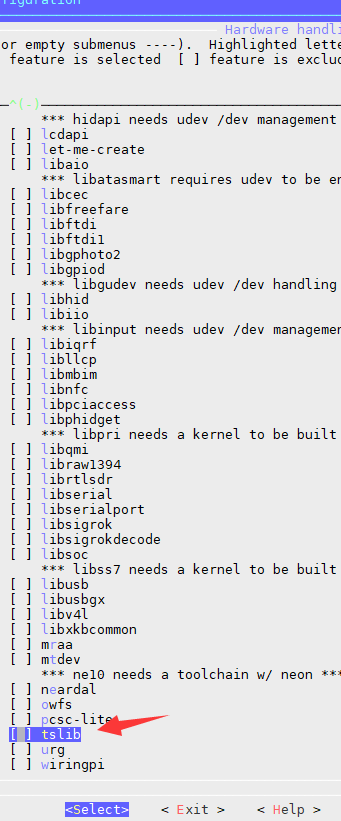
在线
#197 2019-05-14 13:25:23 分享评论
- lgliang
- 会员
- 注册时间: 2019-04-26
- 已发帖子: 11
- 积分: 11
Re: 荔枝派Zero V3s开发板入坑记录 (TF/SD卡启动)(主线Linux,主线u-boot)
晕哥版主,我的那一项显示 “-*-” 选不了
离线
#198 2019-05-14 13:40:58 分享评论
#199 2019-05-14 22:00:46 分享评论
- lgliang
- 会员
- 注册时间: 2019-04-26
- 已发帖子: 11
- 积分: 11
Re: 荔枝派Zero V3s开发板入坑记录 (TF/SD卡启动)(主线Linux,主线u-boot)
我的是“buildroot-2017.08.1”
离线
#200 2019-05-14 22:17:19 分享评论
在线
东莞哇酷科技有限公司开发