楼主 #1 2020-01-07 14:37:48 分享评论
- win32prog
- 会员
- 注册时间: 2019-11-28
- 已发帖子: 138
- 积分: 138
再来水一帖, ubuntu & win32 编译 librecad
https://whycan.cn/t_3519.html#p31644
https://github.com/LibreCAD/LibreCAD
LibreCAD 虽然没打开 helix_r9.dxf, 但是我试用了一下, 真挺好用的。
离线
楼主 #2 2020-01-07 14:40:10 分享评论
- win32prog
- 会员
- 注册时间: 2019-11-28
- 已发帖子: 138
- 积分: 138
Re: 再来水一帖, ubuntu & win32 编译 librecad
ubuntu 编译:
准备工作:
sudo apt install libboost-dev qt5-default -y克隆源码:
git clone https://github.com/LibreCAD/LibreCAD.git编译:
cd LibreCAD
qmake librecad.pro
make
离线
楼主 #3 2020-01-07 15:03:24 分享评论
- win32prog
- 会员
- 注册时间: 2019-11-28
- 已发帖子: 138
- 积分: 138
Re: 再来水一帖, ubuntu & win32 编译 librecad
执行 unix/librecad 就可以跑了:
离线
楼主 #4 2020-01-07 15:03:55 分享评论
- win32prog
- 会员
- 注册时间: 2019-11-28
- 已发帖子: 138
- 积分: 138
Re: 再来水一帖, ubuntu & win32 编译 librecad


离线
楼主 #5 2020-01-07 15:04:29 分享评论
- win32prog
- 会员
- 注册时间: 2019-11-28
- 已发帖子: 138
- 积分: 138
Re: 再来水一帖, ubuntu & win32 编译 librecad
这个软件真省心, ubuntu 编译什么编译错误都没有.
离线
楼主 #6 2020-01-07 15:10:39 分享评论
- win32prog
- 会员
- 注册时间: 2019-11-28
- 已发帖子: 138
- 积分: 138
Re: 再来水一帖, ubuntu & win32 编译 librecad
windows 编译稍复杂一点, 不过也挺省心的.
下载 boost sdk:
https://www.boost.org/users/download/
https://dl.bintray.com/boostorg/release/1.72.0/source/boost_1_72_0.7z解压, 我的解压路径是 D:\Downloads\boost_1_72_0
设置环境变量 BOOST_DIR, 值为 D:\Downloads\boost_1_72_0
克隆源码:
git clone https://github.com/LibreCAD/LibreCAD.git编译:
qtcreator.exe 打开 librecad.pro 工程, 直接按编译即可,约20分钟可以编译完成。
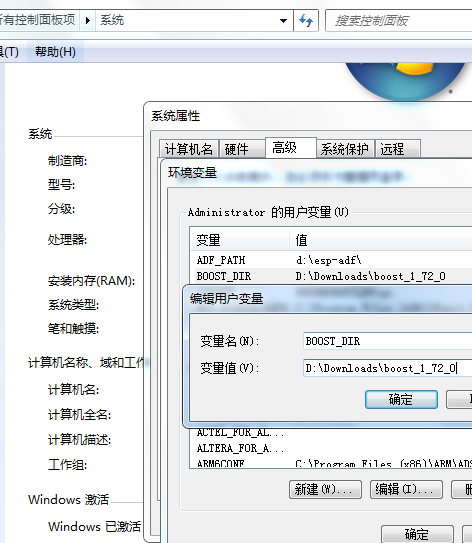
离线
楼主 #7 2020-01-07 15:12:47 分享评论
- win32prog
- 会员
- 注册时间: 2019-11-28
- 已发帖子: 138
- 积分: 138
Re: 再来水一帖, ubuntu & win32 编译 librecad


离线
感谢为中文互联网持续输出优质内容的各位老铁们。
QQ: 516333132, 微信(wechat): whycan_cn (哇酷网/挖坑网/填坑网) service@whycan.cn
东莞哇酷科技有限公司开发
东莞哇酷科技有限公司开发